
Mighty Networks vs Thinkific: Comparison for Course Creators & Coaches [2026]

Last updated August 3, 2026
Quick Answer
Mighty Networks and Thinkific solve different problems. Thinkific ($54/month, or $40/month billed annually, after its August 2026 price increase) is a structured course-delivery platform: modules, quizzes, and certificates, with 0% platform transaction fees but no free plan. Mighty Networks ($79/month billed annually, or $95/month) is community-first, built around feeds, groups, and events, but it charges a transaction fee on every plan (2% on Launch down to 0.5% on Growth and Mighty Pro) that never reaches zero. Neither offers a genuine free plan. FreshLearn combines structured course delivery with built-in community tools, charges 0% transaction fees on every plan including its free plan, and starts at $35/month on a two-year commitment.
Key Takeaways
- Thinkific charges 0% platform transaction fees on all paid plans and starts at $54/month ($40/month billed annually), after a roughly 10% price increase that took effect August 13, 2026.
- Mighty Networks restructured its plans in 2026 to Launch ($79/month annually), Scale ($179/month annually), and Growth ($354/month), and charges a transaction fee on every tier that never drops to 0% (2% on Launch, 1% on Scale, 0.5% on Growth and Mighty Pro).
- Neither Thinkific nor Mighty Networks offers a free plan; Thinkific gives a free trial requiring a credit card, while Mighty Networks offers a 14-day trial.
- FreshLearn charges 0% transaction fees on every plan, including a genuine free plan, and paid plans start at $35/month on a two-year commitment.
- Thinkific offers only basic community features (discussion boards, limited interaction) and requires third-party plugins for advanced community capability; Mighty Networks makes community the core product.
- Mighty Networks does not support PayPal directly, relying on Stripe alone, while Thinkific and FreshLearn both support Stripe and PayPal.
Writing about Mighty Networks vs Thinkific turned out to be more interesting than I expected. At first glance, both promise the same thing: helping creators share knowledge online. But once I dug in, I realized they take very different approaches.
Thinkific is all about structure. It gives you a clear, organized way to package and deliver on-demand courses, whereas Mighty Networks puts community building at the center. It’s less about a course page and more about creating an interactive space where people can connect as they learn.
So no, the question isn’t which one is “better.” It’s which one fits the way you (or your audience) actually want to learn and grow. To make it easy, I’ll unpack the real differences, business implications, and value each platform delivers. And since many creators don’t want to choose between structure and community, I’ll also cover FreshLearn, a platform that strikes the right balance.
The FreshLearn advantage: We’re the team behind FreshLearn, a unified platform for creating and selling courses, trusted by thousands of creators. In building FreshLearn, we studied how real creators work, where existing tools fall short, and what it actually takes to scale without friction. That’s why FreshLearn offers a mix of what Mighty Networks and Thinkific bring to the table, but in one simple, streamlined platform. See why most creators rated us 5/5 in their user reviews.
What’s driving the choice: Course creation or community building?
Choosing between Mighty Networks and Thinkific often comes down to a simple question: Do you want a powerful classroom or a thriving community hub?
Thinkific is like a high-end studio. Everything is structured: modules, quizzes, certificates, so your learners follow a clear, step-by-step path. It works when you want to deliver polished, professional courses. If your priority is course creation and you want to scale your teaching with structure, Thinkific fits the bill.
Mighty Networks takes a different path. It’s like a buzzing café where members gather to talk, exchange ideas, and build relationships. Its strength lies in community-first experiences: groups, conversations, and peer-driven learning. If your focus is sparking engagement and building belonging, Mighty Networks is the right pick.
But here’s the problem: most creators don’t want to make a choice. A great course without a community can feel one-dimensional. A lively community without structured learning can feel scattered. Success today often needs both an organized way to teach and a space to keep people connected.
That’s exactly where FreshLearn fits in. It doesn’t force you to decide between a studio and a hub; it gives you both. You can build courses with all the essentials (drip lessons, assignments, certificates) and layer in community features that bring connection and engagement.
Also, unlike the other two, FreshLearn doesn’t charge transaction fees, and its pricing stays lower, making the business side more profitable for you.
Side-by-side feature breakdown
When comparing Mighty Networks, Thinkific, and FreshLearn, you see the real differences only when you go feature by feature.
Course creation and content delivery
Let’s start with the core of any platform: how it actually helps you build and deliver your courses. Here’s a side-by-side comparison to give you a clearer picture.
When you look closely, the differences in course creation aren’t just about features; they decide the kind of teaching experience you can actually deliver.
Thinkific gives you structure, which works well if your main goal is to create polished, step-by-step lessons. It’s great for packaging knowledge in a clear format. Still, you’ll often find yourself relying on additional integrations to go beyond the basics, especially for APIs and advanced community features.
Here’s a user review:

Mighty Networks takes almost the opposite approach. Course creation exists, but it’s not really the star of the show. The focus is on creating interaction — feeds, groups, and events that make learners feel like part of an interactive community.
That’s good if your priority is ongoing engagement, but it can feel limiting if your goal is to deliver in-depth, structured courses with assessments, certifications, or automated delivery.
Apart from this, when I looked at the platform’s user reviews, many of them report it's challenging to understand the features and has a steep learning curve.


FreshLearn is where we fill the missing pieces between Mighty Networks and Thinkific. With us, you will create a complete learning experience that carries your learners from the first lesson to long-term engagement.
See what one of our trusted clients, Dr Pamela Manning, has to say:
"I really love this company because they are saving me money and they have really good customer service. I was with thinkific but they raised their prices which did not benefit me and now I am in a better place. A few times I needed things not included in Freshlearn platform and the support guys, get it done for me. You will not regret it."
Community and engagement
Next is the community. Besides creating and delivering courses, you will need a group of like-minded people to discuss and improve your future offerings. Let’s see how each platform stacks up on this.
Comments, polls, feeds, and events
Thinkific
We all know Thinkific is a course-first platform. It offers basic community features and requires external plugin integration to access advanced capabilities. Thinkific lets you give access to a community related to a particular course, group, bundle, or create a site-wide community for global student access.
The platform even allows you to segment your community into spaces, kind of like virtual rooms for specific topics or cohorts. Offers member profiles, @mentions, reactions, threads, and push notifications to keep the community integrated with your course structure.
- Comments: The ‘reply to comments’ lets you and your students add a new comment or reply to an existing comment. You can follow posts to get email notifications when someone comments on that post.
- Poll: Though Thinkific lets you create discussion posts including text, file, or video embeds, it doesn’t support polls natively.
- Feeds: Thinkific has a centralized activity feed for each community, which has recent posts and interactions.
- Events: Create live events within a community, but will require a third-party video conferencing tool to do so.
Check out our roundup of the Top 10 Thinkific alternatives for a deeper look at platforms designed for course creators.
Mighty Networks
When I tried creating a Mighty Networks account, it asked for a community name and description in the very beginning, highlighting its emphasis on being a ‘community-first’ platform rather than a course-based one.
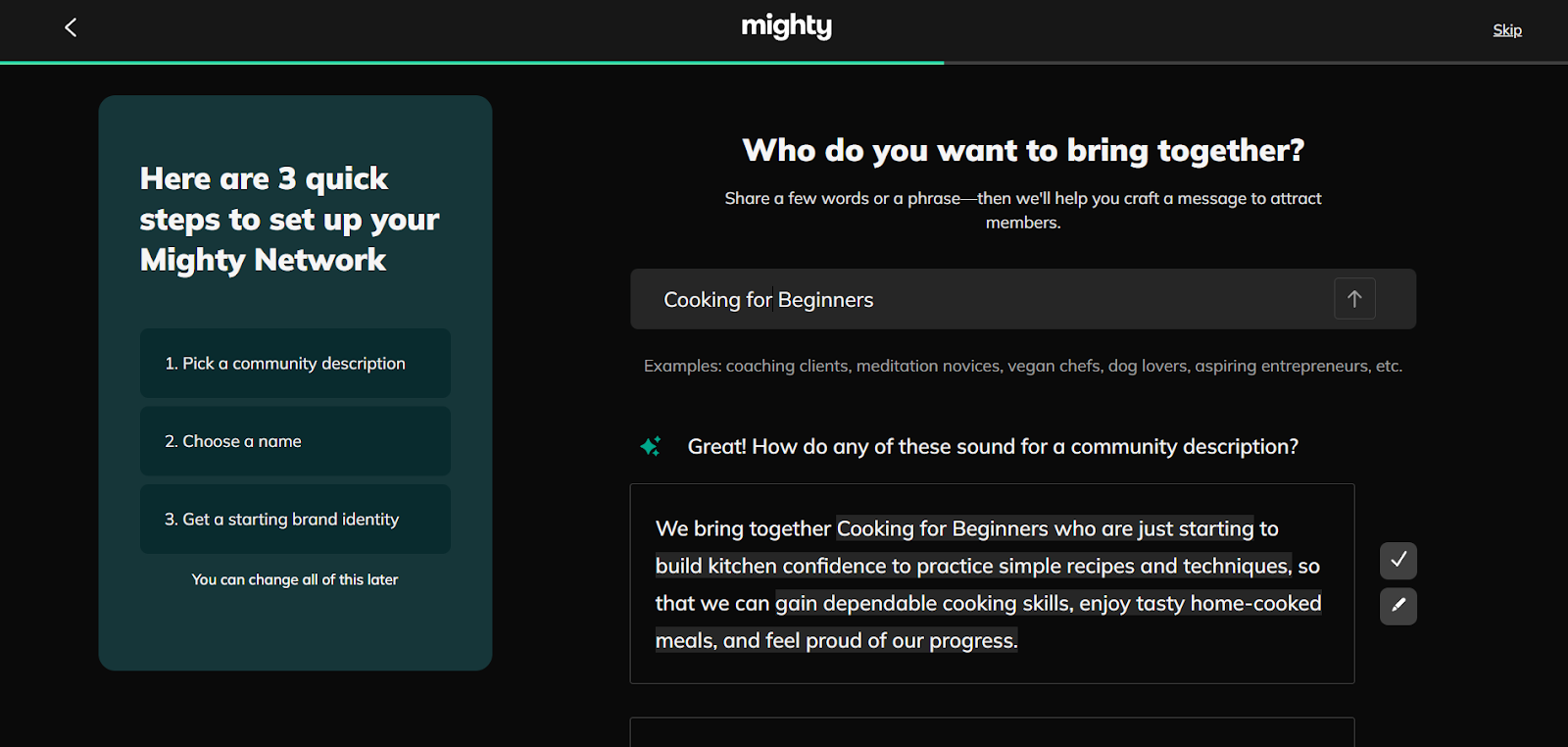
It offers a native mobile app and built-in features that make community interaction the central experience, with courses sitting alongside discussions, posts, and events.
The platform lets you organize your members into groups, courses, or events, each with its own dedicated space. Within these, you can create discussions, run polls, and share updates in a feed-like format.
- Comments: Mighty Networks makes threaded comments standard. Members can reply directly within a post, use @mentions, and react with emojis.
- Polls: Unlike Thinkific, polls are native to Mighty Networks. You can post multiple-choice polls directly in the community or within a specific group.
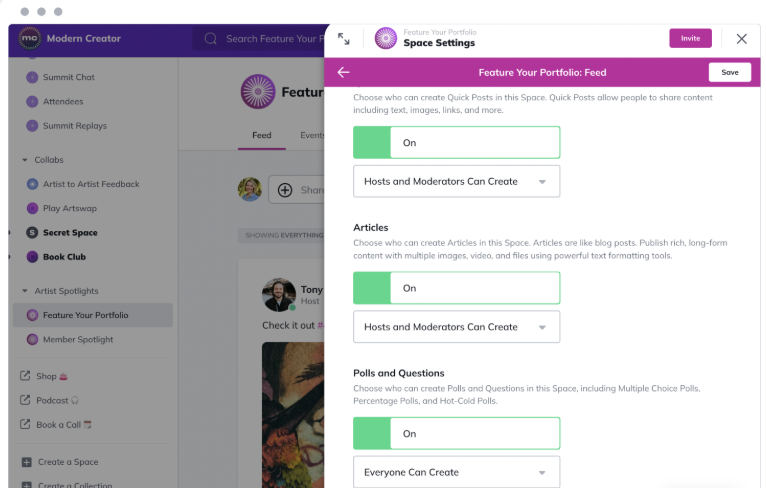
- Feeds: Every group or course comes with its own feed, which includes pages, posts, polls, events, and more. While the broader community feed has aggregated events, feeds, and discovery across all spaces, much like a social media platform designed specifically for your members.
- Events: You can schedule live sessions, virtual meetups, or in-person gatherings. The platform allows you to share event details, RSVP lists, and reminders without leaving the community.
If you love the idea of community but want more advanced features or better value, check out our list of 7 Mighty Networks alternatives for smart creators.
FreshLearn
FreshLearn weaves community tools into the core. You can create groups, launch polls, host events, and moderate with ease. Add gamification (think points and badges) to make your community even more interactive. Plus, you have moderation controls that help maintain quality and safety in discussions.
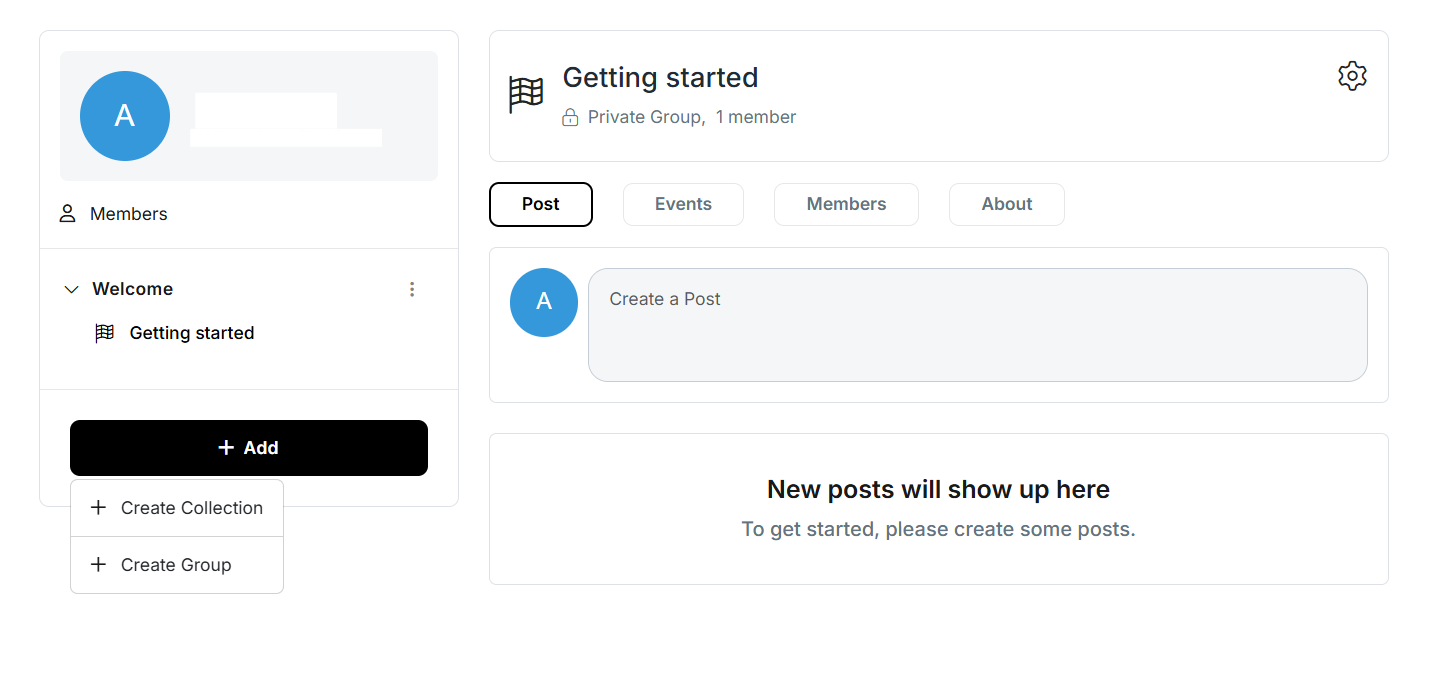
With FreshLearn, you can create membership plans at the price you decide (one-time, monthly, or yearly) with a 0% commission cut.
- Comments: FreshLearn supports interactive discussions through comments. Learners can leave feedback, ask questions, or start a conversation within lessons or community spaces.
- Polls/Surveys: Unlike Thinkific, FreshLearn has a built-in survey feature that functions like polls. You can create quick surveys to collect learner opinions, run knowledge checks, or spark participation, without having to rely on third-party tools.
- Feeds: FreshLearn organizes community interactions into dedicated spaces, much like group feeds. Each space can host posts, comments, surveys, and resources, ensuring discussions stay relevant and organized.
- Events: The platform supports live sessions and workshops through native integrations with tools like Zoom or Google Meet. You can schedule these directly within the platform and keep them linked to your courses or groups, effectively making them community events.
Monetization and payments
When it comes to earning money from your content, how you charge, collect, and manage payments can make or break your experience. Let’s see how Mighty Networks, Thinkific, and FreshLearn differ so that you can make informed decisions.
Payment gateways and processing
Thinkific
Thinkific provides a straightforward funnel. You connect a payment gateway, usually Thinkific Payments (powered by Stripe and is a default payment option in certain countries), Stripe directly, or PayPal, and course sales land in your account.
The upside? Thinkific charges no platform commission if you use Thinkific Payments, so what you owe is just what Stripe or PayPal charges. If you connect your own Stripe or PayPal instead, Thinkific adds a penalty on top: 5% on Basic, 2% on Start, and 1% on Grow.
For example, Stripe in the U.S. charges around 2.9% + $0.30, with additional small fees for services such as subscriptions or international cards.
Using Thinkific Payments, you also have the option to offer:
- Digital wallets: Help learners complete payments directly from their mobile devices. Stored payment details remove the need for manual entry, making the process faster and more secure.
- Bank redirects: Process payments through a learner’s online banking system. This method adds a layer of security, meets regional compliance standards, and is commonly used in Europe and Asia.
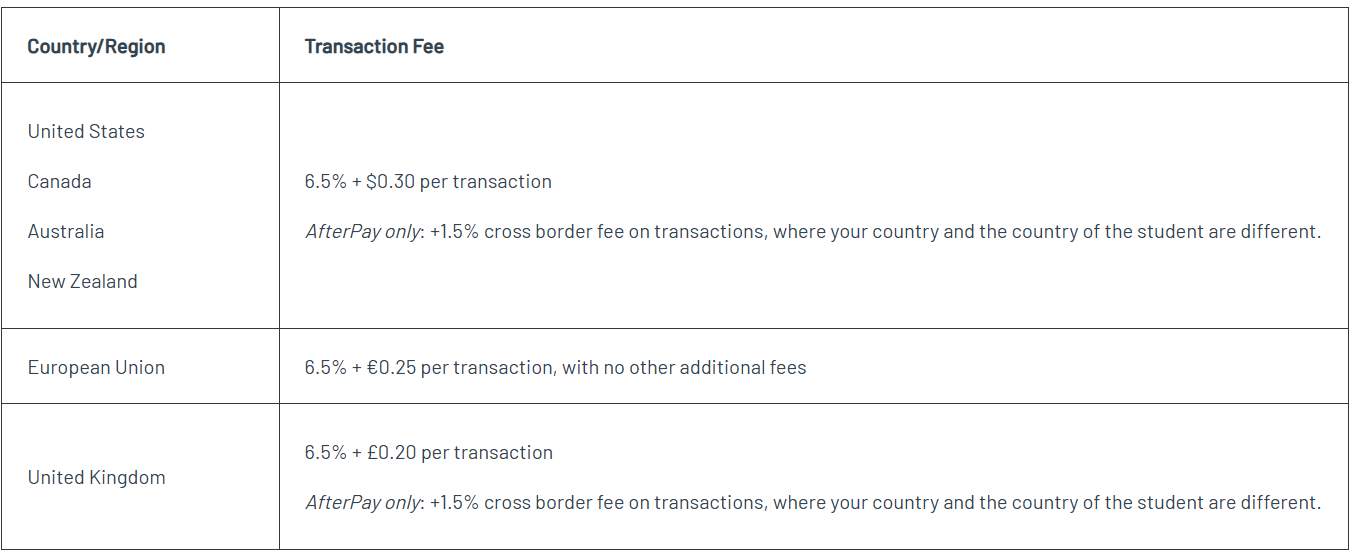
- Buy Now, Pay Later (BNPL): Your customers can pay in installments, but you receive the full payment during checkout. This option also comes with a transaction fee depending on the location.
Mighty Networks
Mighty Networks uses Stripe to process payments, and Stripe operates in 46 countries. The platform does not support PayPal or other gateways directly, but you can handle payments with external processors outside the platform.
When you create your first plan, the system prompts you to connect to Stripe. Members who purchase online pay through Stripe, and Stripe transfers the funds to your linked bank account.
For iOS app purchases, Apple collects the payments, issues a bulk payout to Mighty Networks, and then deposits the funds into your Stripe account. Because of Apple’s schedule, you usually receive iOS payouts 8 to 12 weeks later, about a month behind the current date.
Regarding the transaction fee, Mighty Networks applies its own platform fee on top of standard payment processing, and the rate depends on your subscription plan: 2% on Launch, 1% on Scale, and 0.5% on Growth and Mighty Pro. This platform fee is separate from Stripe's own processing charge (around 2.9% + $0.30 in the U.S.), so a web transaction on the Launch plan effectively costs close to 5% once both fees are combined.

When members purchase on the web, Stripe deducts between 2.5% and 5% as transaction fees. Web transactions always include Stripe’s processing charges, but iOS purchases do not.
For iOS transactions, Apple processes all payments through In-App Purchases and manages them in the App Store. Apple charges a 15% transaction fee on each iOS purchase. When you create a new Plan and set its price, you can adjust the iOS price separately to account for Apple’s mandatory fee.
FreshLearn
FreshLearn offers a transparent approach to payment processing, prioritizing creator autonomy and financial clarity.
- Zero platform transaction fees: FreshLearn does not impose any transaction fees on payments made through the platform. Whether you're on the free plan or a paid subscription, you retain 100% of your revenue. This policy stands in contrast to Mighty Networks, which charges a transaction fee on every plan, from 2% on its entry Launch tier down to 0.5% on Growth, and never reaches 0%.
- Flexible payment gateway integration: You can easily connect with popular payment gateways, including Stripe, PayPal, and Razorpay. Once connected, payments are processed directly into your bank account, ensuring timely and secure transactions without intermediary delays.
- Comprehensive tax management: FreshLearn simplifies tax compliance by supporting automatic collection of taxes, including US sales tax and EU VAT. Detailed tax reports are available within your dashboard, facilitating transparent financial management.
- Customizable payment plans: The platform allows you to offer various payment structures, including one-time payments, monthly, or yearly subscriptions. This flexibility serves diverse business models and customer preferences.
- Global currency support: FreshLearn lets you accept payments in over 100 currencies, broadening your reach to a global audience and accommodating international customers.
- Gift and upsell options: You can offer giftable courses and implement upsell strategies during the checkout process, improving sales opportunities and customer satisfaction.
Integration and customization
From connecting email tools and analytics dashboards to tweaking the learner experience, integration features decide how much control you have and how smooth your workflow is.
Here’s a look at what Mighty Networks, Thinkific, and FreshLearn bring to the table.
Thinkific
Thinkific offers 20+ native integrations and flexible API access. You can connect marketing tools like Mailchimp, ConvertKit, and ActiveCampaign, as well as analytics platforms such as Google Analytics.
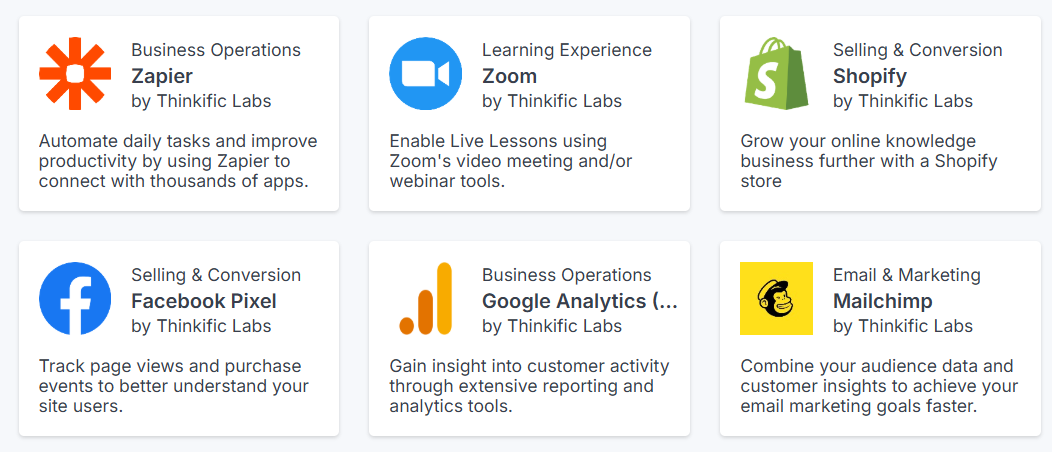
Thinkific also supports Zapier, which handles other apps, although each integration can require some setup and technical know-how. Customization of your product page is good, with options for CSS, HTML blocks, and theming, letting you tailor the experience visually.
Mighty Networks
Mighty Networks has a community-centric approach, offering integrations primarily through Zapier, which connects to over 2,000 applications, including email platforms, CRMs, and productivity tools like Salesforce. It also integrates well with social media platforms, which helps in building strong brands.
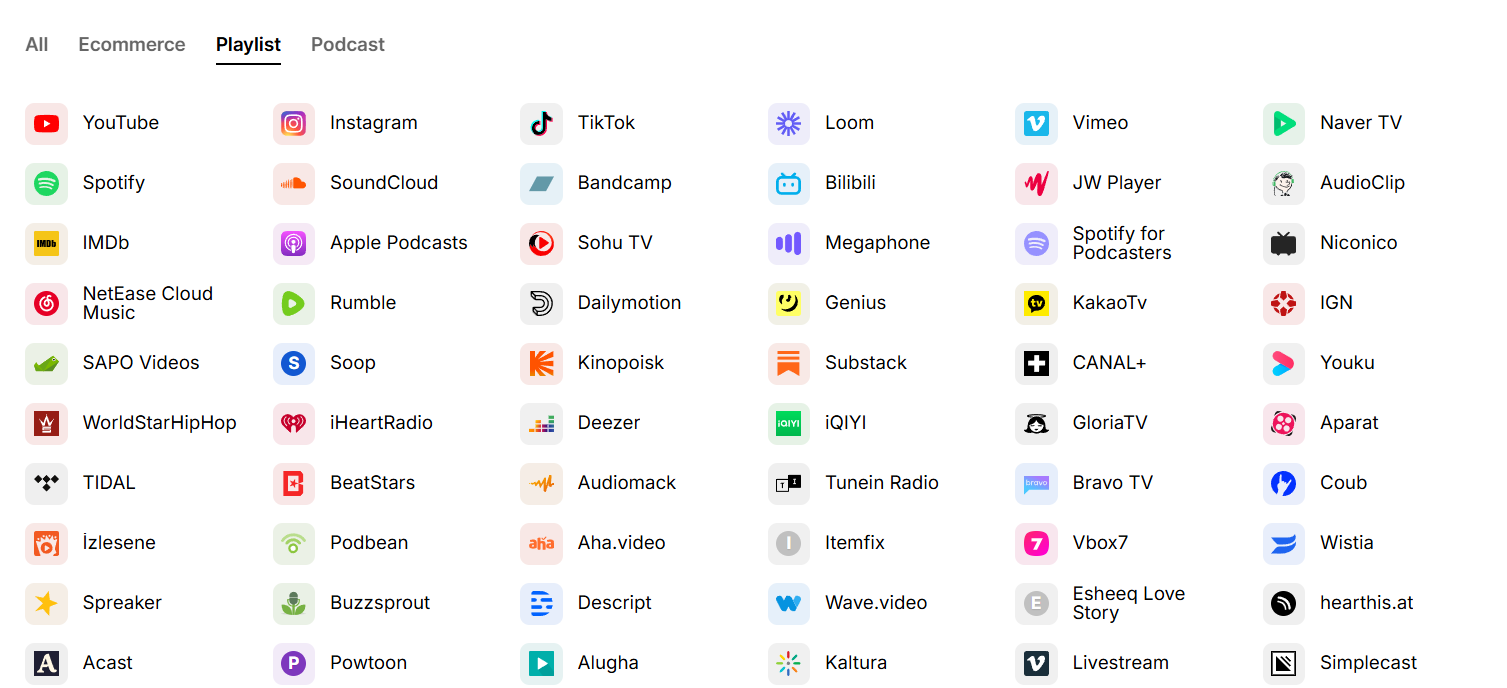
In terms of customization, Mighty Networks enables users to personalize their community's appearance by adding logos, selecting theme colors, and uploading network images or videos. However, these customization options are primarily focused on branding and do not extend to deep course site control.
FreshLearn
FreshLearn offers a comprehensive suite of integrations and customization options, enabling creators to easily build, market, and manage their online courses with ease.
Native integrations
- Email marketing: FreshLearn provides robust email marketing capabilities directly within its platform, eliminating the need for third-party integrations. Creators can design visually appealing emails using a drag-and-drop builder, segment their audience, and automate campaigns to enhance engagement and sales. Additionally, FreshLearn offers detailed analytics to track email performance, including open rates, click-through rates, and bounce rates.
- CRM and marketing automation: Through native integrations with HubSpot, FreshLearn enables creators to sync student data, track progress, and manage relationships effectively. This integration supports custom properties and objects, improving CRM functionalities.
Third-party integrations
- Zapier: For extended automation, FreshLearn offers Zapier integrations, connecting with extensive apps. This facilitates workflows, such as adding new course enrollments to email lists or updating CRM records.
- API access: Developers can utilize FreshLearn's REST API to create custom integrations, automate processes, and extend platform functionalities to meet specific business needs.
Customization features
1. Course creation tools: FreshLearn provides AI Studio, an AI layer that generates a full course structure, quizzes, captions, and lesson summaries from your own content, plus a sales page builder to help you develop high-quality content. On the learner side, students can chat with your course videos, get timestamped answers, and rehearse scenarios with AI Coach, which neither Thinkific nor Mighty Networks offers.
2. Branding: Creators can customize their course sites with logos, color schemes, and custom domains, ensuring a consistent brand identity across their offerings. We also offer pre-built, conversion-optimized checkout pages that you can brand and customize to align with your business model.
Pricing plans and value
Courses, communities, analytics … the tools are all there. But how much will they cost you? And are you really getting your money’s worth?
Let’s see the pricing plans and value behind Mighty Networks, Thinkific, and FreshLearn.
Thinkific
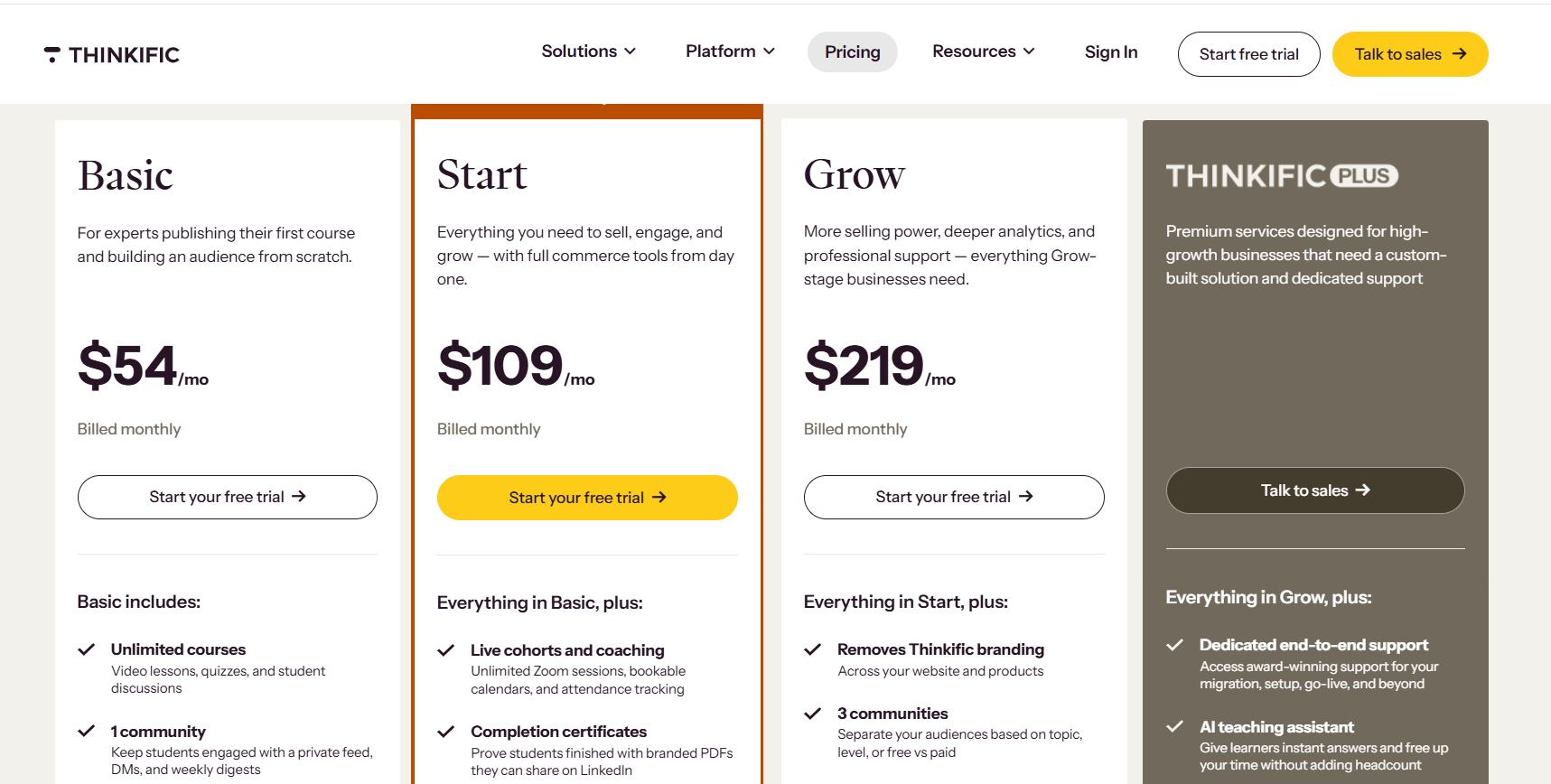
Thinkific has 4 pricing plans. It raised these prices by roughly 10% on August 13, 2026, its first increase since 2022; the figures below reflect the new rates:
- Basic: $54/month and $40/month (when billed annually)
- Start: $109/month and $82/month (when billed annually)
- Grow: $219/month and $164/month (when billed annually)
- Thinkific Plus: Custom pricing.
- Thinkific does not charge a platform transaction fee on any of its pricing plans when you use Thinkific Payments; bringing your own Stripe or PayPal instead adds a penalty of 5% on Basic, 2% on Start, and 1% on Grow.
- It does not offer a free plan.
- Though Thinkific has a free trial, it requires your credit card information upfront, which I felt could be a loss if we fail to cancel the renewal.
Mighty Networks
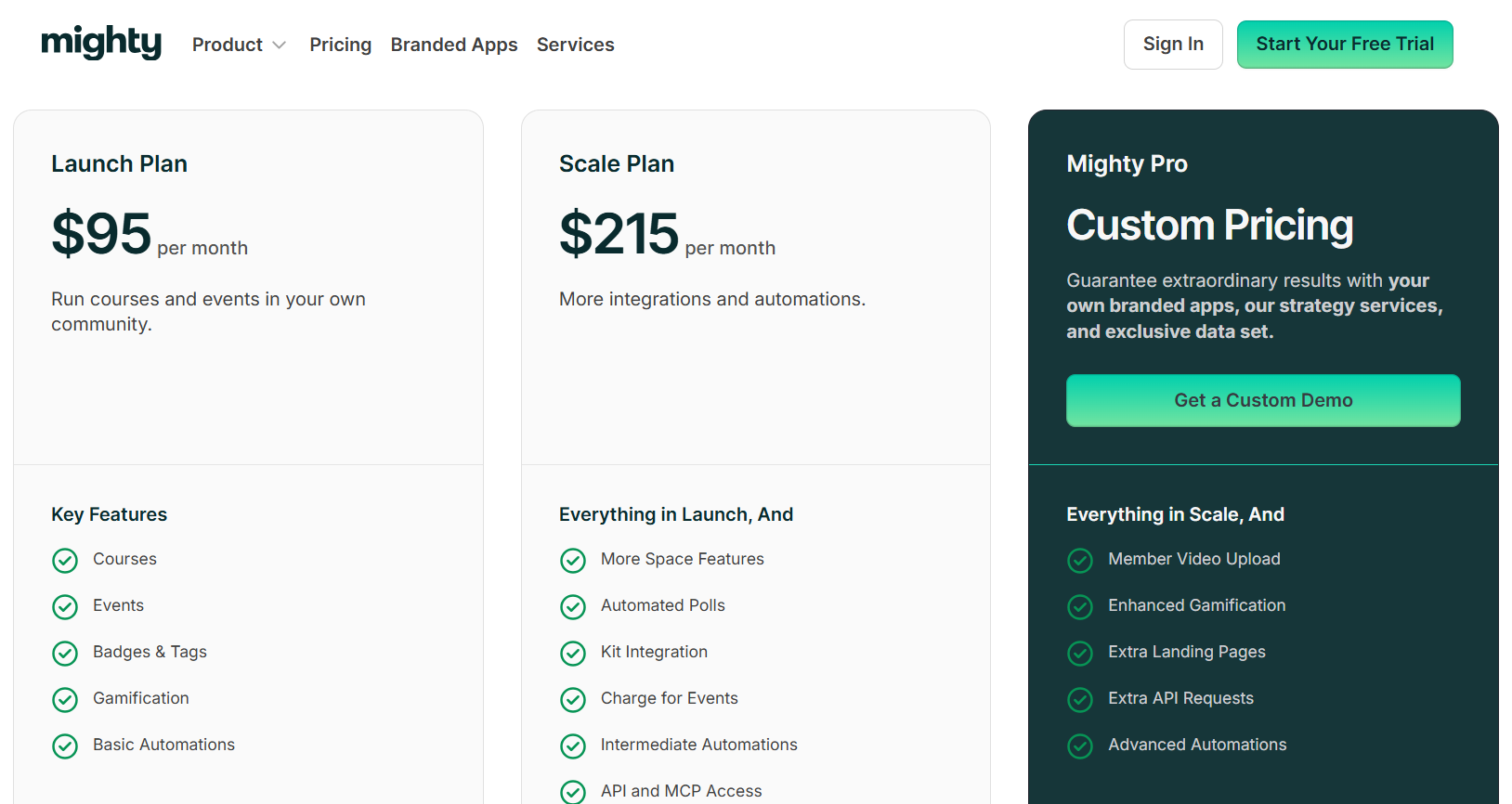
Mighty Networks restructured its plans in 2026. It now has 4 pricing plans, renamed from its previous Community/Courses/Business tiers:
- Launch: $95/month and $79/month (when billed annually)
- Scale: $215/month and $179/month (when billed annually)
- Growth: $354/month
- Mighty Pro: Custom pricing
- Unlike Thinkific and FreshLearn, every Mighty Networks plan charges a transaction fee, and unusually, it never drops to 0%: 2% on Launch, 1% on Scale, and 0.5% on Growth and Mighty Pro.
- Mighty Networks does not offer a free plan like FreshLearn.
- It offers a 14-day free trial.
Check out our article to know more about Thinkific’s pricing breakdown and hidden fees.
FreshLearn
FreshLearn has 3 paid pricing plans plus a free plan:
- Pro plan: $49/month, or $41/month (when billed annually), or $35/month (when billed for 2 years)
- No Brainer plan: $79/month, or $59/month (when billed annually), or $46/month (when billed for 2 years)
- No Brainer+ plan: $149/month, or $119/month (when billed annually), or $89/month (when billed for 2 years)
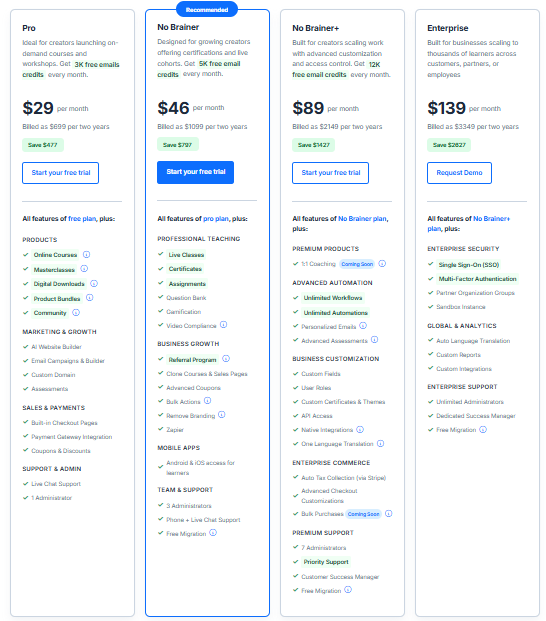
- FreshLearn offers a 14-day trial on all its paid plans
- FreshLearn also provides a free plan with all the basic features
- It does not charge a transaction fee in any of its paid plans
Given the additional fees and the pricing plans, let’s see how much you will actually earn, assuming you opt for the basic plan on all 3 platforms.
FreshLearn edges ahead of Thinkific by $5/month at these monthly rates, and both stay well ahead of Mighty Networks, because of:
- Free plan availability.
- Unlimited features are available even in their basic plan, including communities, digital downloads, and product bundles.
- Lower cost options with annual or 2-year billing.
Mighty Networks eats away over $200 more than FreshLearn in this example, just in one month, with only 60 students paying $100 each. Scale that to hundreds of students, and the gap widens dramatically because Mighty Networks' transaction fee scales with revenue while FreshLearn's does not.
FreshLearn vs Thinkific vs Mighty Networks: Summary
Note on this table: Thinkific and Mighty Networks figures reflect each platform's 2026 pricing changes (Thinkific's roughly 10% increase effective August 13, 2026, and Mighty Networks' plan rename and restructure from Community / Courses / Business to Launch / Scale / Growth).
FreshLearn's figures reflect its current Pro plan; an Enterprise tier referenced in an earlier version of this article is not included here pending updated verification.
Step-by-step migration from Mighty Networks or Thinkific to FreshLearn
By now, you’re probably doing the math in your head and realizing FreshLearn makes more sense for your business. But before you start second-guessing, let me save you the trouble: the migration is simple, smooth, and mostly handled for you. Here’s the step-by-step.
Step 1: Connect with FreshLearn
Start by reaching out to the FreshLearn migration team. Share details about your current platform, your courses, and any specific requirements you want to carry forward.
Step 2: Transfer your content securely
Once you provide access, the FreshLearn experts begin moving everything. They migrate your courses, members, enrollments, payments, websites, landing pages, and blogs. Some tasks, like video transfers, happen manually, while bulk imports handle data such as contacts and transactions.
Step 3: Track the progress
You can monitor the migration inside your FreshLearn account. The team updates you regularly, and you’ll always know which stage the migration is at.
Step 4: Review your setup
After the migration is complete, you’ll find all your content inside FreshLearn. Review the courses, pages, and design to make sure they align with your brand. If adjustments are needed, the team helps refine them.
Step 5: Launch on FreshLearn
Once you approve, go live. Continue growing your business on FreshLearn without downtime or disruption.
A few extras worth noting:
- Migration usually takes 2–3 weeks, depending on account size.
- It’s free with the No Brainer yearly and No Brainer+ (yearly) plans. For monthly plans, it comes at a minimal cost.
- You keep access to both platforms during the transition.
Wrapping Up
Choosing the right platform really comes down to your priorities.
- If you want a community-first tool, Mighty Networks fits.
- If you need a straightforward course delivery setup, Thinkific works.
However, if you’re looking for the best of both worlds — courses + community, at a fraction of the cost, FreshLearn stands out. With its no-transaction-fee model, free plan, and end-to-end migration support, it’s easy to see why more creators are making the switch.
Start your risk-free FreshLearn trial today and experience the difference for yourself.
FAQs
1. Is Mighty Networks better than Thinkific for communities?
Yes, Mighty Networks works better than Thinkific when it comes to building and engaging communities. Its platform centers around interactions, discussions, and networking, making it stronger for community-driven creators. However, if you want both a powerful course builder and a vibrant community in one place, FreshLearn gives you the best of both platforms.
2. Can I switch from Thinkific to Mighty Networks (or vice versa)?
Yes, you can switch from Thinkific to Mighty Networks or vice versa. The process usually involves exporting your course content, member lists, and payment data, then setting them up again on the new platform. Since this can get time-consuming, many creators choose platforms like FreshLearn that offer a dedicated migration team to handle the heavy lifting for you.
3. What is better than Mighty Networks?
FreshLearn is better than Mighty Networks because it gives what Mighty Networks lacks: strong community features and a powerful course builder. Unlike Mighty Networks, which charges a transaction fee on every plan (2% down to 0.5%, never reaching 0%), FreshLearn charges nothing, and its pricing is far more affordable, making it the smarter choice for creators who want growth without extra costs.
4. What’s the easiest platform to migrate to?
FreshLearn is the easiest platform to migrate to because it offers a dedicated migration team that handles everything for you, from courses and members to payments and websites. The process is secure, transparent, and often completed within 2–3 weeks. You just review, approve, and launch. Unlike most platforms, FreshLearn even offers free migration with its yearly plans, making the switch hassle-free and cost-effective.
5. What's better than Thinkific?
FreshLearn is better than Thinkific and here’s why: FreshLearn brings together the structured elegance of Thinkific’s course delivery with powerful community-building tools, something Thinkific treats as an add-on. Beyond that, FreshLearn charges zero transaction fees, offers more flexible and cost-effective pricing (including free and multi-year plans), and makes migration straightforward and stress-free with a dedicated support team.
6. Does Mighty Networks ever charge 0% transaction fees?
No. Unlike Thinkific and FreshLearn, Mighty Networks charges a transaction fee on every plan it offers, from 2% on the entry Launch plan down to 0.5% on Growth and Mighty Pro. There is no tier, however high-priced, that removes the fee entirely, which is unusual among course and community platforms.

You might also like
Hosted by
