
Kajabi Pricing - Is It Too Expensive?

I thought I’d just break down all the Kajabi pricing tiers, reveal hidden costs that inflate budgets, and show you exactly what financial value each plan delivers.
But once I narrowed down on Kajabi pricing, I couldn’t help but also add:
- Real cost comparisons,
- Upgrade triggers that catch creators off guard, and
- Analysis of when Kajabi's premium pricing makes sense versus when it doesn't.
For the guide to make (real) sense.
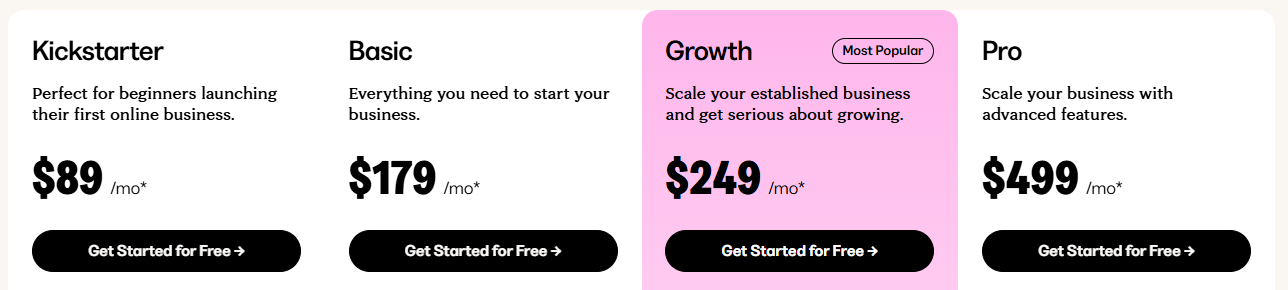
Kajabi is one of the most comprehensive course creation platforms available, and commands premium prices to match that position. Starting January 13, 2026, they removed their Kickstarter plan, which was relatively affordable at $89 per month. Now, with plans starting at $179/month and climbing to $499/month, it sits firmly in the expensive category among online course platforms.
The question isn't whether Kajabi costs more than competitors (it does), it’s whether that premium price delivers premium value for your specific situation.
And the answer isn't simple either.
When you add up the cost of an LMS, email marketing, and checkout tools, the total is staggering. Most creators find it more profitable to replace fragmented tools with a unified stack.
Kajabi's cost can be a smart consolidation move that saves money across multiple tool subscriptions or an expensive overpayment for features you'll never use.
The difference lies in understanding exactly what you get at each tier and how those features align with your business needs.
Let’s get started.
TL;DR: Kajabi pricing plans compared
Understanding Kajabi's "all-in-one" philosophy and its impact on price
Kajabi is an all-in-one knowledge commerce platform, and this philosophy directly drives its pricing structure. It has helped over 75 million customers launch more than 100,000 businesses.
The platform bundles course hosting, website building, email marketing, sales funnels, membership sites, coaching programs, podcasting tools, online communities, and analytics into one integrated system.
That means you're not paying for individual features; you're paying for their integration and the promise that everything works together without plugins, code, or broken connections.
You’ll see this bundled strategy reflected in its pricing. Instead of charging separately for each feature, Kajabi packages everything at premium rates.
This approach explains why even Kajabi's lowest plan starts at $179/month, while many course builder platforms begin at around $39. So basically, you're buying the ability to run your entire online business from one dashboard without technical complexity.
The pricing assumes you'll use multiple tools and value the time savings from having them pre-integrated rather than managing separate subscriptions and connections.
Kajabi pricing plans: A detailed financial breakdown
Kajabi offers three pricing tiers to match different business stages and revenue levels. The pricing structure encourages upgrades through feature limitations, so it’s important to understand not just what you get, but what you'll pay extra for as you grow.
Kajabi Basic Plan: The budget-friendly option for growing creators
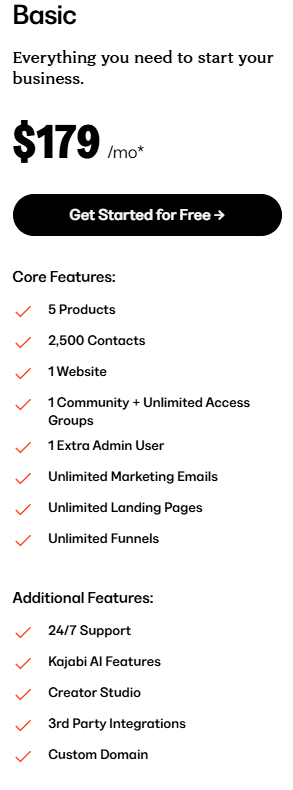
Kajabi’s Basic plan comes with 5 products, 2,500 contacts, and professional features like custom domains and third-party integrations.
At this price point, you're paying for the ability to build a legitimate online business rather than just test concepts.
Pricing: $179/month or $143/month (when you bill annually).
Key features of the plan
The following are the important features to note in the basic plan:
- Higher product and contact limits: Compared to the old Kickstarter plan (now removed), you get more room to play around, from 1 product to 5 and from 250 contacts to 2,500. This gives you more flexibility to grow your offerings and audience without having to upgrade right away.
- Custom domain and third-party integrations: You get professional branding with your own domain and can connect tools like Zapier, analytics platforms, and other marketing software. This adds much value for the $90/month price jump.
Limitations and potential deal-breakers
Though the Basic plan offers some options, it's still restrictive, forcing you to upgrade to a higher plan.
a) Product limitation: You get an increase to 5 products, which may sound generous, but it fills up quickly if you create:
- A main course
- A mini-course
- A membership
- A resource library
- A cohort program or workshop
Suddenly, you're at the ceiling. This also limits your ability to test multiple offers or create low-ticket funnels. Once you need a sixth product, you will have to subscribe to the Growth plan at $249/month.
b) 2,500 contacts + unlimited emails (but with limits in practice): The contact cap is the real challenge here. A few lead magnets, a webinar, and a small launch can push you past 2,500 contacts sooner than expected. And unlike email marketing tools that scale gradually (e.g., 5,000 → 10,000 → etc.), Kajabi forces a plan jump. Growing beyond 2,500 contacts effectively adds $840/year to your platform cost when you have to upgrade.
c) No advanced customization: Even with 3rd-party integrations, you don't get a custom code editor (Pro-only). So, your design options stay limited to Kajabi’s built-in tools. If you want to add custom scripts, pixel tracking, advanced design elements, or unique layouts, you’ll hit Kajabi’s design limits quickly.
d) Single website, admin user, and community: Standard limitation that works for solo creators, but becomes restrictive when building a team or managing multiple brands.
It also limits:
- Agencies serving clients
- Coaches who want to separate course libraries from memberships
- Businesses experimenting with different niches
To split anything into separate experiences, you’ll need to upgrade or use patchwork solutions that aren’t ideal.
Who is the Basic Plan best for?
The Basic plan is ideal for:
- The solo expert launching their first full-fledged signature course; someone who needs more than a single-product test run but isn’t ready for advanced automation or scaling tools yet.
- Coaches who create a small suite of offers, which is a main program plus a few supporting products like a mini-course, workshop, or community.
- The creator who’s building momentum and expects their audience to grow beyond a few hundred subscribers, but isn’t at the “serious scaling” stage yet.
- The early-stage educator or consultant who needs a custom domain and basic integrations to look professional from day one.
Value proposition at this price
Zero transaction fees (some competitors charge 5% at this level), unlimited landing pages, unlimited marketing emails, and AI-powered content generation are all offering great value at this point. Also, if you're currently paying for separate email marketing, website hosting, and funnel tools, Basic often costs less than the combined cost of these subscriptions.
Key pricing considerations for this plan
The five-product limit becomes the primary upgrade trigger for prolific creators. The lack of advanced automation and analytics means you're managing most processes manually, which becomes time-consuming as you scale.
However, the unlimited email and landing page features provide genuine value that justifies the price point for active marketers.
Kajabi Growth Plan: Your scale-up investment
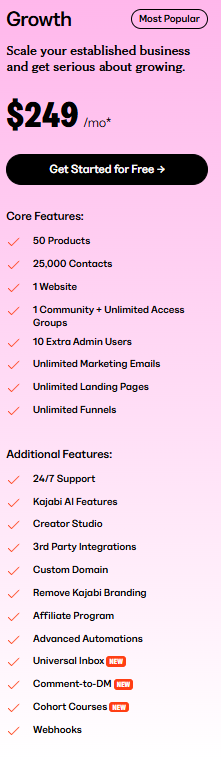
Marked as their "Most Popular" option, the Growth plan removes key limitations from Basic while adding professional features like affiliate marketing, advanced automation, and white-label branding.
The jump from Basic buys you room to grow and tools to automate, making it the logical choice for creators outgrowing the five-product restriction.
Pricing: $249/month or $199/month (when you bill annually).
Key features of the plan
The following are the important features to note in the Growth plan:
a) 25,000 contacts vs Basic's 2,500: This gives you 10 times the audience capacity, supporting serious list-building efforts. Most creators can operate at this level for several years before hitting contact limits.
b) Advanced automations: Unlike Basic's simple automations, Growth delivers complex "when, then, but only if" workflows. You can create conditional rules across funnels, email campaigns, forms, offers, and course lessons to automate customer journeys that would otherwise require manual intervention.
50 product offerings: A substantial upgrade from Basic's 5-product limit, giving you room for multiple course tiers, coaching programs, and membership options. This capacity supports diverse revenue streams without forcing immediate upgrades.
Limitations and potential deal-breakers
The Growth plan indeed gives you more features, expanding your product offering. But it also comes with limitations, including:
a) No pro-level customization: While Growth provides advanced automations and a much higher product limit, you still don’t get access to Kajabi’s custom code editor. This becomes a real constraint for creators who want complete control over layouts, advanced design elements, A/B-tested landing pages, or deeply customized user experiences.
If your brand depends on a high level of design customization, you’ll eventually find the Growth tier restrictive.
b) Still limited to one website: Despite the higher price, you will only have access to one website, which limits multi-brand strategies or separate audience targeting.
c) Contact limitations: While 25,000 contacts is huge, businesses running paid ads, webinars, or lead-gen-heavy funnels may hit this limit faster than expected. Once you do, the only upgrade path is Pro, which comes with a steep price increase.
d) Missing advanced features: Though you pay $249/month, you don't get advanced features like:
- API access
- Video Transcriptions & Translations
- Branded mobile app
- Dedicated success manager.
e) Built-in affiliate marketing system: Track affiliate registrations, conversions, and automatically calculate earnings. Affiliates get unique share links and personalized coupon codes.
f) White-label branding: Professional appearance without "Powered by Kajabi" branding. For creators charging premium prices, this control protects positioning and credibility.
Who is the Growth Plan best for?
The Growth plan is ideal for:
- Course creators offering a mix of courses, group coaching, and memberships as they will need more products, automation, and admin support.
- If you’re hosting webinars, running ads, or nurturing a high-volume funnel, the 25,000-contact limit gives you room to expand without immediately jumping to enterprise-level pricing.
- Perfect for experts bringing in virtual assistants, marketers, or community managers who need access without sharing one login.
- If you’re rolling out multiple courses, bundles, or cohort-based experiences, the Growth plan’s 50-product capacity removes the ceiling you’d hit on Basic.
Value proposition at this price
At $249/month, you're paying for business acceleration tools that can generate measurable returns. For example, the affiliate system typically pays for itself if partners drive just 2-3 additional sales monthly. The plan also includes 24/7 live chat support, critical when running paid campaigns or launches.
You get webhooks for advanced integrations, a comment-to-DM feature, and a universal inbox, which justifies the price increase for active businesses.
Key pricing considerations for this plan
At almost $2,400 annually, this plan requires serious revenue to justify the investment. The single website limitation means multi-brand creators still can't fully leverage the higher price point.
That means, go for it only when you’re sure that your returns are worth the investment.
Kajabi Pro Plan: An enterprise-level investment
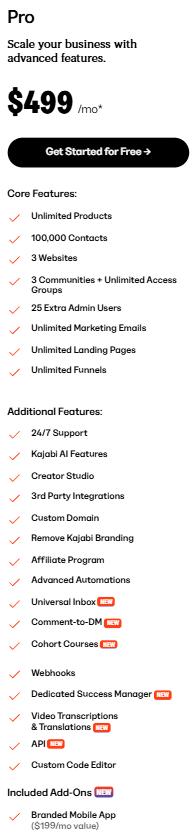
The Pro plan, at $499 per month, is Kajabi's top-tier pricing. It targets established creators with multiple brands or large-scale operations. At this price point, you pay for maximum capacity and advanced technical control.
The jump to Growth brings enterprise-level features, like multiple websites, custom code editing, and higher limits across all metrics.
Pricing: $499/month or $399/month (when you pay annually).
Key features of the plan
The following are the important features to note in the Pro plan:
a) 10,000 product offerings: Removes practical limitations for prolific creators or agencies managing multiple client accounts. With this capacity, you can support extensive product catalogs without forced upgrades.
b) Three websites vs Growth's single site: This is the major differentiator, allowing separate brands, audience targeting, or client management. Each website gets full Kajabi functionality independently.
c) 25 admin users vs Growth's 10: Supports larger teams with granular access controls. Useful for agencies or businesses with extensive support staff.
Limitations and potential deal breakers
Though this is the highest pricing tier that Kajabi offers, it also comes with certain limitations.
a) 100,000 contacts and 25,000 active members: Supports large-scale operations with substantial audiences. Most creators never reach these limits, making Pro overkill unless you're operating at a significant scale.
b) Still has website restrictions: Even enterprise users can’t create unlimited sites. If you manage multiple brands, client projects, sub-businesses, or different regional websites, 3 sites can feel tight.
c) Custom code editor access: Full HTML/CSS and Liquid template editing capabilities. It
allows for pixel-perfect customization of themes, landing pages, and checkout flows, but still requires technical expertise.
Who is the Pro Plan best for?
The Pro Plan is ideal for:
- Creators who are selling courses, memberships, coaching programs, and digital products, all at once, and need room to expand without hitting platform ceilings every few months.
- Ideal for creators who require custom layouts, scripts, advanced tracking, and fully branded student portals.
- If your funnels involve complex branching logic, multi-step email sequences, segment-based targeting, and lifecycle automation, Pro gives you the operational space you need.
- If your list size, product catalog, automations, or admin seats keep pushing you up against Growth-plan restrictions, Pro is the natural, stability-focused next step.
Value proposition at this price
The code editor and multiple websites are Pro's primary justifications. Custom code control offers design flexibility not available on lower tiers, while multiple websites eliminate the need for separate Kajabi accounts.
For agencies or multi-brand creators, these features can justify the premium cost.
Key pricing considerations for this plan
At nearly $4,800 annually, Pro costs more than most small businesses' entire software budgets. The features primarily benefit technical users or large-scale operations. For most solo creators, Growth provides sufficient capacity and features at half the cost.
Upgrade only if you specifically need multiple websites, custom code editing, or managing teams that require 10 or more admin users.
The Kajabi Access add-on: An extra layer to consider
Kajabi Access is an optional add-on available for any plan at $99/month extra. It serves as a middle ground between plan tiers, offering doubled limits and premium features without requiring a full upgrade.
For creators approaching their current plan's restrictions but not needing every feature of the next tier, Access offers relief at a lower cost than upgrading.
What access adds to your plan
a) Doubled limits based on the current plan: Basic users get ten products instead of five. Growth users receive expanded capacity without needing to upgrade to Pro pricing. This doubling applies across products, contacts, and members.
b) Custom code editor access: Unlocks HTML/CSS and Liquid template editing normally reserved for Pro plan users. This gives Growth plan subscribers advanced customization control without the need to pay $249 per month.
c) One-on-one success sessions: 45-minute sessions with Kajabi Customer Success Managers who help optimize your platform usage and business strategy. These expert consultations provide personalized guidance that is not available at lower tiers.
d) Early Beta access: First access to new Kajabi features before general release, allowing you to test and implement new tools ahead of competitors.
So, when does Access make financial sense?
If you're on Growth ($249/month) but need Pro-level contact limits or code editor access, Access at $99 total costs $100 less than Pro's $499. The one-on-one sessions alone could justify the cost if you're struggling with platform optimization.
But note that adding Access to Basic creates a total cost of $188 per month (more than the full feature set of the Growth plan). At that point, upgrading to Growth makes more sense. Access works best for Growth users who need specific Pro features but not the full package.
The “True Cost” of Kajabi: A realistic first-year budget
Kajabi’s sticker price looks straightforward, but the real cost becomes clear only when you factor in everything you’ll actually use to run a polished, revenue-generating online business.
Kajabi replaces a lot of tools (email platform, video hosting, funnel builder, landing pages, website builder), which is great.
But as soon as you start customizing your brand or scaling your audience, a few extra line items enter the picture: custom domains, premium themes, Zapier upgrades, mobile apps, Access, etc.
To make this practical, here’s what a realistic first-year budget looks like for someone on the Growth Plan.
Sample first-year cost breakdown (Kajabi Growth Plan)
Here’s a sample table of what you will actually pay beyond the subscription price.
What does this add up to?
Here’s a realistic first-year total assuming only the common extras included along with the subscription value (Domain + premium theme + Zapier):
Estimated first-year total (Growth Plan):
2,388+20+200 (average value of premium themes)+228=2,836.
If you add branded mobile apps or Kajabi Access, the cost easily rises to:
$2,836+$2,388/year+$1,188/year=6,412.
The Growth plan’s subscription price is $2,388/year, but with common extras, it rises to $2,836 (19% higher).
With advanced branding and support (mobile app + Kajabi Access), it rises to $6,412, which is 169% higher than the advertised price.
This is why the “true cost” of Kajabi is often 20–170% higher than the advertised plan price, depending on the level of branding, automation, and scale your business requires.
Evaluating Kajabi's price: pros and cons of its pricing model
Here’s a quick review of what works and what doesn’t with the Kajabi pricing structure.
Kajabi’s pricing structure works well for established creators with predictable revenue, but it restricts experimentation. Even routine marketing efforts, like lead magnets, can trigger expensive plan upgrades when you hit the contact limit.
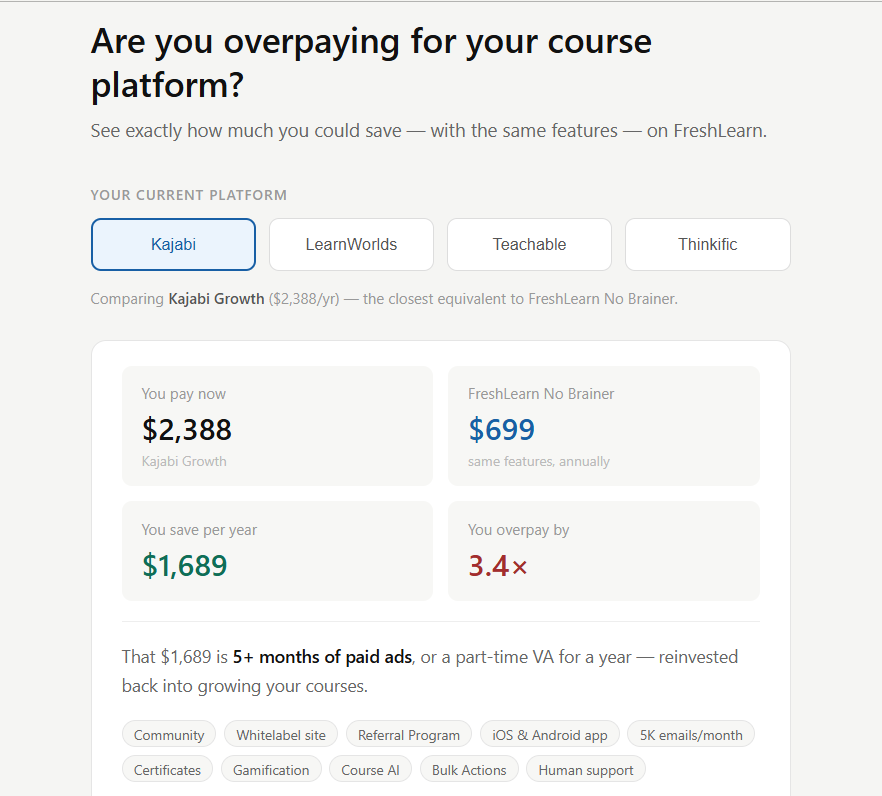
Hundreds of users are switching to FreshLearn, where platform fees stay predictable as they grow and essential features remain accessible without paying for higher tiers.
Kajabi pricing vs. the market: How does it stack up?
While Kajabi positions itself as a premium all-in-one solution, its price point isn't a fit for everyone. Let's see how its pricing philosophy compares against major competitors in the course creation space.
Kajabi vs. FreshLearn vs. Teachable vs. Thinkific: Pricing comparison
Kajabi starts at $179/month (Basic) while FreshLearn begins at $49/month (Pro), Teachable begins at $39/month (Starter), and Thinkific at $49/month (Basic).
But a direct comparison isn't straightforward, as these platforms take different approaches to pricing and features.
Kajabi’s all-in-one approach (integrated course hosting, email marketing, funnels, and website building) doesn’t need multiple subscriptions but creates a high entry barrier for new creators.
FreshLearn takes a different approach. Its plans start at a much lower monthly cost, with 0% platform fees, and even the affordable tiers include core features like unlimited courses, email automations, and affiliate tools.
This makes it easier for new creators to launch and scale without worrying about sudden fee hikes or forced upgrades. With FreshLearn, your business can grow smoothly, and you get access to the tools you need without paying for extras you might not yet use.
Teachable also takes another approach, starting at $39/month with 7.5% transaction fees, scaling up to $399/month for their Advanced plan. They include built-in affiliate programs from their Builder plan at $69/month and offer live chat support, making them more accessible for beginners.
Thinkific offers a different model: Basic plans at $49/month provide unlimited courses and students across all tiers, unlike Kajabi, which restricts this. Their higher-tier plans include advanced course features like white-labeling, plus expanded community capabilities. But these educational tools are only available in the Grow plan.
Where do competitors gain an advantage over Kajabi?
The short answer is predictable pricing and growth-friendly features. FreshLearn’s unlimited courses and students remove the product and plan restrictions that often force costly Kajabi upgrades.
Also, FreshLearn’s built-in automations, affiliate tools, and flexible marketing tools give creators a fully capable, all-in-one platform without the high entry cost.
Thinkific's unlimited course structure eliminates the product restrictions that force expensive Kajabi upgrades, while its advanced educational tools surpass what Kajabi offers for serious course creators.
Teachable provides a more gradual pricing ramp, allowing creators to start affordably and scale features as revenue grows, rather than Kajabi's steep tier jumps.
Where do they fall short?
However, the competitors have notable gaps that limit their effectiveness. FreshLearn offers limited customization options; Thinkific requires users to manage email marketing separately.
Teachable's email marketing, while included, remains basic compared to the advanced automation and funnel integration that Kajabi provides natively.
Making your decision: Is Kajabi's pricing right for you?
There's no right or wrong answer to whether Kajabi's pricing makes financial sense. The right choice depends on your specific situation, business stage, and growth trajectory. Here are some questions to guide your decision:
- What's your realistic monthly software budget? Be honest about what you can afford without straining cash flow. If $179/month feels like a stretch, Kajabi probably isn't your best starting point. Factor in potential upgrades - most users outgrow their initial plan within 12-18 months.
- Which Kajabi features are must-haves versus nice-to-haves? List the specific tools you need today, not what you might want eventually. Paying for unused features is expensive. If you only need course hosting, you're overpaying for email marketing, funnels, and community tools you won't touch.
- What are you currently spending on separate tools? Add up costs for email marketing, website hosting, Online course platforms, and funnel software. If the total approaches Kajabi's pricing, consolidation might save money and reduce management complexity.
- How comfortable are you with technical integration? Kajabi's all-in-one approach reduces setup work but increases learning curves. Some creators prefer managing best-of-breed tools separately rather than learning one complex system.
- What's your projected growth timeline? If you expect to hit contact limits or need multiple products within 12 months, factor upgrade costs into your budget. Kajabi's tier jumps can add up to $2,400 annually when you hit constraints.
- How much do you value integrated convenience? Some creators love having everything in one dashboard. Others prefer specialized tools that excel in specific areas. Your preference affects whether Kajabi's premium is worthwhile.
If you're still unsure, a simple checklist can help you evaluate whether Kajabi truly fits your needs. Review the statements below. If you find yourself nodding “yes” to four or more, Kajabi is likely a strong investment for your business:
- I want a single platform for my courses, website, email, and marketing funnels.
- I value seamless integration and ease of use over granular customization.
- My budget can comfortably accommodate a starting cost of over $150 per month.
- I plan to sell more than just courses (e.g., coaching, memberships, digital products).
- I want to avoid the technical hassle of piecing together multiple tools.
If you checked fewer than four boxes, you may want to explore more budget-friendly or specialized alternatives. This is where FreshLearn stands out. We provide the core all-in-one functionality creators need, but without Kajabi’s steep entry price or restrictive upgrade path.
What about larger organizations? If you're a scaling team, you're better off looking at enterprise-grade LMS options like LearnUpon and its alternatives.
Final verdict
Kajabi's pricing reflects its position as a premium, comprehensive platform. For established creators who use multiple features and have predictable revenue streams, the all-in-one convenience can justify the investment.
But the platform delivers genuine value when you leverage its full suite of tools and can afford the $179-499/month commitment.
The reality is that creators don't need to pay premium prices for professional results. FreshLearn offers a compelling balance of great features and significantly better pricing.
Starting with a generous free tier (versus Kajabi's $179 minimum), FreshLearn includes AI-powered course creation tools, unlimited products without transaction fees, and an intuitive interface that reduces the learning curve.
Many creators find that they can achieve their business goals at a fraction of Kajabi's cost while accessing modern features, such as AI content generation, that Kajabi lacks.
FreshLearn also helps you avoid switching barriers by offering free course migration. You can experience the platform with your actual content before committing. The platform migrates one course completely free, and if you upgrade to an annual plan, Freshlearn handles your entire Kajabi account migration at no extra cost, including all courses, products, and member data.
Compare Kajabi and FreshLearn directly to see how you can get the features you need at a price that makes sense. The right platform balances your feature needs with your budget scope.
The best way to make the most out of your platform subscription is to perform a thorough analysis and comparison of the multiple options available today.
Sounds like a lot of work? We have got you covered. Read these posts to get an in-depth idea of where Kajabi stands compared to its competitors.
Kajabi pricing FAQ
1. Does Kajabi offer a money-back guarantee?
Yes, Kajabi offers a 30-day money-back guarantee for new subscribers. You can get a full refund if you cancel within 30 days of making your first payment. After 30 days, payments are non-refundable, but you can cancel anytime to stop future charges.
2. How does the 14-day free trial work with billing?
The platform collects credit card information to start the trial, but you won't be charged during the 14-day period. Billing automatically starts after the trial ends unless you cancel.
3. What happens if I go over my plan limits?
When you reach 90% of your contact limit, you'll receive in-app notifications. At 100% usage, you get a 30-day grace period to upgrade your plan or remove contacts before your account is restricted.
4. Are there any setup fees with Kajabi?
No, there are no setup fees beyond the monthly or annual subscription cost. Kajabi doesn't charge any upfront costs.
5. What payment methods does Kajabi accept for subscriptions?
Kajabi accepts major credit cards like Visa, Mastercard, American Express, and Discover. For customer payments, Kajabi offers Kajabi Payments, Stripe, and PayPal, with additional options like Apple Pay, Google Pay, and Afterpay available through Kajabi Payments.
6. Are there platforms with similar features to Kajabi but better pricing?
Yes, platforms like FreshLearn aim to provide a comprehensive feature set comparable to many aspects of Kajabi, but with a more accessible pricing model. Many users migrate for this reason, finding they can get essential course creation, email marketing, and sales funnel features at significantly lower costs. You can see a direct comparison at FreshLearn Vs Kajabi.
7. Does Kajabi offer a free trial?
Yes. Kajabi provides a 14-day free trial period for new users. You can cancel the trial at any time before it ends, and your account will remain active until the end of the trial.
8. Can I get a discount on Kajabi pricing?
Yes. If you choose to pay annually, Kajabi offers a 20% discount versus monthly billing, making it significantly cheaper for creators who are ready to commit.
9. What happens if I downgrade my Kajabi plan?
When you change (downgrade) your plan in Kajabi:
- You will get a prorated billing for the remainder of the current cycle.
- But a downgrade isn’t allowed if your current usage exceeds the limits of the new (lower) plan.
- If you’ve increased feature limits (like extra products or contacts), you might need to lower or remove them before downgrading.
10. Do I need to host my videos elsewhere?
No. Kajabi doesn't force you to use an external video host, but it uses Wistia for video delivery (i.e., Wistia powers Kajabi’s video hosting). You can embed videos from external platforms like YouTube or Vimeo in your Kajabi pages, too.
11. Can I cancel my Kajabi account at any time?
Yes. You can cancel your Kajabi subscription via Account Settings → Subscription & Billing → Change Plan → Cancel Subscription. After canceling, your account will remain active until the end of your current billing or trial period. If you want to stop temporarily and come back later, you can also “park” your account.
You might also like
Hosted by
