
LearnDash vs Thinkific: Which One is Actually Better?

Last updated August 4, 2026
Quick Answer
LearnDash and Thinkific represent two different ways to run a course business. LearnDash is a WordPress plugin, now restructured into Essentials ($259/year), Pro ($399/year), and Elite ($599/year) tiers, with membership functionality bundled into every plan as of 2026, but you supply your own hosting and handle maintenance. Thinkific is a fully hosted platform starting at $54/month ($40/month billed annually, after its August 2026 price increase), with 0% platform fees on Thinkific Payments, but design flexibility stays within its built-in layouts. When you add hosting, setup time, and optional add-ons to LearnDash's sticker price, Thinkific frequently comes out cheaper for a comparable first-year setup, despite the higher-looking subscription fee. FreshLearn bundles hosting, community, and marketing into one price with 0% transaction fees, starting at $35/month on a two-year commitment.
Key Takeaways
- LearnDash restructured its pricing in 2026: Essentials ($259/year), Pro ($399/year), and Elite ($599/year), with the MemberDash membership platform now bundled into every tier, no longer a separate paid add-on.
- Thinkific charges 0% platform transaction fees on Thinkific Payments and starts at $54/month ($40/month billed annually), following a roughly 10% price increase effective August 13, 2026.
- Neither LearnDash nor Thinkific offers a free plan; LearnDash has no free tier at all, and Thinkific replaced its former free plan with a 30-day trial in 2024.
- LearnDash's advertised sticker price excludes hosting ($240 to $720/year), and add-ons like advanced analytics (ProPanel, around $199/year) if you don't upgrade to the Pro tier that includes reporting natively.
- Thinkific's branded mobile app costs $199/month as an ongoing add-on; LearnDash's mobile app options are typically a smaller annual add-on, so the true comparison depends heavily on whether you need a branded app.
- FreshLearn charges 0% transaction fees on every plan, bundles hosting, community, and analytics by default, and starts at $35/month on a two-year commitment.
LearnDash vs Thinkific: We've seen smart people rush this choice and pay for it later in time, money, and sanity.
So, we will provide you with a straightforward framework for deciding between the DIY grit of a WordPress plugin (hello, LearnDash) and the plug-and-play polish of a hosted platform (hello, Thinkific).
Plus, we’ll spill the tea on the real costs like hosting, add-ons, and sneaky upsells, so you’re not blindsided later.
TL;DR LearnDash vs Thinkific vs FreshLearn
Note on this table: LearnDash's starting price and community-features row reflect its 2026 pricing restructure, where MemberDash membership functionality moved from a paid add-on into every plan. Thinkific's figures reflect its roughly 10% price increase effective August 13, 2026. FreshLearn's starting price reflects its current two-year billing rate.
The most important question: Plugin vs. Hosted platform?
Before you even compare features, you need to decide how you want to run your course site. This single decision impacts everything about your business. LearnDash and Thinkific are two completely different approaches.
A hosted platform like Thinkific handles the infrastructure for you. You log in, build your course, and launch. Everything (hosting, security, updates, backups) is part of the package. This makes it quick to set up and easy to maintain, especially if you don’t want to deal with technical details.
The trade-off? You work within the framework they’ve designed. You get fewer customization options, and you pay a recurring subscription fee.
A WordPress plugin like LearnDash is different. You’ll install it on your own WordPress site, and from there, have complete control. You can customize the site’s design, functionality, and integrations in almost any way you want.
But with that freedom comes responsibility: you have to arrange hosting, keep WordPress and plugins updated, manage site security, and troubleshoot issues yourself.
Here’s how the two approaches compare side-by-side:
LearnDash vs Thinkific: Detailed feature comparison
Let's put LearnDash and Thinkific head-to-head in the categories that matter most to course creators.
Course creation and engagement tools
Your platform shouldn’t stop with seamless course creation. Keeping students hooked is just as important as getting them started. Let’s find the platform that nails this.
What’s it like on LearnDash?
LearnDash works as a WordPress plugin, so you build your course within your site.
Courses are organized into sections, lessons, and topics. You’ll have the option to add media like videos and text to each lesson, and full control over formatting through WordPress.
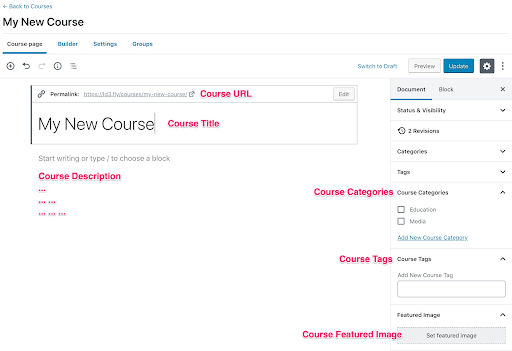
But there’s a catch: you often have to create lessons and quizzes separately, then assign them to a course, which means a bit of back-and-forth. For beginners, this can slow things down.
The visual Course Builder lets you add, remove, and reorder these elements in a drag-and-drop interface, so you can map out your course in one place.
The lesson editor uses the standard WordPress post editor. This gives you familiarity if you already work in WordPress, but it’s not as media-rich as some standalone platforms: you mainly add text, images, or video embeds.
For engagement, LearnDash offers a solid quiz system with:
- Multiple question types (multiple choice, true/false, essay).
- Global settings to standardize the quizzes across the site.
- Question banks for randomized quizzes.
- Progression controls (one question at a time or all at once).
- Time limits, scoring, leaderboards, and email notifications.
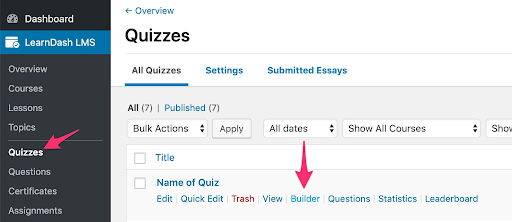
Assignments can be added to lessons or topics, letting learners upload files for review. You can also set progression rules, so a student must pass a quiz or complete an assignment before moving forward.
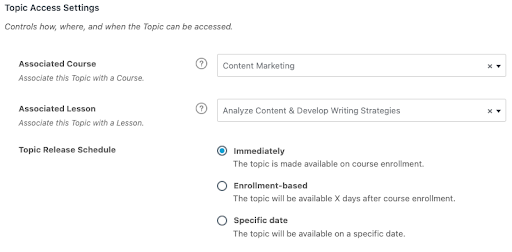
Drip scheduling works at both the section and lesson level, so you can unlock content after a certain number of days or once prerequisites are met.
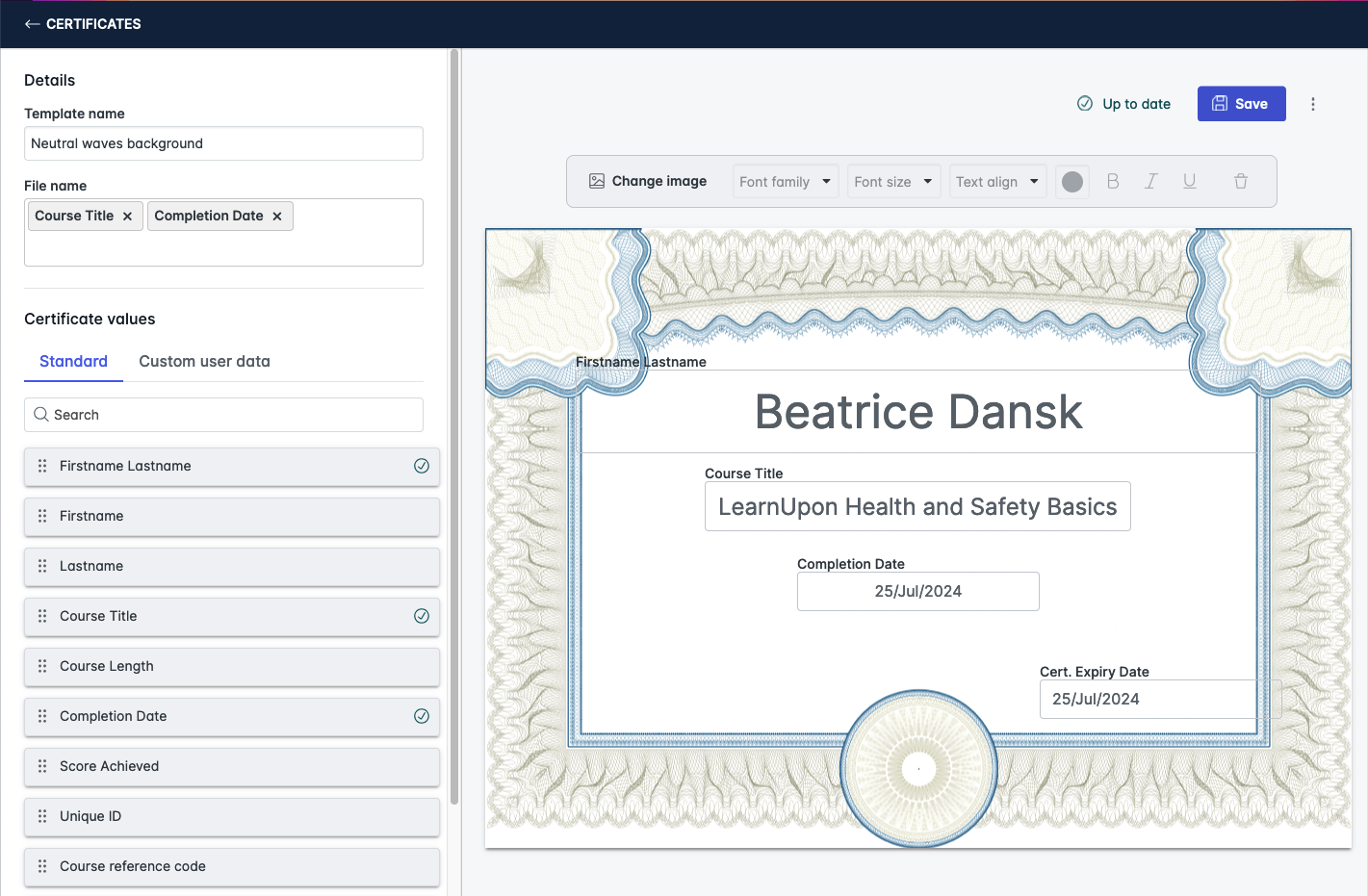
Certificates are available as PDF downloads, triggered by course completion or quiz thresholds. Design options depend on the custom templates you create. So branding is possible, though setup may require some trial and error.
Content ownership here is clear: everything sits on your WordPress site, giving you full control. The trade-off is responsibility: hosting, backups, and security are on you.
Read our guide on the top LearnDash alternatives to see how competitors stack up against the platform for course creation.
What’s it like on Thinkific?
Thinkific is fully hosted, so you log in and start building without touching WordPress or code. The course builder is drag-and-drop, with a clean interface and no technical setup. For speed, you can bulk upload video, audio, or PDF files; Thinkific automatically turns each file into its own lesson.
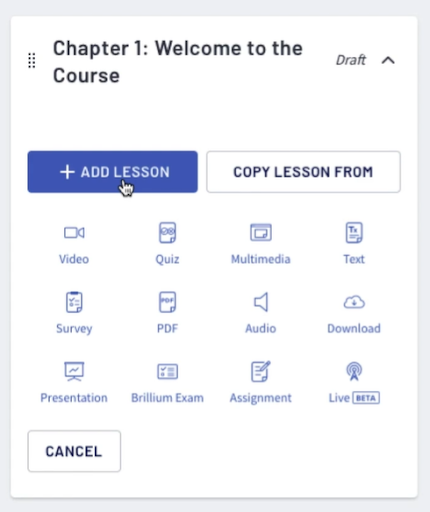
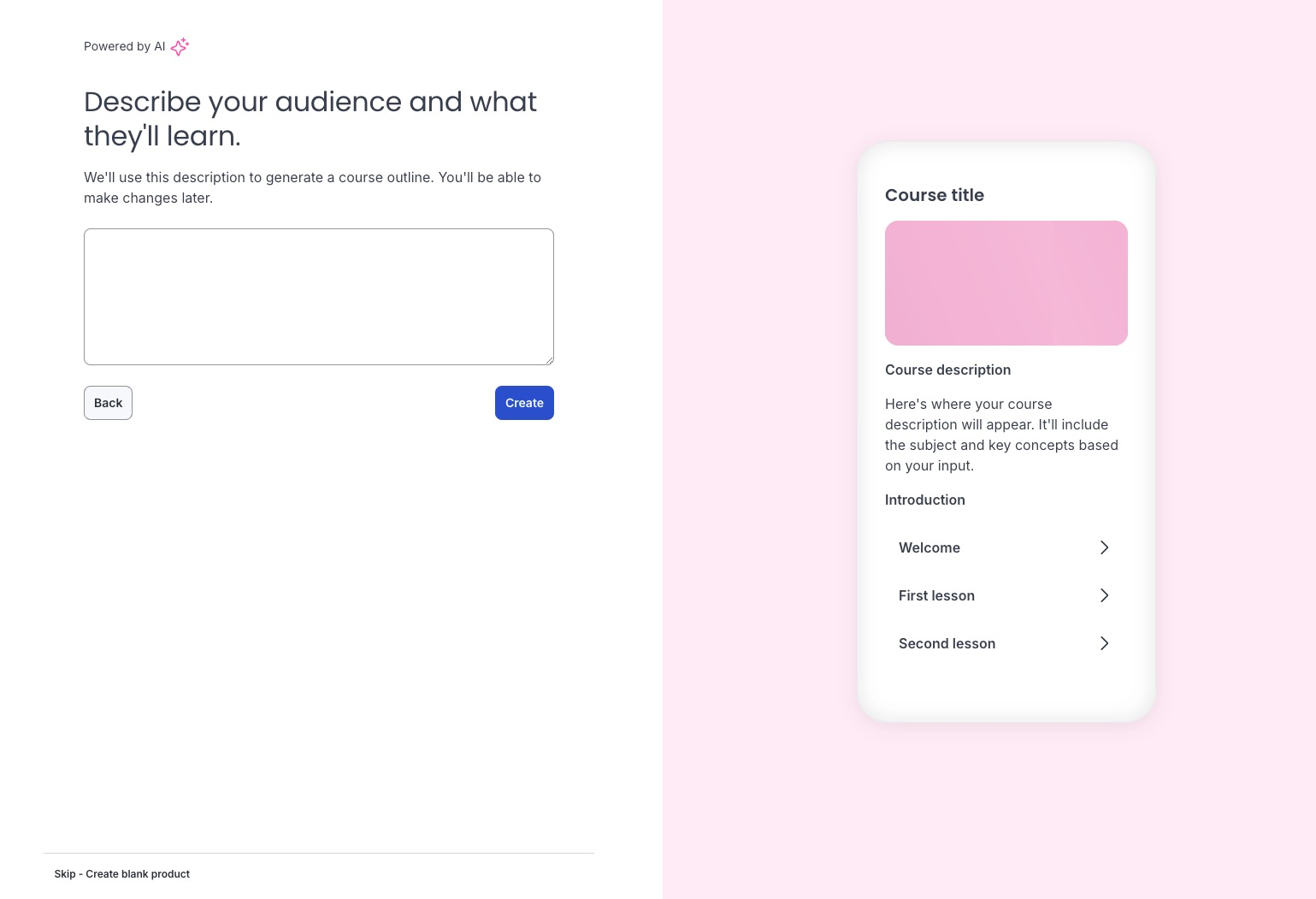
Templates let you start from a pre-built course structure or from scratch. You can also use an AI outline generator, which suggests modules and lessons based on your topic, audience, and goals. While this can save time, most creators will still tweak the structure for accuracy and flow.
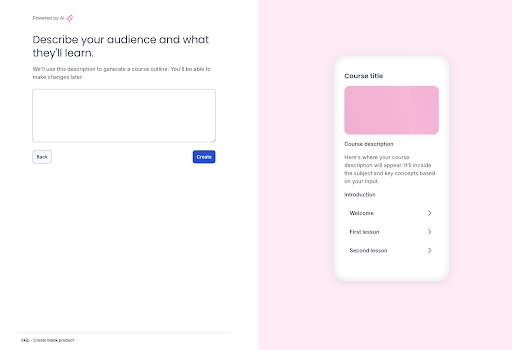
Lesson types are broad:
- Video, text, audio, PDFs, downloads.
- Quizzes, surveys, and assignments.
- Presentations with voiceover.
- Live lessons via Zoom.
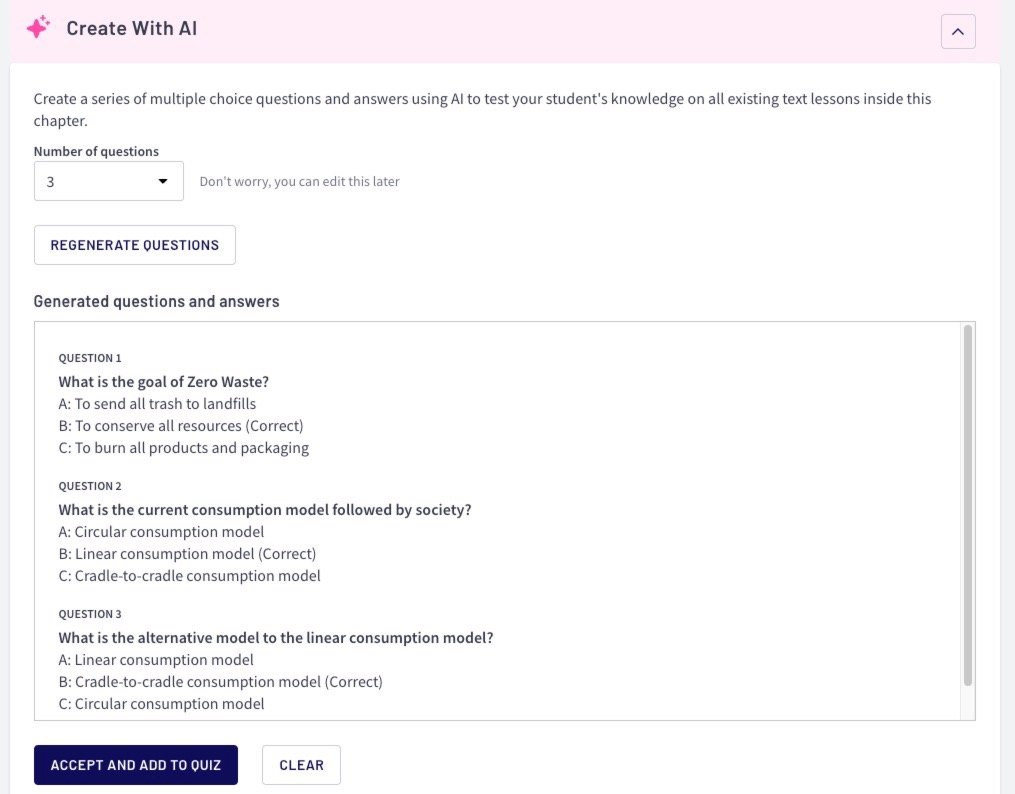
Quizzes and assessments in Thinkific are practical and varied. Multiple choice, randomized question banks, XLSX imports, and an AI quiz generator that creates questions from your lesson content.
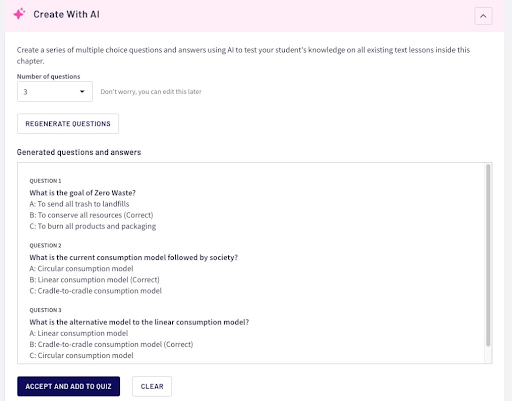
Passing grades and prerequisites can be enforced before learners move on.
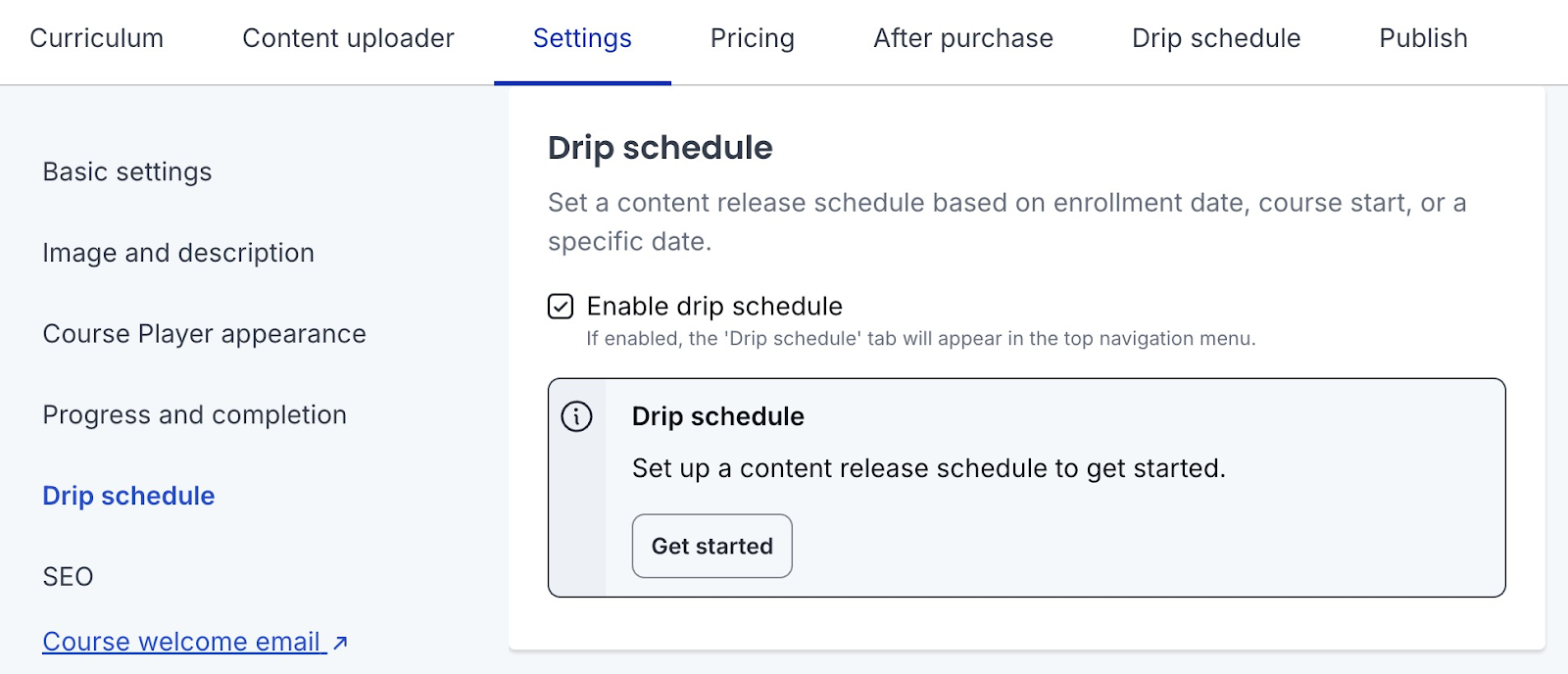
For content drip, Thinkific allows section-level locking based on enrollment date, perfect for cohort-based courses or transformation challenges. Prerequisite lessons can be set, forcing students to complete content in sequence.

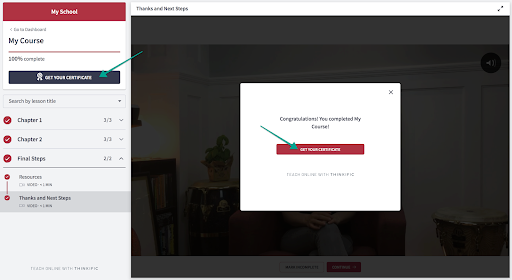
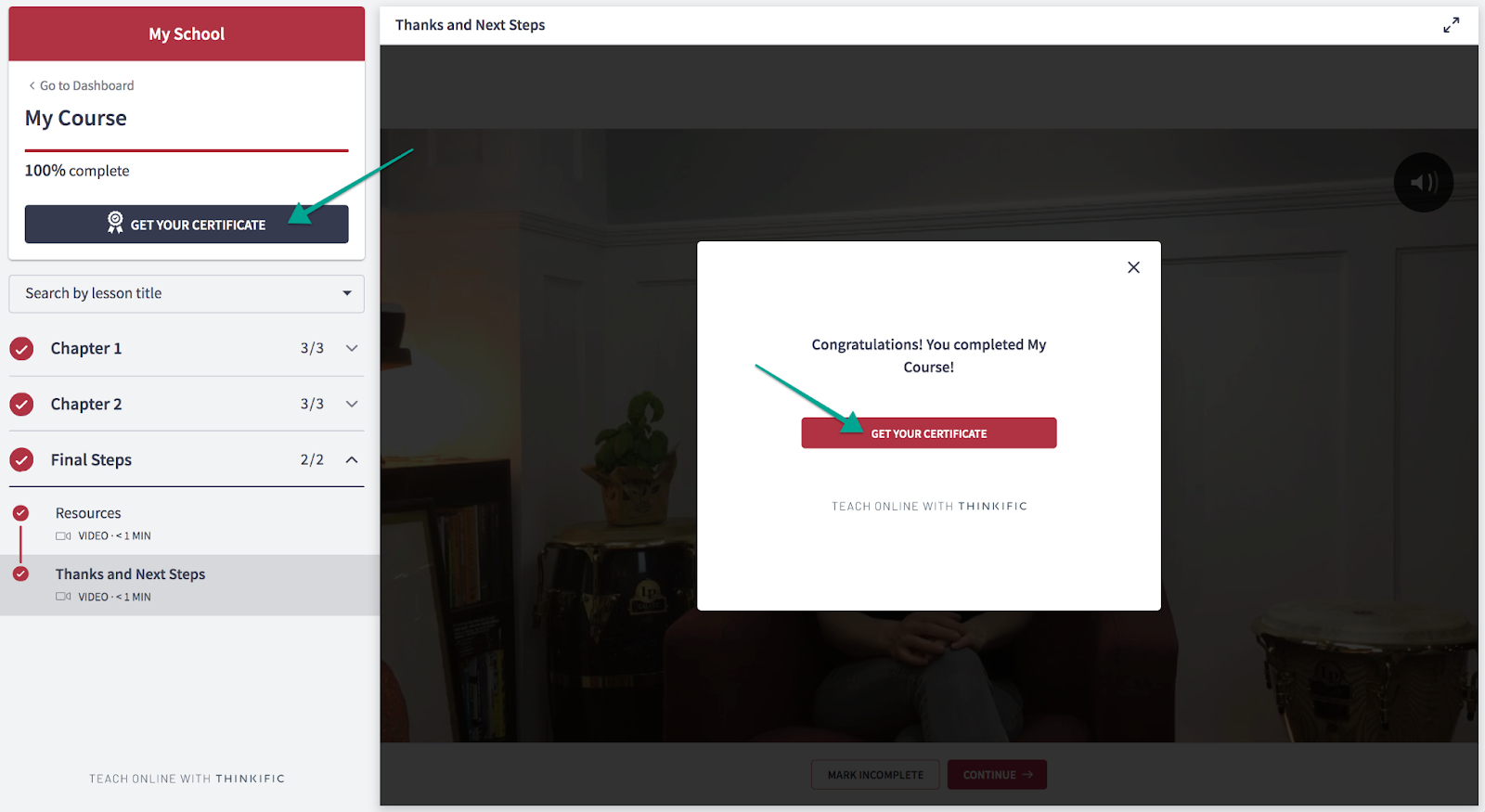
Certificates are built in, with over seven templates you can customize (colors, images, logo, text). They can have expiration dates, adding a nudge for students to complete courses before access lapses. Certificates remain accessible in the student’s account even after course access ends.
Engagement tracking is strong. Thinkific’s analytics show revenue, orders, and enrollments, plus detailed student engagement reports at the school, course, and video level.
You can group students into cohorts for targeted reporting, which helps in structured programs or memberships.
Content ownership here is different: your materials are stored on Thinkific’s servers. While you keep the rights, you can’t export and re-import it into another platform easily. Migration would require manual downloading and re-uploading elsewhere.
Here’s a complete guide on Thinkific alternatives to discover the best course creation platforms.
Winner: Thinkific
While LearnDash offers deeper customization for those willing to manage WordPress and plugins, Thinkific wins this round for ease of creation, variety of lesson types, and integrated engagement tools.
You can launch faster, track results without extra add-ons, and manage everything from one place. That’s a clear advantage for most creators who value speed and simplicity over fine-tuned control.
Site building and customization
When it comes to design and branding between LearnDash and Thinkific, one is almost limitless, but demands effort. The other is quick and safe, but runs into walls fast.
What’s it like on LearnDash?
LearnDash works with any modern WordPress theme, so your design options start wide. It works with any modern WordPress theme, but pairs especially well with Astra, which adds LearnDash-specific options inside its customizer. Without any extra setup, it automatically adopts your theme’s styling. If your theme is mobile-friendly, LearnDash is too.
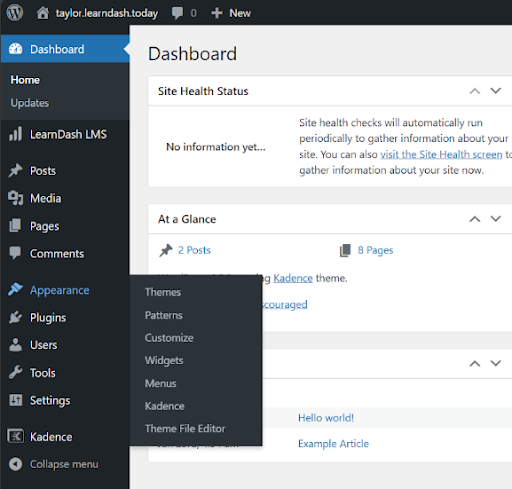
You get the LearnDash Style Customizer, which lets you change the look of courses, lessons, topics, quiz pages, and global styles (without touching code). You can apply changes globally or to specific LearnDash page types.
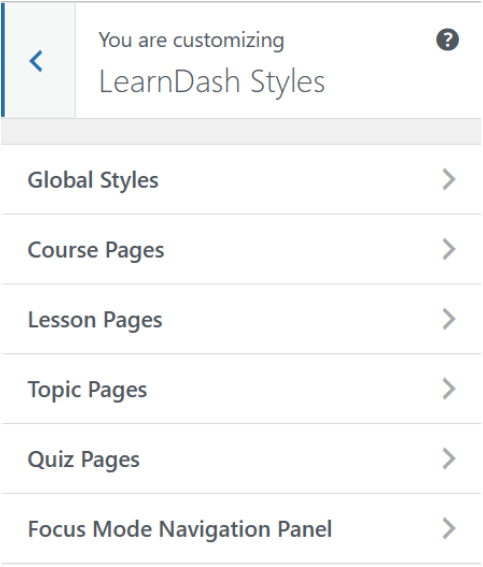
You can customize course tables, progress bars, and widgets.
Because LearnDash is just one part of your WordPress site, your design options go as far as your effort and skills (or your developer’s) allow. You can integrate page builders like Elementor, Divi, or Beaver Builder to design custom sales pages, pop-ups, and navigation.
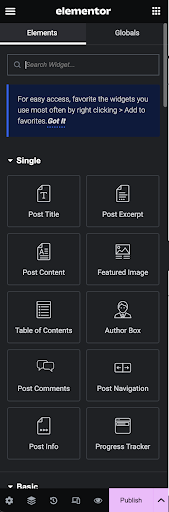
With Elementor, you could build interactive features like buttons that jump to comments or pop-up menus for easy course navigation. You can also add custom CSS or code for full branding control. If needed, you can even hire a developer to create new features (something hosted platforms can’t match).
The flip side: the quality of your design depends entirely on how much work you put in. A poorly built WordPress site will give students a poor experience.
What’s it like on Thinkific?
Thinkific, on the other hand, gives you a built-in site builder. You choose from three themes, each applied across all pages (homepage, course pages, community pages, and custom pages).
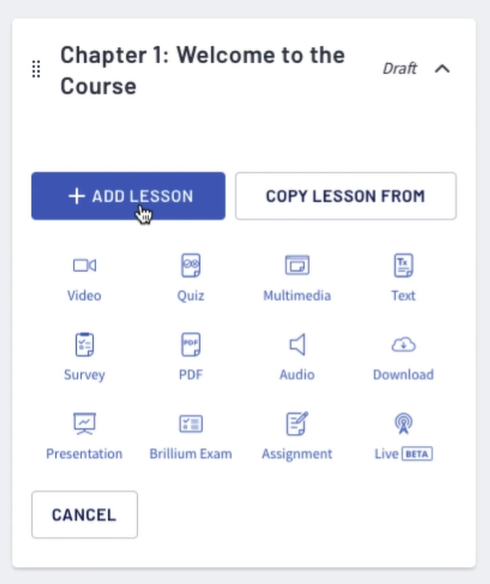
Templates let you start from a pre-built course structure or from scratch. You can also use an AI outline generator, which suggests modules and lessons based on your topic, audience, and goals. While this can save time, most creators will still tweak the structure for accuracy and flow.
Lesson types are broad:
- Video, text, audio, PDFs, downloads.
- Quizzes, surveys, and assignments.
- Presentations with voiceover.
- Live lessons via Zoom.
Quizzes and assessments in Thinkific are practical and varied. Multiple choice, randomized question banks, XLSX imports, and an AI quiz generator that creates questions from your lesson content.
Passing grades and prerequisites can be enforced before learners move on.
For content drip, Thinkific allows section-level locking based on enrollment date, perfect for cohort-based courses or transformation challenges. Prerequisite lessons can be set, forcing students to complete content in sequence.
Certificates are built in, with over seven templates you can customize (colors, images, logo, text). They can have expiration dates, adding a nudge for students to complete courses before access lapses. Certificates remain accessible in the student’s account even after course access ends.
Engagement tracking is strong. Thinkific’s analytics show revenue, orders, and enrollments, plus detailed student engagement reports at the school, course, and video level.
You can group students into cohorts for targeted reporting, which helps in structured programs or memberships.
Content ownership here is different: your materials are stored on Thinkific’s servers. While you keep the rights, you can’t export and re-import it into another platform easily. Migration would require manual downloading and re-uploading elsewhere.
Here’s a complete guide on Thinkific alternatives to discover the best course creation platforms.
Winner: Thinkific
While LearnDash offers deeper customization for those willing to manage WordPress and plugins, Thinkific wins this round for ease of creation, variety of lesson types, and integrated engagement tools.
You can launch faster, track results without extra add-ons, and manage everything from one place. That’s a clear advantage for most creators who value speed and simplicity over fine-tuned control.
Site building and customization
When it comes to design and branding between LearnDash and Thinkific, one is almost limitless, but demands effort. The other is quick and safe, but runs into walls fast.
What’s it like on LearnDash?
LearnDash works with any modern WordPress theme, so your design options start wide. It works with any modern WordPress theme, but pairs especially well with Astra, which adds LearnDash-specific options inside its customizer. Without any extra setup, it automatically adopts your theme’s styling. If your theme is mobile-friendly, LearnDash is too.
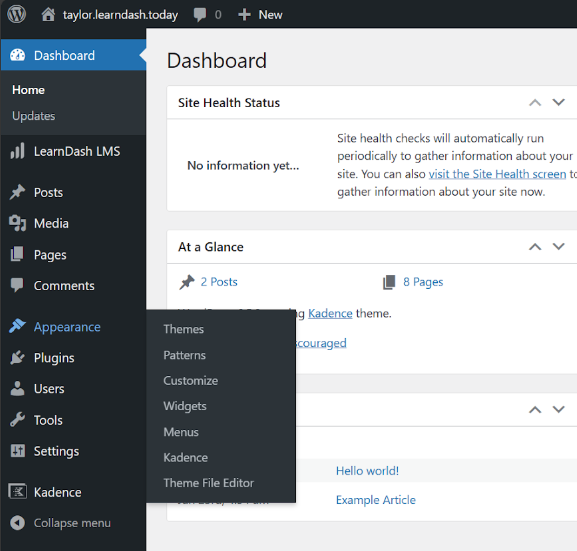
You get the LearnDash Style Customizer, which lets you change the look of courses, lessons, topics, quiz pages, and global styles (without touching code). You can apply changes globally or to specific LearnDash page types.
You can customize course tables, progress bars, and widgets.
Because LearnDash is just one part of your WordPress site, your design options go as far as your effort and skills (or your developer’s) allow. You can integrate page builders like Elementor, Divi, or Beaver Builder to design custom sales pages, popups, and navigation.
With Elementor, you could build interactive features like buttons that jump to comments or pop-up menus for easy course navigation. You can also add custom CSS or code for full branding control. If needed, you can even hire a developer to create new features (something hosted platforms can’t match).
The flip side: the quality of your design depends entirely on how much work you put in. A poorly built WordPress site will give students a poor experience.
What’s it like on Thinkific?
Thinkific, on the other hand, gives you a built-in site builder. You choose from three themes, each applied across all pages (homepage, course pages, community pages, and custom pages).
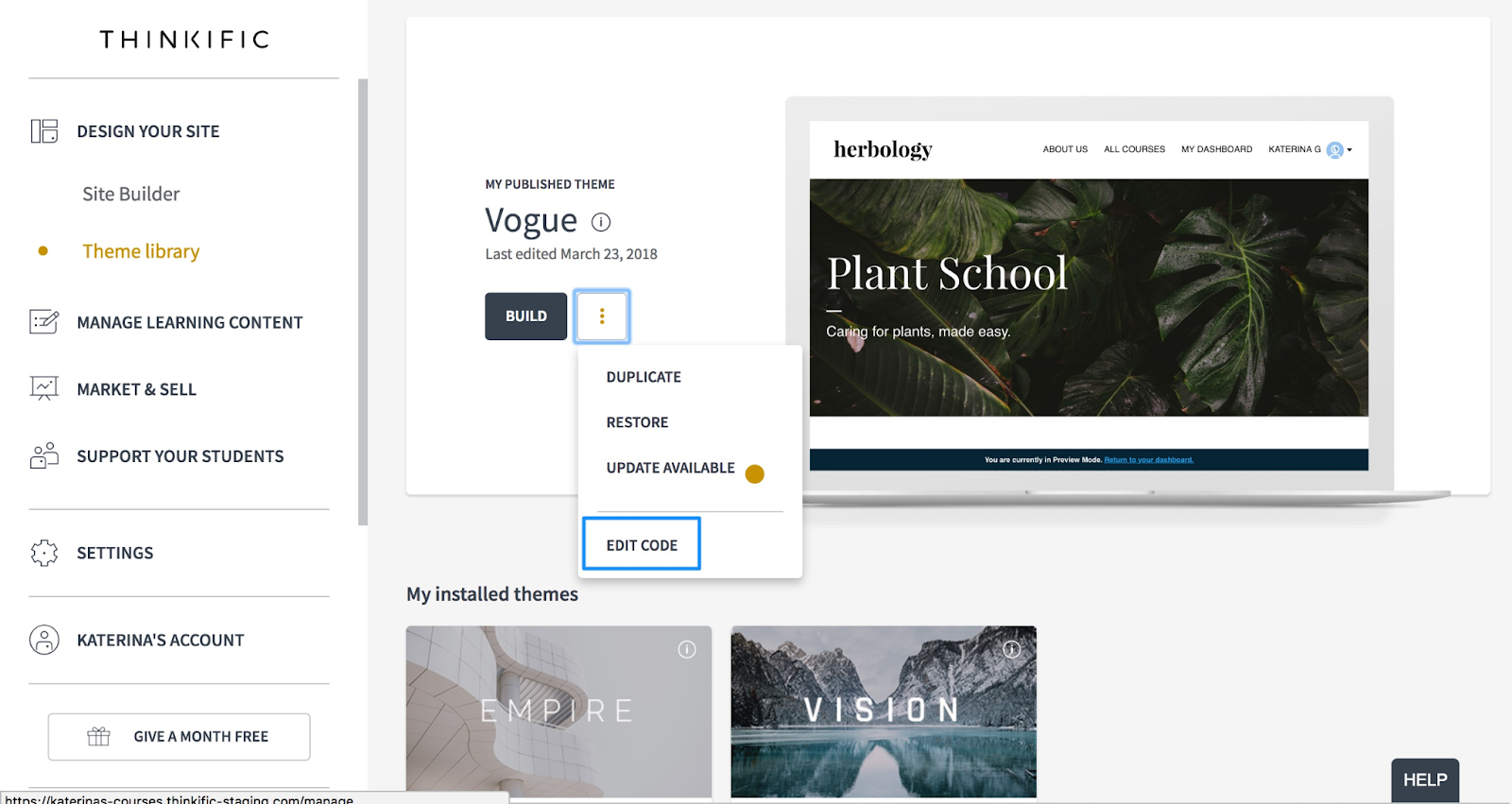
Pages are built by stacking pre-made sections: testimonials, FAQs, pricing blocks, upsells, reviews, lead capture, and more. Around 20 section types are available.
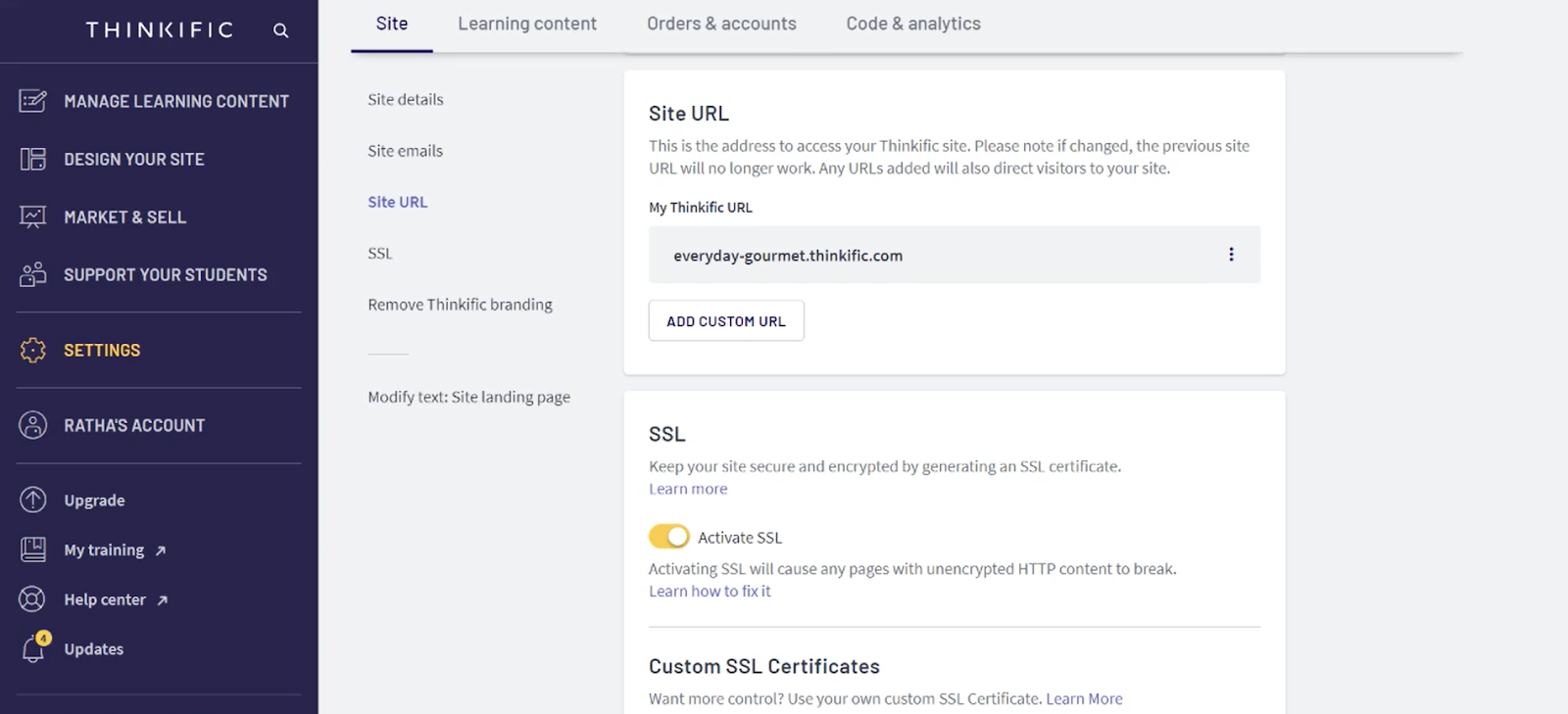
It’s easy to use. You drag and drop sections, change colors, fonts, and button styles. Every site is responsive out of the box, comes with SSL, and you can use a free Thinkific subdomain or connect your own.
But customization is limited. Layouts are fixed. If a section template has an image on the left and text on the right, you can’t swap them or add new elements outside its structure. Most creators never touch the HTML/CSS, so they stay within the preset options.
There’s no deep control over branding, SEO tweaks, or advanced marketing design. As your needs grow, you may have to run a separate marketing site to get more flexibility.
Winner: LearnDash
LearnDash takes the win here mainly for the customization depth. It works with any theme, supports advanced page builders, offers multiple skins, and lets you edit with CSS or custom code. You can make every element on brand and even hire developers for bespoke features.
Thinkific’s builder is faster to learn, but its rigid layouts and limited themes mean your site will always look and function within its preset boundaries.
Sales and marketing capabilities
Creating your course is only half the battle. Can these platforms actually help you sell it, or will you need yet another tool for that? Here’s what I found.
What’s it like on LearnDash?
LearnDash doesn’t have its own native payment processor. Instead, it integrates with Stripe and PayPal by default, and you can expand to other processors like Razorpay, SamCart, ThriveCart, or WooCommerce for more options.

With WooCommerce, you gain access to additional payment gateways and coupon features.
Upsells, order bumps, and cart abandonment recovery are not built in. To get those, you’ll need third-party tools like CartFlows, SamCart, or ThriveCart.
Moving on to courses, you can sell them individually or in bundles. Membership and group functionality now comes bundled into every LearnDash plan through MemberDash, as of the platform's 2026 pricing restructure, so you no longer need a separate tool like Paid Memberships Pro just to handle memberships. You can create membership levels and award certificates to groups.
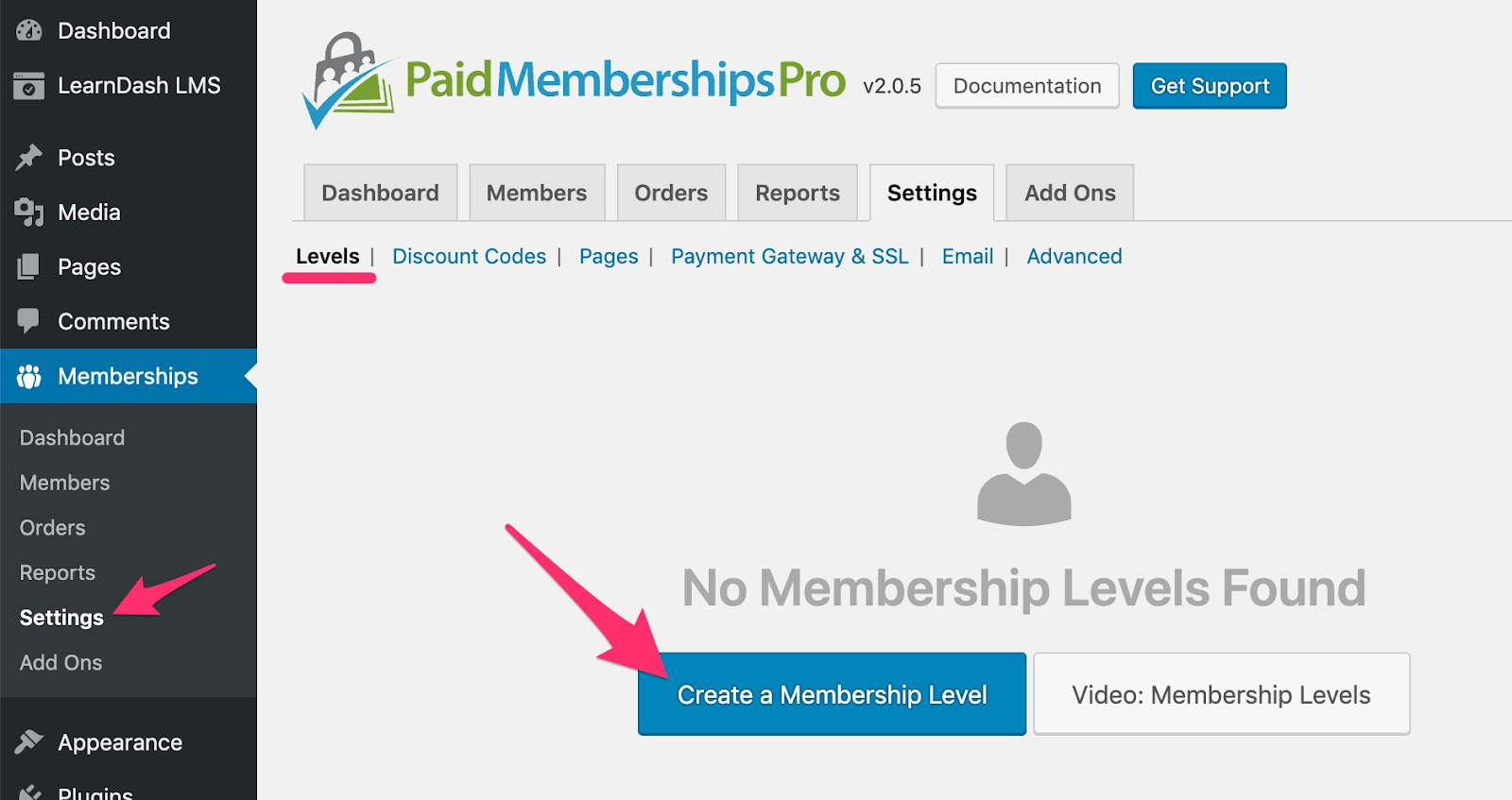
It even lets you handle the e-commerce and checkout experience. For more control over access, coupons, and reminders, integrations like MemberPress work well.
LearnDash itself has no native marketing tools like upsells, downsells, or cart abandonment recovery. These require external tools such as CartFlows, ThriveCart, or SamCart.
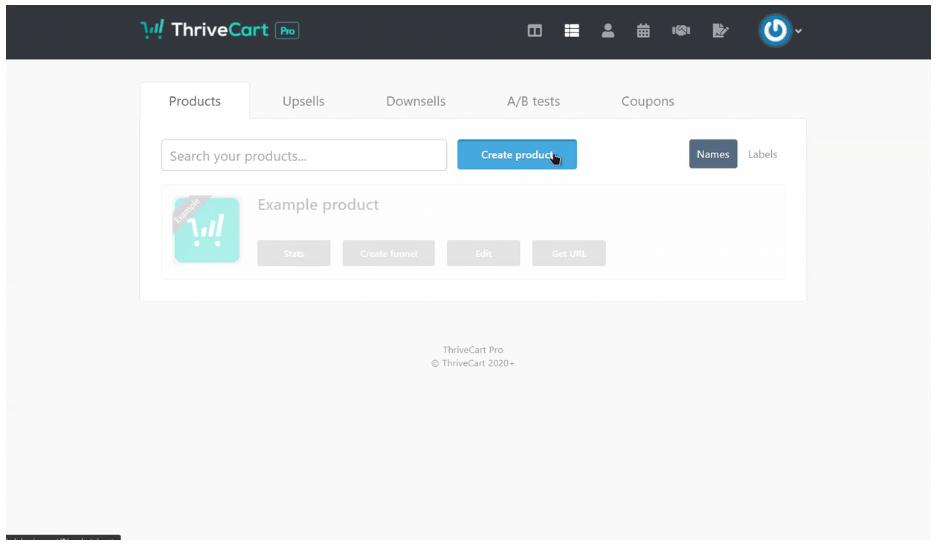
The same goes for order bumps and advanced checkout flows.
Affiliate programs aren’t built in either. You can add them with AffiliateWP (works with WooCommerce or Easy Digital Downloads) or use affiliate features from shopping cart tools like ThriveCart.
LearnDash offers deep customization of sales processes, but almost everything beyond basic payments depends on integrations. That means more flexibility, but also more moving parts to manage.
What’s it like on Thinkific?
Thinkific supports PayPal and Stripe globally, plus Thinkific Payments in the US, Canada, and the UK. Thinkific Payments adds one-step checkout, order bumps, buy-now-pay-later, digital wallets, and bank redirects. These features improve conversions and reduce admin work.
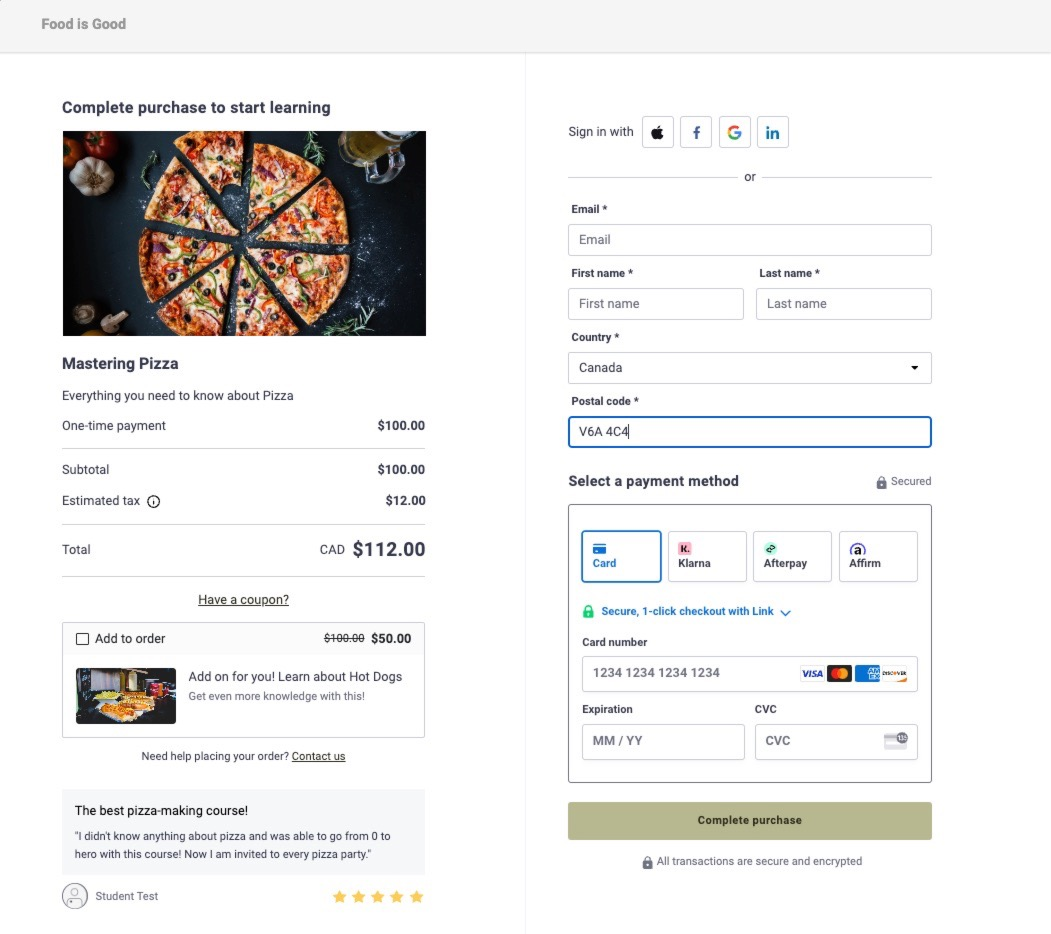
You can set custom pricing per course, create bundles with unique post-purchase flows, and direct buyers to upsell pages or custom URLs.
Thinkific includes an affiliate program. You can set commission rates for affiliates, specific products, or even individual partners. Detailed reports track clicks, conversions, and earnings.
Revenue Partners is another built-in feature for joint course launches, with automated profit-sharing. This is handled entirely inside Thinkific (no external tools needed).
For memberships, you can include communities, courses, downloads, and live events. Access is subscription-based, creating recurring revenue opportunities. Bundling these with community interaction supports retention.
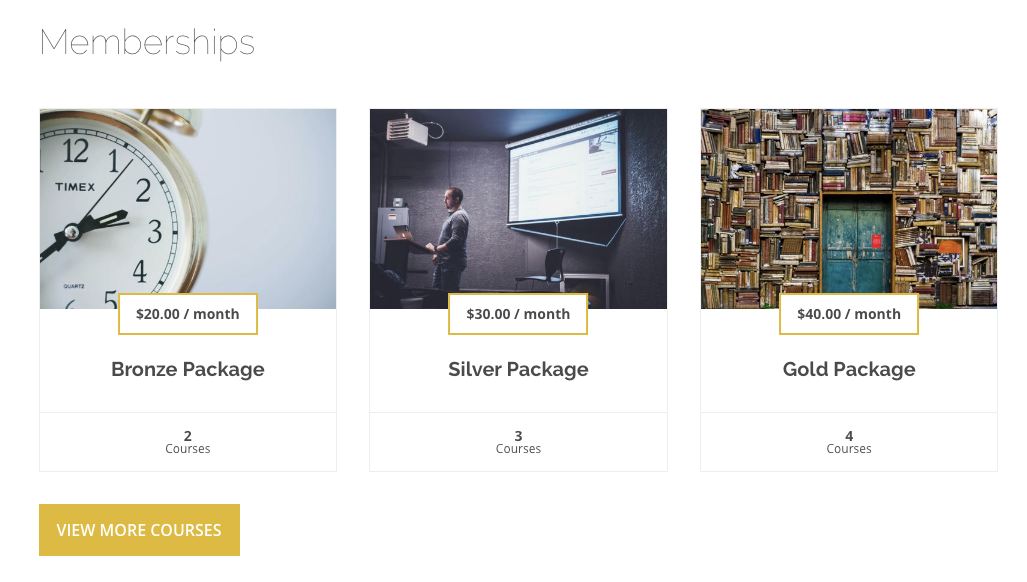
If you host your main site elsewhere, Thinkific provides embeddable sales widgets so you can use its checkout on external pages.
Winner: Thinkific
Thinkific wins here because it offers a full sales and marketing toolkit out of the box. Payment flexibility (with Thinkific Payments), one-step checkout, order bumps, built-in affiliates, revenue sharing, memberships, and upsells are all included without extra plugins.
LearnDash can match or exceed these features, but only through external integrations. This makes Thinkific faster to set up and easier to maintain for creators who want sales, marketing, and course delivery in one system.
Support and ease of use
What really decides if you’ll love a platform is how quickly you can actually get the hang of it and whether support shows up when things go sideways. Here’s how each one stacks up when it comes to the everyday, human side of running your courses.
What’s it like on LearnDash?
With LearnDash, you’ll need to handle hosting, theme setup, plugin management, and integrations yourself (or pay a WordPress expert to do it). It offers more flexibility for those comfortable with WordPress, but the learning curve is steep. Beginners or non-technical users may find it overwhelming.
And when it comes to support, LearnDash offers ticket-based support alongside a large collection of self-help resources. This includes detailed guides, video tutorials, a knowledge base, and a Facebook community of over 25,000 members.
If you still need help, you can contact their team. There’s also LearnDash Academy, a program for becoming a certified course-building expert.
What’s it like on Thinkific?
Thinkific uses a clean, sidebar-driven interface. All your tools (site design, marketing features, analytics, and student support) are neatly organized in one place. The navigation is straightforward, and the terminology is familiar.
For example, look at the way the menu appears neat and organized below.

Everything is hosted and maintained for you, so there’s no need to manage updates or worry about compatibility issues. It’s beginner-friendly and works out of the box.
Coming to the support part, Thinkific’s support starts with its built-in chatbot, Champ, for quick answers. All paid plans get human support via email and live chat. Higher-tier plans include priority phone support and a dedicated customer success manager.

The platform also offers a network of experts, a growing peer community, and an Accelerator Program for course-selling guidance (free on all paid plans).

Winner: Thinkific
Thinkific takes the lead here. It’s beginner-friendly, all-in-one, and maintenance-free. Support scales with your needs, and the Accelerator Program adds hands-on guidance that LearnDash doesn’t provide natively.
LearnDash is great for WordPress pros, but for most users who want a smooth start and responsive support, Thinkific is the easier, more supportive choice.
The true cost compared between LearnDash vs Thinkific
The advertised price tag is rarely the actual cost you’ll pay in reality. I’ve broken down the sticker price, actual price, and all the hidden prices there are (with both platforms).
Understanding LearnDash's cost structure
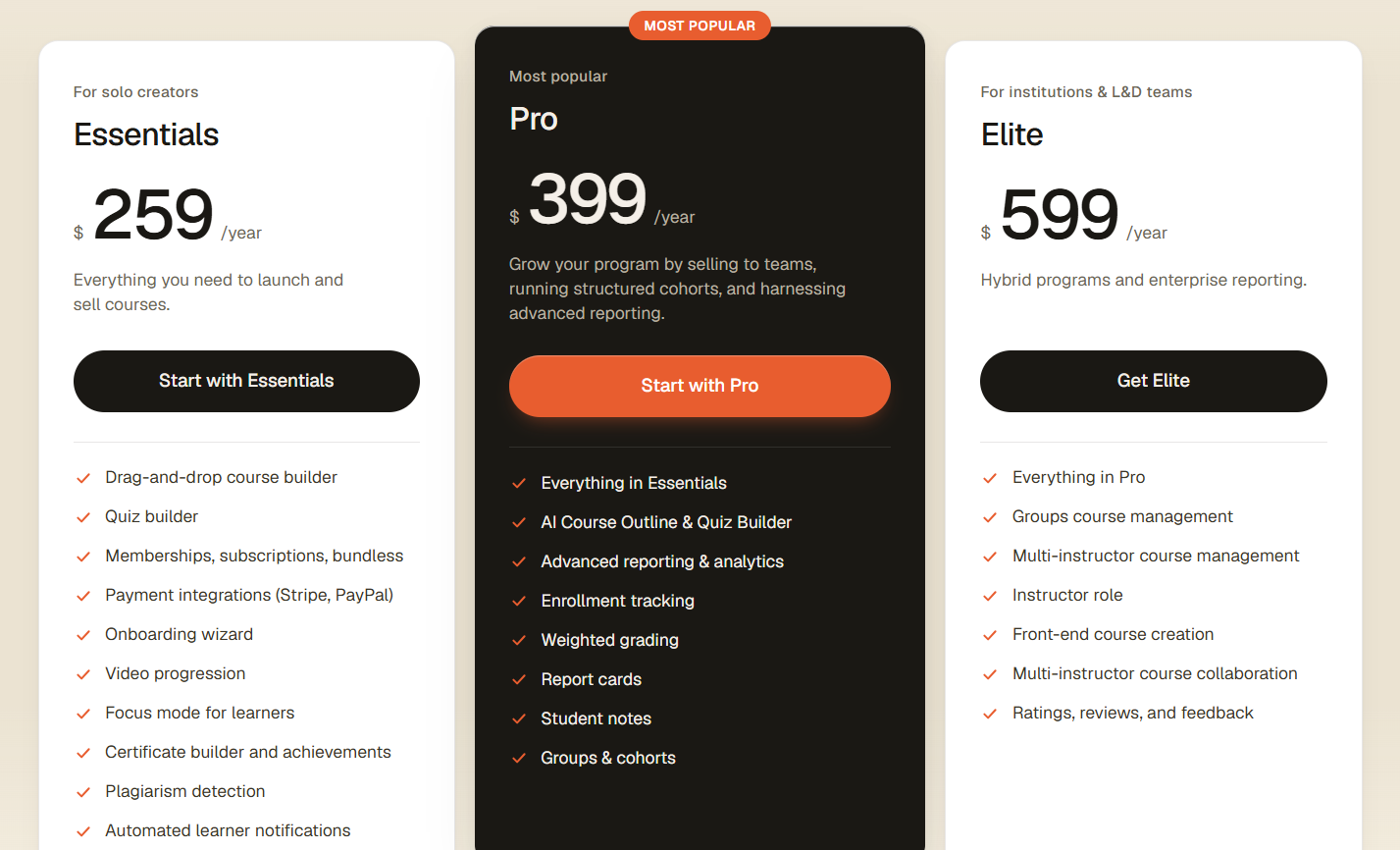
LearnDash restructured its pricing in 2026. The plugin now comes in three annual tiers: Essentials ($259/year), Pro ($399/year), and Elite ($599/year). A significant change worth knowing: MemberDash, LearnDash's membership platform, is now bundled into every tier, where it used to be a separate paid add-on.
Essentials covers the drag-and-drop course builder, quizzes, memberships via MemberDash, Stripe and PayPal integrations, and certificates. Pro adds AI-assisted course and quiz building, advanced reporting, enrollment tracking, and cohorts. Elite adds front-end course creation, multiple instructors, and group-management workflows.
There's also StellarSites Learning (formerly LearnDash Cloud), a managed hosting option starting around $29/month billed annually, which bundles hosting with LearnDash pre-installed.
Most course creators quickly discover they need additional capabilities beyond their base tier. If you're on Essentials and want deeper analytics without upgrading to Pro, the standalone ProPanel add-on runs around $199/year. Student note-taking is a smaller add-on, around $49/year.
You'll need WordPress hosting, which runs $15-25 monthly for decent performance, unless you choose the StellarSites Learning route above. You'll handle security updates, backups, and technical maintenance yourself or pay someone else to do it.
Many course creators end up hiring developers for initial setup because the learning curve is steeper than expected. The real story with LearnDash isn't the plugin cost; it's everything else you need to pay to make it work.
Take a look at our LearnDash pricing guide for a detailed breakdown.
Decoding Thinkific's pricing model
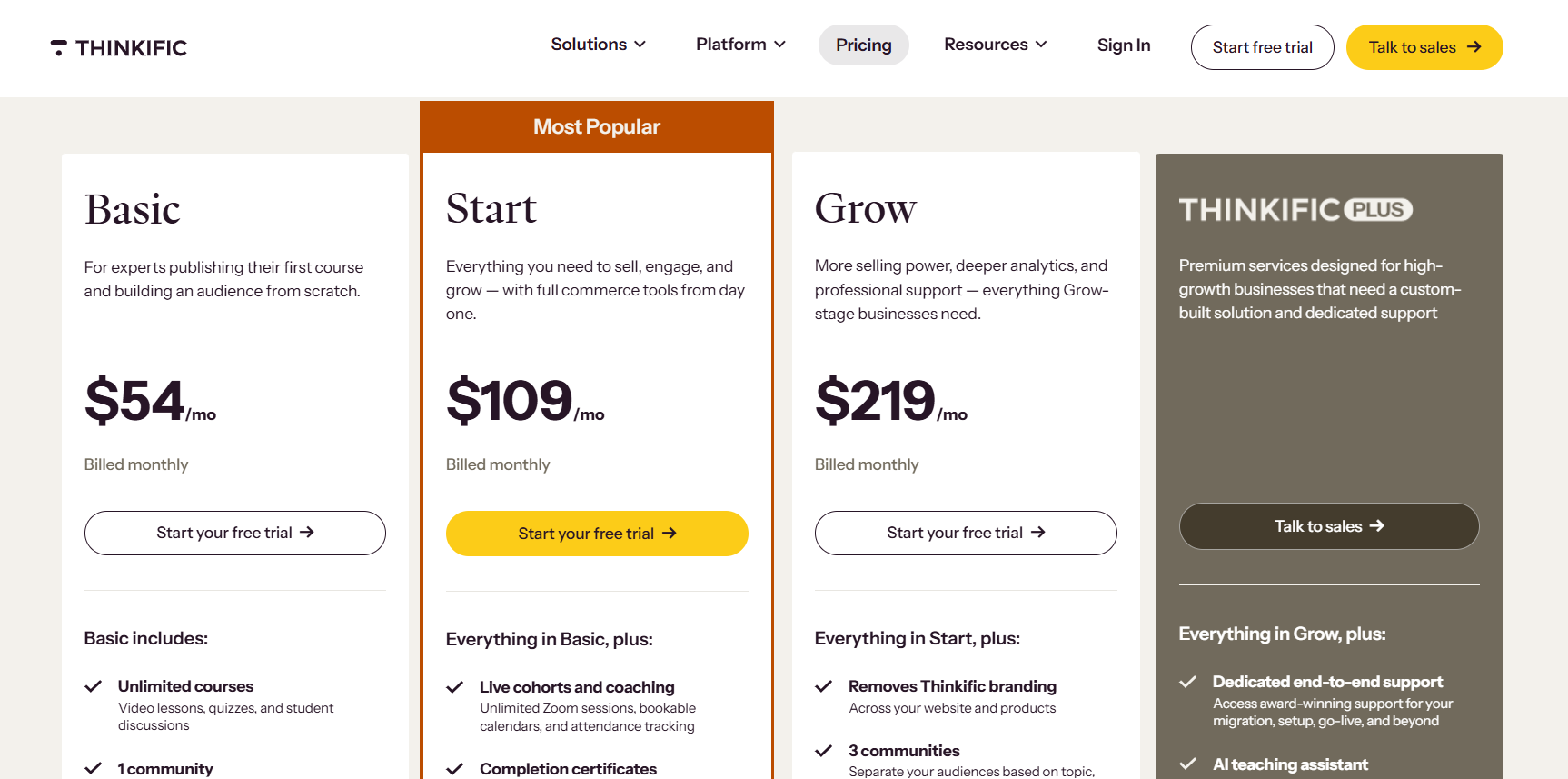
Thinkific's all-inclusive subscription approach looks more expensive upfront. Their most popular "Start" plan now runs $109/month, or $82/month billed annually ($984 annually), following Thinkific's roughly 10% price increase on August 13, 2026.
However, this price includes hosting, security, maintenance, unlimited courses, memberships, and coaching sessions (items that would require separate purchases or subscriptions with LearnDash).
But Thinkific has its own hidden costs. The biggest? Payment processing penalties. If you don't use Thinkific Payments, Thinkific applies a penalty of 5% on Basic, 2% on Start, and 1% on Grow.
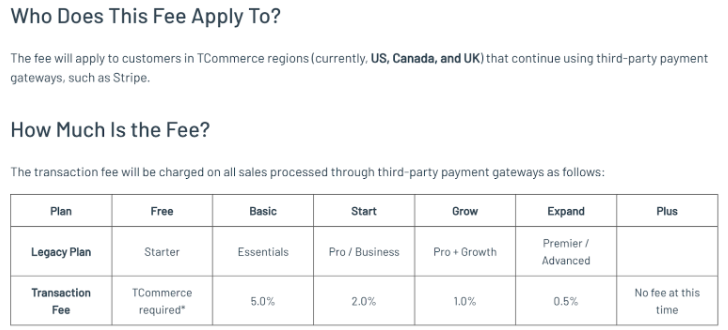
Selling $3,000 monthly in courses? That's an extra $60 every month ($720 annually) that never appears in the headline price.
For an in-depth comparison of all Thinkific pricing plans, head to our comprehensive guide.
Let’s compare the actual costs of LearnDash vs Thinkific
Here, I’m only factoring in the basic costs that’ll help you get ready with the platform set up, minus all the transaction fees and the extras.
Note on this table: LearnDash's platform cost reflects its 2026 restructure to the Essentials tier; the mobile app is not included in this table because Thinkific prices it monthly ($199/month, or $2,388/year if used all year) while LearnDash's mobile options are typically a smaller annual add-on, so folding either into this base comparison would skew the total more than it clarifies it. See the note below for that specific trade-off.
When you add it all up, Thinkific comes out ahead even after its August 2026 price increase, mainly because LearnDash's hosting, setup, and analytics add-ons offset its lower sticker price.
What the table doesn't show is the ongoing time investment. LearnDash requires regular maintenance, updates, and occasional troubleshooting. Thinkific handles these tasks for you.
If a branded mobile app matters to your business, price it separately before deciding: Thinkific’s app costs $199/month for as long as you keep it active, which adds up to $2,388 over a year. That single line item can flip the total-cost comparison, so don't assume it's a rounding error.
If you value an all-inclusive, predictable setup without needing to source and manage multiple vendors, Thinkific delivers better overall value. LearnDash can still make sense for those who already have hosting and WordPress expertise, but for most course creators, the “cheaper” option quickly becomes the more expensive one.
Still, both platforms come with trade-offs. If neither fully checks your boxes for cost-efficiency, scalability, and flexibility, it might be worth looking at a better alternative.
The smarter choice: An alternative that offers the best of both worlds
If Thinkific feels overpriced for what you get, and LearnDash feels too technical and piecemeal, there’s a third option worth considering: FreshLearn.
It brings the simplicity of a hosted platform like Thinkific, the flexibility of a self-hosted setup, and does it at a fraction of the cost.
Why Creators Choose FreshLearn over LearnDash or Thinkific
1. All-in-one, without the premium price tag
FreshLearn unifies course creation, marketing, community, and payments in one place. You don’t have to buy hosting, bolt on a community tool, or wire up analytics through third-party apps.
Paid tiers start at $35, $46, and $89/month on biannual billing (all with 0% transaction fees).
Compare that to Thinkific’s $984/year starting point or LearnDash’s base price plus hosting, add-ons, and setup costs, and the difference is clear.
2. Unlimited courses and students on every plan
You’re never penalized for growth. Whether you’re serving 50 students or 5,000, your platform fee stays the same. Thinkific caps features by tier, while LearnDash can require more hosting power (and cost) as your audience grows. You can start with our Forever Free Plan to test the platform (again, no other platform offers this).
3. AI Studio: course creation and validation, plus a learner-facing AI layer
Instead of starting from scratch, FreshLearn's AI Studio generates course outlines, quizzes, captions, and lesson summaries from your own content. It also lets your students chat with your course videos for timestamped answers, search your whole academy, and rehearse real scenarios with AI Coach. The AI Course Idea Validator even checks market demand before you start recording. Neither Thinkific nor LearnDash offers a learner-facing AI layer like this natively.
4. Engagement that scales with you
Badges, certificates, question banks, mobile apps, and real-time analytics keep learners motivated and on track. With 24/7 live chat, you won’t get stuck waiting on email support queues.
5. Built-in marketing and monetization tools
Email campaigns, automations, referrals, coupons, blogs, and website-building tools are already inside FreshLearn. No need for a stack of extra subscriptions. Monetization options go beyond one-off sales, with subscriptions, memberships, digital downloads, and coaching (all processed at 0% platform commission).
6. Migration that doesn’t cost time or data
Switching from Thinkific, LearnDash, or another LMS? FreshLearn moves your courses, student data, videos, and URLs so you can relaunch without downtime or loss of SEO.
You can see why thousands of creators rate the platform highly; just check out these user reviews.
Final verdict: Who should use LearnDash, Thinkific, or FreshLearn?
After comparing features, costs, and capabilities, the best platform for you depends entirely on your specific situation.
Choose LearnDash if…
- You’re already comfortable managing WordPress sites.
- You want complete control over design, plugins, and integrations.
- You don’t mind handling hosting, updates, and technical troubleshooting.
- You have the budget for premium add-ons and developer help when needed.
Choose Thinkific if…
- You’re a beginner who values simplicity above all else.
- You prefer a ready-to-use hosted platform that works out of the box.
- You don’t need heavy customization beyond what’s built in.
- You’re focused on launching quickly without dealing with tech setup.
Choose FreshLearn if…
- You want an affordable, all-in-one platform with 0% transaction fees.
- You like the idea of Thinkific’s simplicity but want more built-in tools for marketing, engagement, and monetization.
- You don’t want to manage hosting, plugins, or software updates.
- You want to create courses, communities, and digital products under one roof.
Making the right choice for your business (and students)
It all comes down to whether you want control or convenience. LearnDash demands expertise but grants freedom. Thinkific offers ease, but at a premium. FreshLearn gives you an all-in-one solution (with features that neither platform offers).
So, why compromise? Experience a course platform built around your needs, not its limitations. Start with FreshLearn for free and build your platform your way, just like over 15,000 creators already have.
Frequently Asked Questions (FAQs)
1. Do I need WordPress to use LearnDash?
Yes. LearnDash is a WordPress plugin, so you’ll need an active WordPress site, hosting, and compatible themes or page builders to run it. Without WordPress, LearnDash will not function. You may also want to consider FreshLearn’s free migration support for annual plan users.
2. Can I switch from LearnDash to Thinkific later?
Yes, but it’s not a one-click process. You’ll need to manually migrate course content, student data, and settings, or hire a migration service. Some formatting and features may not transfer perfectly.
3. Which is better for selling memberships, LearnDash or Thinkific?
Both can handle memberships, but in different ways. LearnDash now bundles its MemberDash membership platform into every plan as of its 2026 restructure, so this no longer requires a separate paid add-on. Thinkific includes built-in memberships as well, but full membership functionality sits at higher plan tiers.
4. Which platform has the lower total cost of ownership?
It depends on whether you need a branded mobile app. Without one, Thinkific typically comes out ahead of a comparable LearnDash setup once you factor in LearnDash's hosting, setup, and analytics add-ons. FreshLearn usually beats both: LearnDash may look cheaper upfront, but it requires separate hosting, plugins, and maintenance; Thinkific's plans are all-inclusive but carry higher monthly fees, especially after its August 2026 increase. FreshLearn bundles all core features into lower-priced plans with no hidden costs, and you can start with an absolutely free plan to test the features.
5. Does LearnDash or Thinkific offer a free plan?
Neither does. LearnDash has never offered a free plan; it's a paid WordPress plugin. Thinkific discontinued its free plan in 2024 and now offers only a 30-day free trial. FreshLearn is the only platform of the three with a genuine free plan.

You might also like
Hosted by
