
LearnDash Pricing 2026: Plans, Costs & Alternatives

September 23, 2026
Quick Answer
LearnDash is a WordPress LMS plugin sold on annual plans only: Essentials costs $259 per year, Pro $399 per year, and Elite $599 per year, and every plan includes unlimited courses, unlimited learners, and no transaction fees. None of these plans include web hosting, so a realistic first-year budget for a self-hosted LearnDash site runs roughly $370 to $750 once hosting, a domain, and an optional theme are added, or up to about $1,250 if you pay someone to set it up. LearnDash's former hosted option, LearnDash Cloud, now operates as StellarSites Learning under Liquid Web, starting at $29 per month billed annually. For creators who would rather not manage WordPress at all, FreshLearn is a hosted alternative starting at $41 per month billed annually with 0% transaction fees, though it can't match LearnDash's WordPress-level customization.
Key Takeaways
- LearnDash replaced its site-count pricing with three feature-based annual plans in 2026: Essentials at $259 per year, Pro at $399 per year, and Elite at $599 per year, replacing the earlier $199, $399, and $799 licenses for 1, 10, and unlimited sites.
- Every LearnDash plan includes unlimited courses and unlimited learners, and LearnDash charges 0% transaction fees; standard Stripe or PayPal processing fees still apply.
- LearnDash Pro adds advanced reporting, weighted grading, and student notes, while Elite adds group and seat-based selling, multi-instructor support, and front-end course creation, features that previously required separately purchased add-ons (ProPanel, Gradebook, Notes, Ratings and Reviews, Groups, and Instructor Role).
- LearnDash has no free plan, no monthly billing, and no hosting included; it offers a 30-day money-back guarantee on an initial purchase, and a free 48-hour demo instead of a free trial.
- MemberDash is now built into LearnDash, so creators no longer need a separate paid membership plugin to sell memberships.
- LearnDash Cloud was rebranded as StellarSites Learning, a managed WordPress platform from StellarWP (a Liquid Web brand), with Essential, Plus, and Ultimate tiers at $29, $55, and $79 per month billed annually ($39, $69, and $99 billed monthly).
- FreshLearn's Pro plan costs $49 per month, or $41 per month billed annually, with 0% transaction fees on every plan, but as a hosted platform rather than a WordPress plugin, it offers less low-level customization than LearnDash.
Selling courses online? Smart move. But is LearnDash the right platform for you? Let’s find out.
It’s a go-to LMS packed with features and a strong reputation, especially for WordPress users. But a great platform isn’t just about features — pricing matters too, and LearnDash is no different.
Is LearnDash actually worth it, or are you better off with alternatives like FreshLearn, Teachable, or Kajabi?
To figure that out, we’re breaking down everything: LearnDash pricing, what each plan includes, and the extra costs nobody talks about. Plus, a head-to-head comparison with its top competitors to help you make the right call. All pricing below is verified as of September 2026.
What is LearnDash?
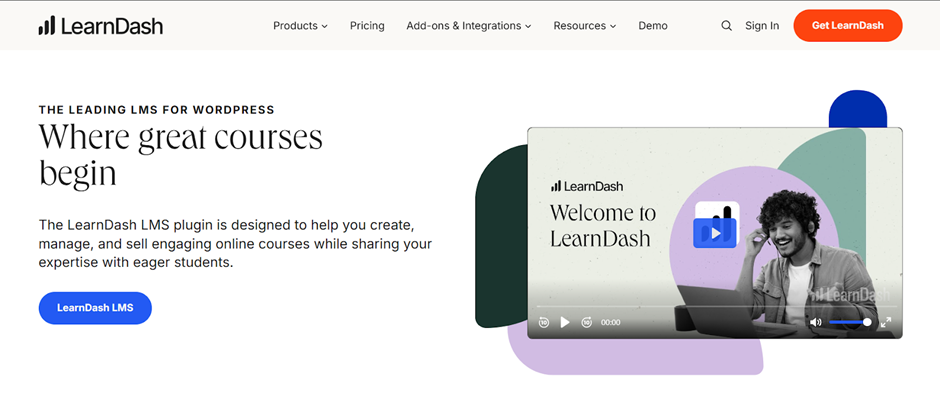
First launched in 2013, LearnDash quickly became a leading Learning Management system (LMS) within the WordPress space. It is now part of Liquid Web, and its product and pricing pages live on the Liquid Web site. It is a WordPress plugin that enhances the learning programs of universities, small to mid-size companies, bloggers, and entrepreneurs worldwide.
LearnDash’s top features
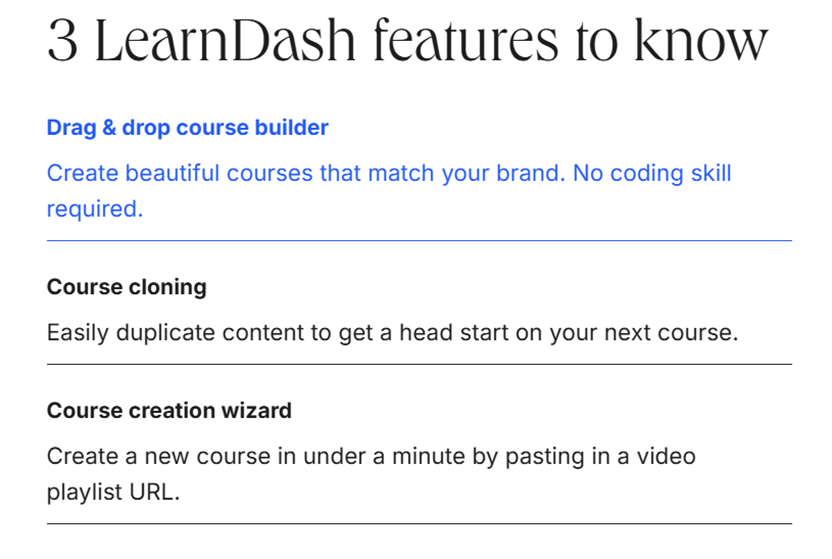
LearnDash features give course creators powerful tools to build and manage engaging online courses. Among its many capabilities, three stand out for making course creation even smoother: drag-and-drop builder, course cloning, and course creation wizard (via videos).
The platform also provides advanced features, including:
- Advanced quizzing & assignments: LearnDash supports various question types, including multiple-choice, true/false, and essays. It also provides features like timed quizzes, randomized questions, and auto-grading. Students can also submit assignments, with built-in tools for instructor feedback.
- Smart automation: Automated features reduce admin workload. They drip-feed content, auto-enroll students, generate completion certificates, and send email notifications, all without manual intervention.
- Smooth external integrations: LearnDash integrates with payment gateways like PayPal and Stripe, email tools like Mailchimp, and membership plugins like MemberPress. These integrations support educators in creating message boards, discussion forums, and student communities within their courses. LearnDash now also includes MemberDash, its own built-in membership tool, so a separate membership plugin is optional rather than required.
- Focus mode for distraction-free learning: This feature provides a clean, minimal interface with progress tracking, mobile optimization, and easy navigation to improve engagement.
- Custom dashboards: Personalized student dashboards display enrolled courses, progress bars, upcoming deadlines, and earned certificates, creating a seamless learning experience.
Advantages of using LearnDash
- Helps in course customization to match company needs, including branding and tailored content.
- Course creators can track student progress in real time, monitoring completion rates, quiz scores, and engagement.
- Access detailed reports to identify strengths, address knowledge gaps, and improve training programs.
- Modify the platform freely with its open-source flexibility, ensuring full control over customization.
- Offer bulk course access to organizations, making it easy for companies to enroll multiple employees..
Who is LearnDash best for?
LearnDash is a great choice for established businesses, universities, and training organizations that need a WordPress plugin with complete course control. It also works well for those willing to invest upfront and manage their course creation platform.
However, LearnDash is not ideal for small businesses or independent course creators looking for a low-cost, plug-and-play LMS solution other than WordPress.
Let’s see why.
All About LearnDash Pricing
LearnDash gives you two ways to build your online course platform: LearnDash LMS (self-hosted) and LearnDash Cloud (fully hosted). Let’s see how much each of these costs.
LearnDash LMS
LearnDash restructured its plugin pricing in 2026. Instead of charging by the number of WordPress sites, its official pricing page now lists three annual plans that differ by features:
- Essentials: $259/year. The core LMS: drag-and-drop course builder, unlimited courses and learners, quizzes, drip scheduling, assignments, certificates, and built-in memberships through MemberDash.
- Pro: $399/year, labelled "Most popular." Adds advanced reporting and analytics (ProPanel), enrollment tracking, weighted grading and custom report cards (Gradebook), and student notes with group leader communications.
- Elite: $599/year, positioned for institutions and L&D teams. Adds group course management and the ability to sell seats to organizations, an instructor role with front-end course creation, multi-instructor course management, and ratings, reviews, and feedback tools.
Every plan includes one license with unlimited courses, unlimited learners, and no per-student or transaction fees, and renews annually. Before this change, LearnDash sold a single core plugin at $199, $399, and $799 per year for 1, 10, or unlimited sites, so guides that still quote those figures are out of date.
Notice anything missing? Yes, a monthly payment option. The LearnDash pricing plan requires a full annual payment upfront. It does not have a free plan with basic features, either.
If you want to discontinue LearnDash by mid-year, you won't get a refund for the remaining months. LearnDash's own billing documentation states it will issue a refund within 30 days of your initial purchase; after that, you're committed to the annual payment. Cancelling from your account portal turns off auto-renewal but does not itself trigger a refund.
Also, the annual price does not include website hosting. You must purchase add-ons for a yearly charge to access extra features, such as the Gradebook, Propanel, and more.
LearnDash LMS does not offer a free trial for the price you pay. Instead, the platform provides access to a demo site to see how the platform works. However, you can’t install it on your own site, test integrations, or customize settings as you would with an actual purchase.
LearnDash Cloud
LearnDash Cloud subscription offers three pricing plans: Starter, Growth, and Pro. Both provide monthly and yearly payment options, with more features in higher tiers.
Also, the annual price does not include website hosting. Some features that used to be paid add-ons, such as advanced reporting and weighted grading, are now included in the Pro and Elite plans, so on Essentials you'll need to upgrade or buy add-ons to get them.
LearnDash LMS does not offer a free trial for the price you pay. Instead, the platform provides a free 48-hour demo (no credit card required; login details are emailed to you) to see how the platform works. However, you can't install it on your own site, test integrations, or customize settings as you would with an actual purchase.
StellarSites Learning (formerly LearnDash Cloud)
LearnDash Cloud was rebranded as StellarSites Learning, a fully managed WordPress platform from StellarWP, a Liquid Web brand. StellarSites sells five solution plans (Foundation, Shop, Learning, Fundraising, and Events), each with Essential, Plus, and Ultimate tiers. Learning is the LearnDash one: it bundles everything in the Foundation plan with LearnDash and the tools to build, sell, and manage courses and memberships. All three tiers provide monthly and yearly payment options, with more features in higher tiers. LearnDash's own product page now lists only the three plugin plans, with no hosted option alongside them, so treat StellarSites as a separate hosting purchase rather than a LearnDash plan.
LearnDash Cloud might seem affordable with its monthly subscription options, but the costs add up quickly.
- The Starter plan is $29 per month, totaling $348 per year — even more than the $299 annual plan.
- The Pro plan jumps to $99 per month, costing nearly $1,900 annually, yet the free domain is only available with this high-priced tier.
- Plus, despite the premium pricing structure, add-ons like Groups Plus, Notes, and Gradebook still require separate purchases (Discounts on add-ons are not available in the Starter plan).
When you break it down, LearnDash Cloud is not only pricey but requires you to pay extra when you plan to pay as you go.
Also, though LearnDash Cloud provides a fully hosted website, it's still within WordPress, which means customization options are quite limited. LearnDash Cloud restricts you to pre-installed themes and LearnDash plugins, blocking access to the broader WordPress ecosystem for deeper customization.
Add-ons
Most LMS platforms have advanced reporting and managing ratings and feedback in their core plans. LearnDash? Not so much. If you need these basics, be ready to pay extra annually. What most LMS platforms consider standard, LearnDash locks behind premium add-ons, adding to your costs year after year.
StellarSites Learning might seem affordable with its monthly subscription options, but the costs add up quickly.
- Essential: $39 per month billed monthly, or $29 per month billed annually ($348 per year). Paying month to month costs $120 more over a year.
- Plus: $69 per month billed monthly, or $55 per month billed annually ($660 per year).
- Ultimate: $99 per month billed monthly, or $79 per month billed annually ($948 per year).
- Several LearnDash features are gated by tier. Advanced analytics, reporting dashboards, the instructor dashboard and course creator, instructor selling tools, and ratings and reviews all require Plus or Ultimate. Groups Management, the Gradebook plugin, and the Notes plugin are Ultimate-only. A domain is included on Plus and Ultimate, but not on Essential.
When you break it down, StellarSites Learning is not only pricey but requires you to pay extra when you plan to pay as you go.
One assumption worth correcting: StellarSites does not lock you into its pre-installed tools. Its own documentation states that you can upload and activate your own themes and plugins exactly as you would on any WordPress site, and add custom CSS if you want it. What you give up is server-level control, not the WordPress plugin ecosystem, which is why StellarWP itself says the platform isn't for developers who need root access or custom server configurations. StellarSites also offers a refund window of 15 days on monthly plans and 30 days on annual plans.
Add-ons
Most LMS platforms have advanced reporting and managing ratings and feedback in their core plans. LearnDash? Not so much. Its 2026 restructure narrowed the gap considerably: ProPanel reporting, the Gradebook, and Notes are now included in Pro, and Ratings and Reviews, Groups Management, and the Instructor Role are included in Elite, instead of being sold as separate add-ons. But on the $259 Essentials plan, you still won't get any of them without upgrading, which adds $140 to $340 a year. What most LMS platforms consider standard, LearnDash locks behind higher tiers or premium add-ons, adding to your costs year after year.
The catch is that as your course offerings grow, the need for more add-ons increases, making it harder to predict total expenses upfront. LearnDash offers free and paid add-ons. While this expands functionality, it also means compatibility issues, inconsistent updates, and potential security risks.
Bundle options
LearnDash has 4 bundle options, each with different feature combinations. These bundles' prices vary based on the number of WordPress sites you install it on and are billed annually.
Ultimate Course Creator Bundle
- 1 site: $499 /year.
- 10 sites: $899/year
- Unlimited: $1,699/year
Student Success Bundle
- 1 site: $249 /year.
- 10 sites: $499/year
- Unlimited: $1,099/year
Professional Suite Bundle
- 1 site: $399 /year.
- 10 sites: $699/year
- Unlimited: $1,299/year
Marketplace Suite Bundle
- 1 site: $399 /year.
- 10 sites: $699/year
- Unlimited: $1,299/year
Two things to notice here:
- You pay for these bundles annually, making an upfront investment similar to purchasing the LearnDash LMS.
- Some bundles (like the student success bundle) provide very limited options. If you are just starting out, those options will suffice. However, as you grow within a year, you cannot upgrade to another bundle, and you will end up purchasing individual add-ons at a higher cost down the road.
Bundle options
LearnDash previously sold four add-on bundles (Ultimate Course Creator, Student Success, Professional Suite, and Marketplace Suite), each priced by the number of sites. Its official pricing page no longer lists any of them. The Essentials, Pro, and Elite plans fold those add-ons in directly instead: the Pro plan, for example, costs the same $399 per year that the Professional Suite bundle used to cost for a single site, and includes ProPanel, the Gradebook, and Notes. Third-party coupon and review sites still advertise the old bundle prices, so treat those listings with caution.
Third-Party Integrations
LearnDash's integration pricing has several notable drawbacks:
- Premium integrations, premium costs: LearnDash integrates with BuddyBoss, Elementor, WP Fusion, and others, but most require separate purchases. If you need advanced community features (BuddyBoss), automation (WP Fusion), or affiliate tracking (Solid Affiliate), expect extra costs.
- Additional costs for upsell features: While LearnDash allows you to set up UpSells for courses, these features are available in the PRO version of the plugin. The free version provides a limited widget, and to unlock full functionality (like integration with WooCommerce and Easy Digital Downloads), you'll need to purchase the premium version.
- Hidden costs for growth: Expanding your LMS means adding more integrations. Private messaging, multilingual support (Weglot), or CRM tools (Memberium, ConvertKit) come at a price, making scalability more expensive than it seems.
- Compatibility and maintenance hassles: These integrations don’t always work seamlessly. Updates, conflicts, and troubleshooting require technical expertise or hiring a third-party developer.
- Slack integration isn’t native: Unlike platforms with built-in communication tools, LearnDash relies on external apps like Slack, which may require paid plans for full functionality.
LearnDash Pricing: How Much Will You Actually Pay?
LearnDash’s base price might seem reasonable, but once you factor in essential add-ons and hosting, the costs can add up quickly. Let’s break down what you’d pay for both LearnDash LMS (plugin) and LearnDash Cloud as a typical course creator.
Scenario 1: LearnDash LMS (Self-Hosted on WordPress)
You're an educator or business setting up an online course with the basic integrations and add-ons.
*Note: The one-time setup value depends on your tech skills. If you consider the scenario as the price required for a non-tech-savvy person, this will include the cost of hiring a developer to help you with the initial setup.
The total first-year cost lands roughly between $370 and $750, or up to about $1,250 if you pay for setup help, excluding transaction fees for using the LearnDash LMS. Only the LearnDash line is a fixed, published price; everything else varies by the supplier you choose, which is exactly why the licence fee alone understates what running a course site costs. If you need advanced reporting, you'd need the Pro plan instead, which adds another $140 a year, and group selling requires Elite at $340 more.
Scenario 2: StellarSites Learning (Hosted Solution)
You want an easier setup, so you opt for StellarSites Learning, which includes hosting.
So, the total first-year cost lands at roughly $358 to $368 before any optional add-ons, without including payment transaction fees. Because hosting, security, backups, and LearnDash itself are bundled into that one figure, the hosted route is more predictable than the self-hosted one, where hosting is the single biggest variable. Depending on the add-ons and third-party paid integrations you prefer, this value will also add up.
LearnDash Alternatives
While there are many learning management systems out there, FreshLearn, Teachable, and Kajabi each offer their own pricing and feature sets.
Let’s see how they stack up.
1. FreshLearn
FreshLearn supports course creators by offering an intuitive platform that focuses on customization and scalability. Flexible pricing, easy course creation, and seamless student management help creators build and grow their online courses efficiently.
It’s a great choice for those who want to deliver engaging content with tools to enhance learning experiences and streamline administrative tasks.

Key features
- Customizable course builder: FreshLearn offers an intuitive drag-and-drop course builder, making course creation effortless. Upload and organize content in various formats, including videos, PDFs, quizzes, assignments, and interactive lessons, all without technical expertise. The flexibility ensures that course creators and businesses can develop engaging learning experiences tailored to their audience.
- Multiple payment gateways: Selling courses globally? FreshLearn supports multiple payment options, including PayPal, Stripe, and Razorpay, providing a smooth checkout experience for your students - all without a 0% commission cut.
- Zero transaction fees: Beyond the base subscription, schools should evaluate the long-term impact of a scalable school pricing model that doesn't add hidden costs as enrollment volume increases.
- Custom branding & domain: Make your online academy truly yours. FreshLearn lets you customize your course portal with your logo, brand colors, and unique domain name. Complete branding with just your business front and center. This feature helps build credibility and brand recognition, ensuring a smooth learning experience for students.
- Flexible course pricing and discounts: Monetizing your courses has never been easier. FreshLearn lets you set up one-time payments, subscription models, or bundled offers. Offer discounts, run promotions, and create coupon codes to attract more students. Whether you're selling an individual course or an entire membership program, FreshLearn gives you control over price planning.
- Drip content: Keep students engaged with a structured learning approach. FreshLearn’s drip content feature lets you schedule lessons and modules to release at specific intervals. This prevents information overload, encourages course completion, and ensures that students understand the material at a steady pace.
- Student analytics and reporting: Get deep insights into student behavior and performance. FreshLearn provides real-time analytics on course completion rates, quiz scores, engagement levels, and more. With these data-driven insights, refine your course content, identify students needing support, and enhance the overall learning experience.
- Affiliate marketing: Turn students into brand ambassadors with FreshLearn’s affiliate marketing feature. Set up an affiliate program where students can promote your courses and earn a commission on sales. This helps expand your reach without additional marketing costs.
- Integrated email marketing: Stay connected with students through FreshLearn’s built-in email marketing tools. Send automated emails for course updates, reminders, promotions, and lead nurturing. Create sequences that guide students through the learning journey and increase retention rates.
Where FreshLearn isn't the right fit
FreshLearn is a hosted platform, not a WordPress plugin. If you already run a WordPress site, want to own your hosting and code, or need deep customization through WordPress themes, PHP hooks, and the wider plugin ecosystem, LearnDash gives you far more control than FreshLearn can. FreshLearn makes the opposite trade: less low-level control, in exchange for no hosting, plugin updates, or compatibility maintenance to manage.
Pricing
- FreshLearn offers a free plan for getting started (1 product, 25 manual enrollments, and 3 sales pages).
- Pro Plan: $49/month, $41/month billed annually, or $35/month billed every two years
- No Brainer Plan: $79/month, $59/month billed annually, or $49/month billed every two years
- No Brainer+ Plan: $149/month, $119/month billed annually, or $99/month billed every two years
- All plans, including the free plan, carry 0% transaction fees.
2. Teachable
Teachable is an LMS platform known for its user-friendly interface and robust course-building tools, which are ideal for beginners and individual course creators.
Key features
- Course creation tools: An easy-to-use course builder with multimedia support (video, quizzes, assignments, etc.).
- Payment options & integrations: The platform supports various payment options, including Stripe and PayPal. It also integrates with payment processors, email marketing tools, and analytics.
- Marketing Features: Teachable has built-in email marketing to nurture leads. Course creators can also use coupons, promotions, and affiliate marketing to improve sales.
- Analytics and reporting: Teachable offers advanced reporting to track sales, revenue, and student progress. It also provides real-time insights into performance metrics, including course engagement.
- Student management: Course creators can manage students’ learning progress and engage them with custom certificates and feedback. Teachable also supports a mobile-friendly interface so students can access content anywhere.
Pricing
Teachable Pricing offers four main plans (renamed and repriced in June 2025):
- Starter: $39/month, or $29/month billed annually, plus a 7.5% transaction fee
- Builder: $89/month, or $69/month billed annually
- Growth: $189/month, or $139/month billed annually
- Advanced: $399/month, or $309/month billed annually
- Teachable removed its free plan in 2025 and now offers a 7-day free trial instead.
3. Kajabi
Kajabi is an all-in-one solution for entrepreneurs. It offers advanced marketing automation, landing pages, and membership sites, making it perfect for scaling businesses.

Key features
- All-inclusive platform: Kajabi offers an integrated system to create, market, and sell courses, membership sites, and digital products in one platform.
- Course creation & delivery: Build courses with video, audio, quizzes, assignments, and more, and deliver them through a fully customizable, mobile-friendly platform.
- Landing pages & websites: Create professional, high-converting landing pages and websites using starter templates and a drag-and-drop builder.
- Email marketing & campaigns: Use Kajabi's email marketing tools to create, schedule, and send targeted email campaigns to your audience.
- Customer support & coaching: Provide personalized support and coaching with features like direct customer communication and live chat integrations.
- Analytics & reporting: To make informed decisions, monitor your business’s performance with detailed reports on sales, engagement, and course-completion rates.
Pricing
Kajabi Pricing was restructured in January 2026 and now publicly lists three plans:
- Basic: $179/month, or $143/month billed annually
- Growth: $249/month, or $199/month billed annually
- Pro: $499/month, or $399/month billed annually
- The former Kickstarter plan was removed from Kajabi's public pricing page in January 2026.
Now let's compare FreshLearn, Teachable, and Kajabi's entry-level pricing for better insights:
After comparing the alternatives, FreshLearn is a strong fit if you'd rather not manage WordPress yourself. Why?
- Teachable's Starter plan is cheaper on paper ($29 versus FreshLearn's $41 per month, both billed annually), but it charges 7.5% on every sale and allows only one published product. Once you sell more than about $160 a month, FreshLearn's Pro plan works out cheaper.
- Unlike Teachable's Starter plan (7.5% per sale) and Kajabi when you connect your own Stripe account (a 0.5% to 2% surcharge), FreshLearn charges 0% transaction fees on every plan, allowing you to keep more of your earnings. LearnDash also charges 0%, so this matters most when you're weighing FreshLearn against Teachable or Kajabi.
- FreshLearn offers customizable course creation and integrations, perfect for creators who want an easy-to-use platform without complex setups.
- Also, unlike LearnDash, which requires your own hosting and, on the Essentials plan, an upgrade or add-ons for advanced reporting, FreshLearn is an all-in-one solution with hosting included.
So, why are you still waiting? Sign up now to easily create your courses and see how FreshLearn can take them to the next level!
FAQs
1. Is LearnDash free or paid?
LearnDash is a paid platform. Its plans start at $259 per year for Essentials, which includes core LMS features, unlimited courses, and unlimited learners. Additional costs may apply for add-ons, external hosting, and third-party integrations, including the LearnDash course grid.
2. Is LearnDash an LMS?
Yes, LearnDash is a Learning Management System (LMS) designed for WordPress. It allows users to create, manage, and sell dynamic courses and offers flexible features like quizzes, certifications, and course tracking. It's ideal for educators, businesses, and course creators who want advanced customization.
3. What is the difference between LearnDash and LearnPress?
LearnDash and LearnPress are both WordPress-based LMS plugins, but LearnDash is a premium, feature-rich platform with advanced customization options, while LearnPress is free with optional paid add-ons. LearnDash offers more robust features for course creators, while LearnPress is a more budget-friendly option for basic courses.
4. What's the difference between LearnDash Essentials, Pro, and Elite?
LearnDash Essentials ($259 per year) covers the core LMS: the drag-and-drop course builder, quiz builder, unlimited courses and learners, assignments, certificates, plagiarism detection, and built-in memberships through MemberDash. LearnDash Pro ($399 per year) adds ProPanel reporting and analytics, enrollment tracking, weighted grading and custom report cards, and student notes. LearnDash Elite ($599 per year) adds group course management and seat-based selling to organizations, an instructor role with front-end course creation, multi-instructor courses, and ratings and reviews. All three are billed annually, and none include hosting.
5. Does LearnDash charge transaction fees?
No. LearnDash charges 0% transaction fees on all three plans, so you keep your course revenue apart from standard payment processing, typically 2.9% plus $0.30 per transaction through Stripe in the US. This puts LearnDash on par with FreshLearn and ahead of Teachable's Starter plan, which charges 7.5% per sale.
6. What happened to LearnDash Cloud?
LearnDash Cloud was rebranded as StellarSites Learning, a fully managed WordPress platform from StellarWP, a Liquid Web brand. StellarSites offers five solution plans, and Learning is the LearnDash one, bundling hosting, security, premium themes, and LearnDash together. Its tiers are Essential, Plus, and Ultimate, priced at $29, $55, and $79 per month billed annually, or $39, $69, and $99 billed monthly. Unlike a typical SaaS course platform, you can still install your own WordPress themes and plugins on it.
7. Does LearnDash offer a free trial or refunds?
LearnDash has no free plan. It offers a free 48-hour demo, with no credit card required and login details emailed to you, plus a 30-day money-back guarantee on an initial purchase, per LearnDash's own billing documentation. After 30 days, the annual payment is non-refundable, including if you stop using LearnDash partway through the year. Cancelling your subscription turns off auto-renewal but does not trigger a refund on its own.

You might also like
Hosted by
