

Integrating Slack with FreshLearn allows you to receive important notifications directly in your Slack channels, streamlining your workflow and ensuring you stay updated on key events. This procedure will guide you through connecting your Slack workspace to FreshLearn, configuring notification preferences, and enabling notifications in private channels if needed. Integrating Slack helps centralize communication and reduces the risk of missing important updates from FreshLearn.
Here is a detailed step-by-step video
1. Navigate to the Settings menu in your FreshLearn admin account
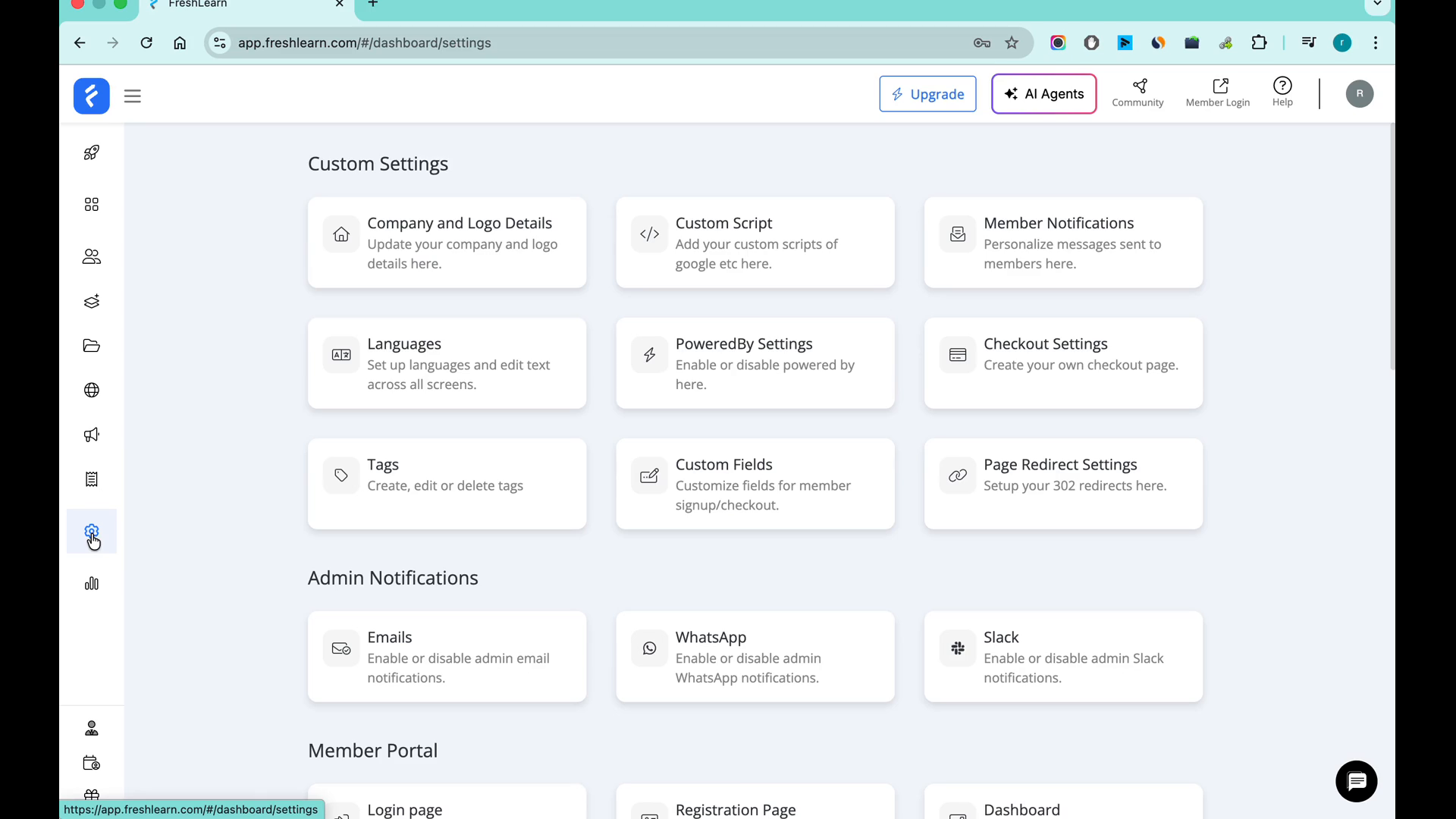
2. Go to Integration and click on Slack
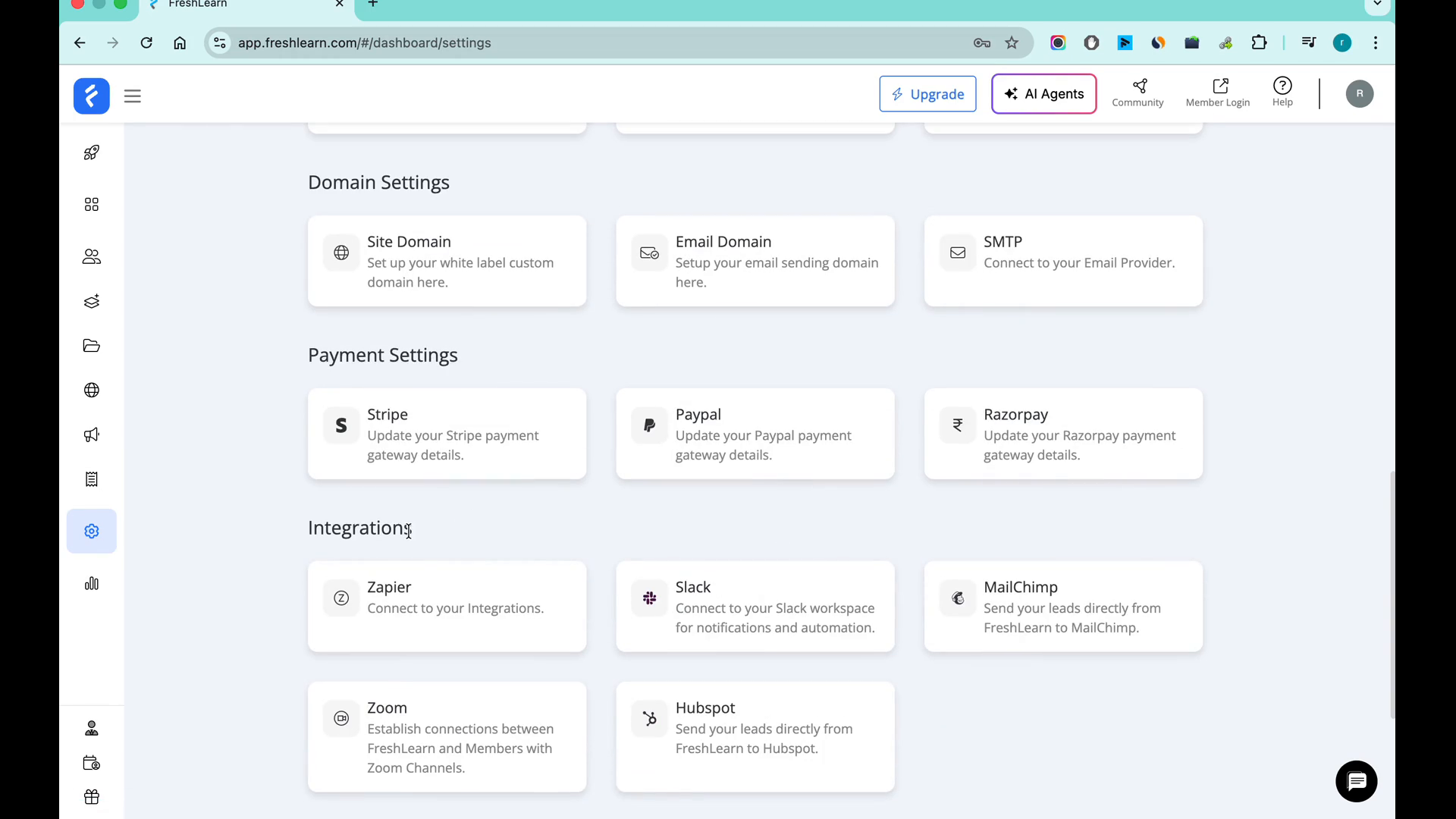
3. Click the Connect button.
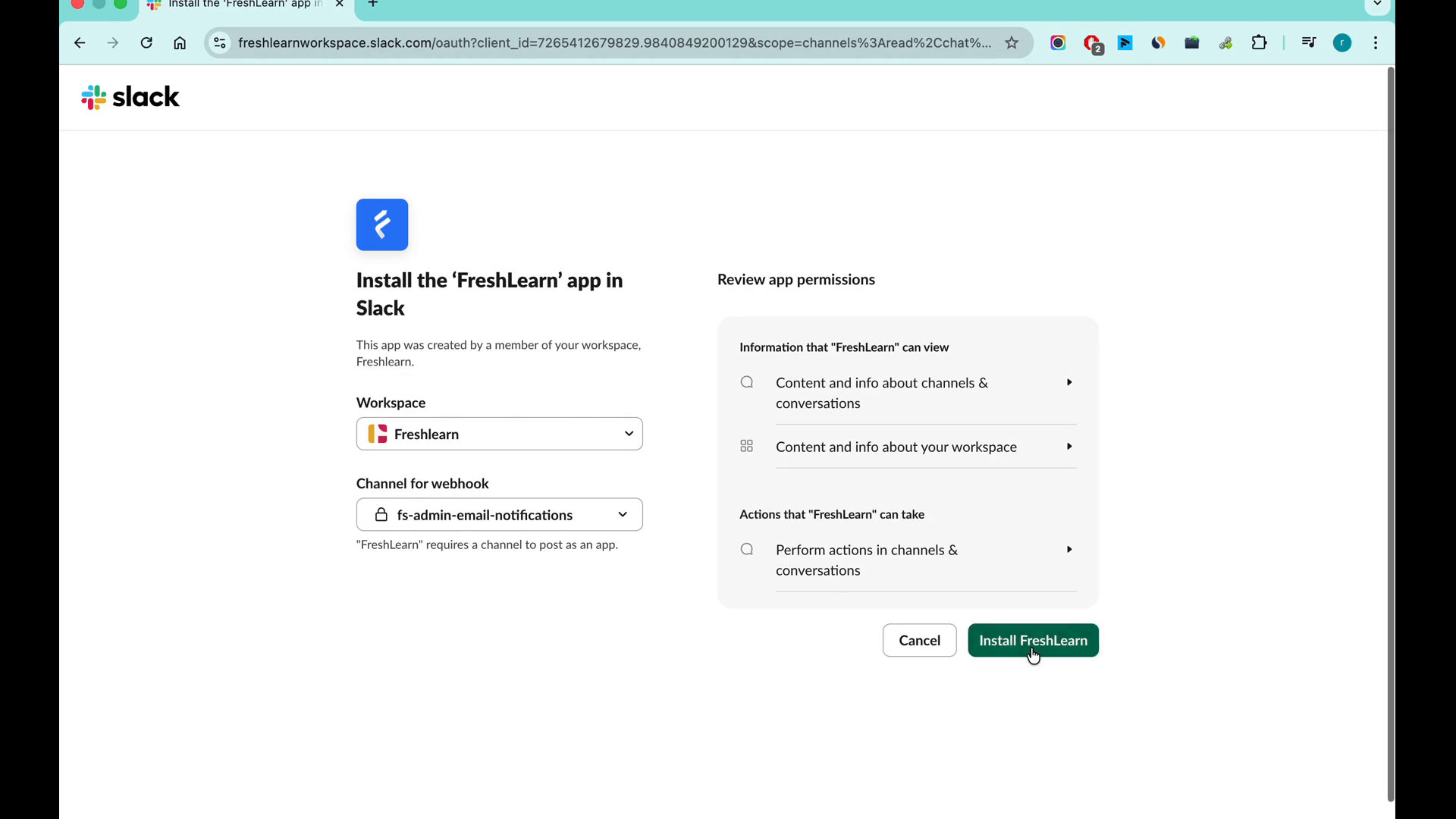
You are redirected to the Slack authorization page.
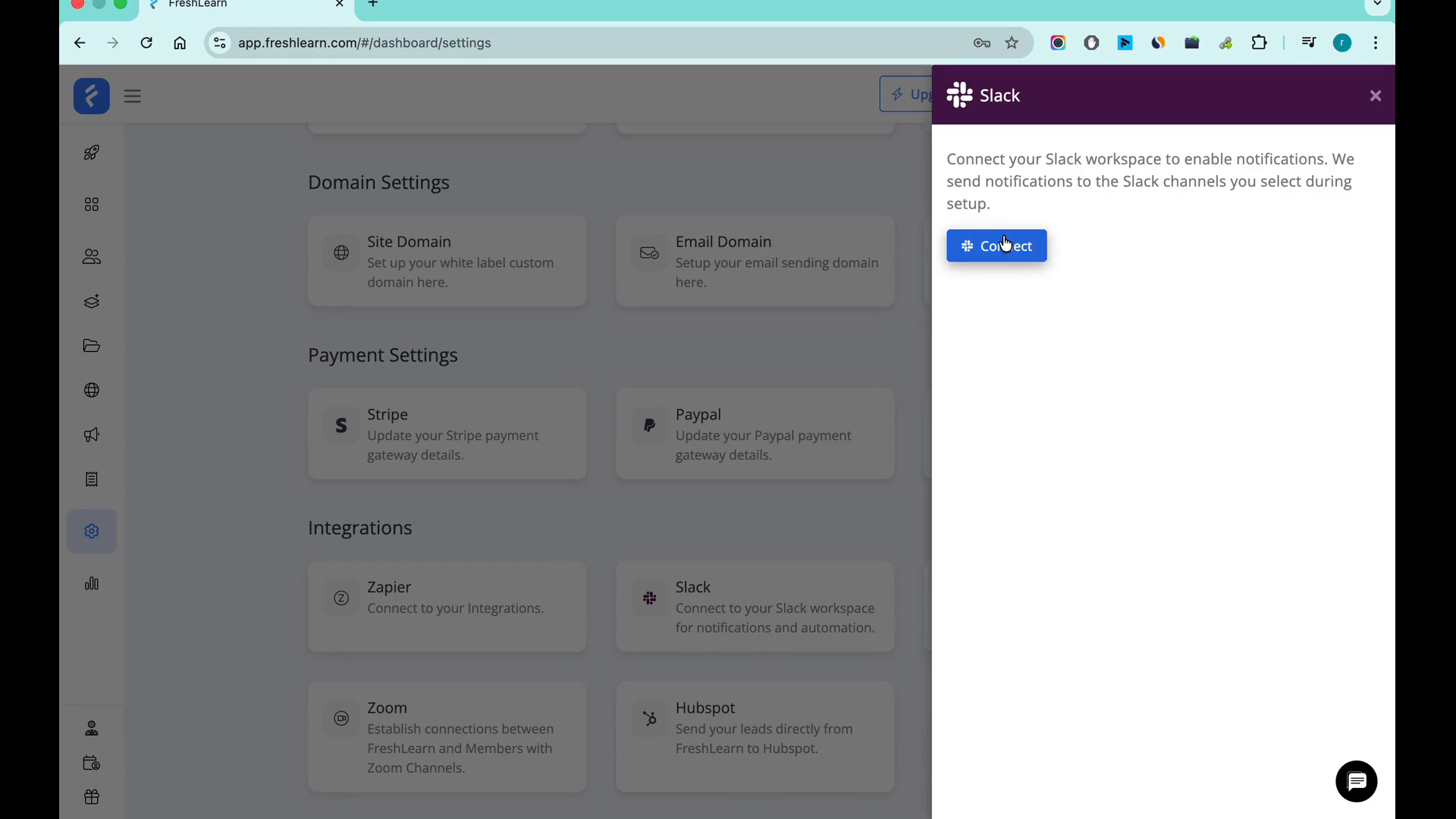
4. On the Slack authorization page, choose the Slack channel you want to connect.
The selected channel will be linked to FreshLearn for notifications.
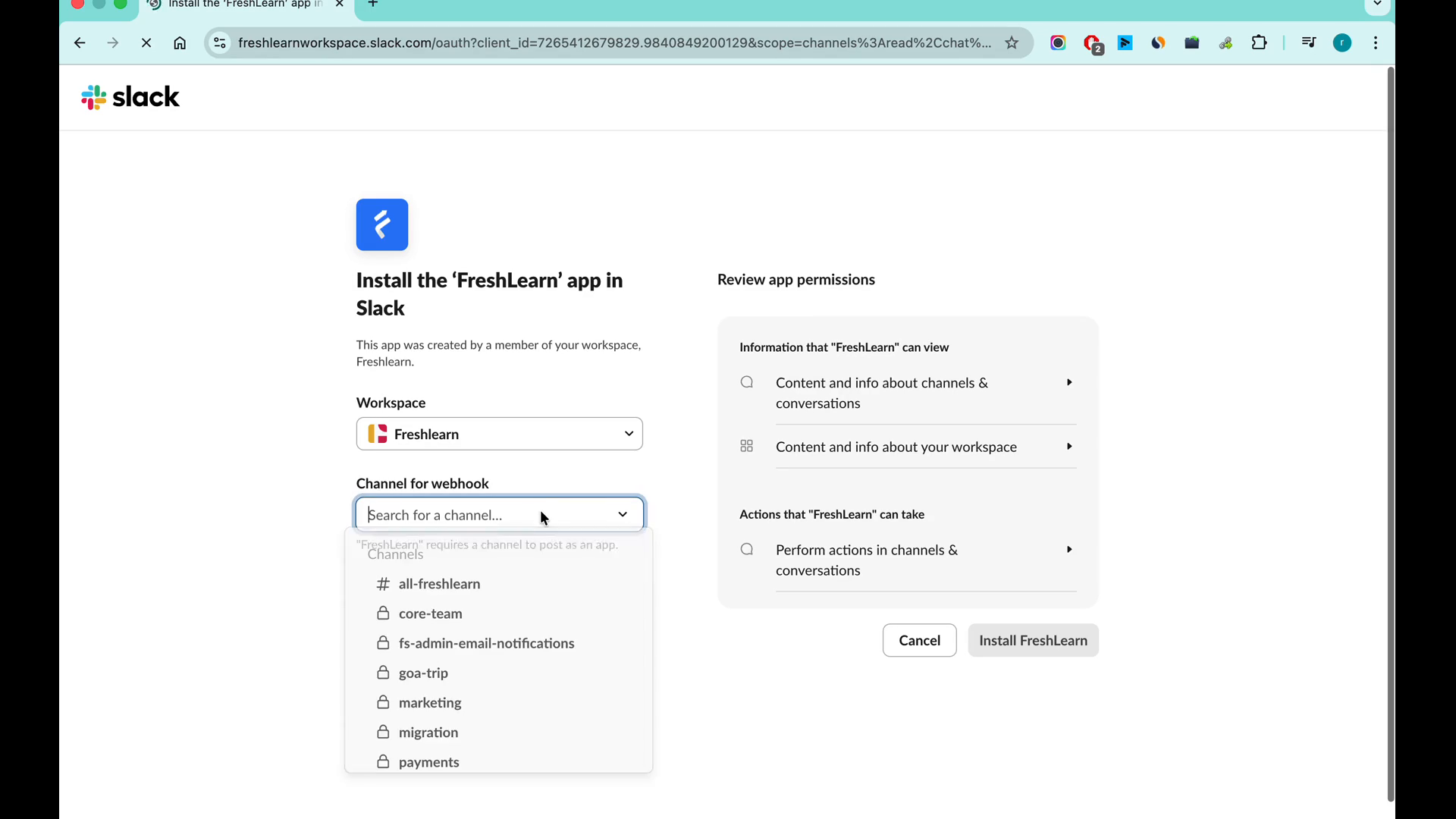
5. Proceed to install the FreshLearn app in your Slack workspace.
The FreshLearn app is installed and authorized to send messages to the selected channel.
Note: By default, FreshLearn can only send messages to public channels.
Important: FreshLearn cannot send messages to private channels unless you manually add it to those channels.
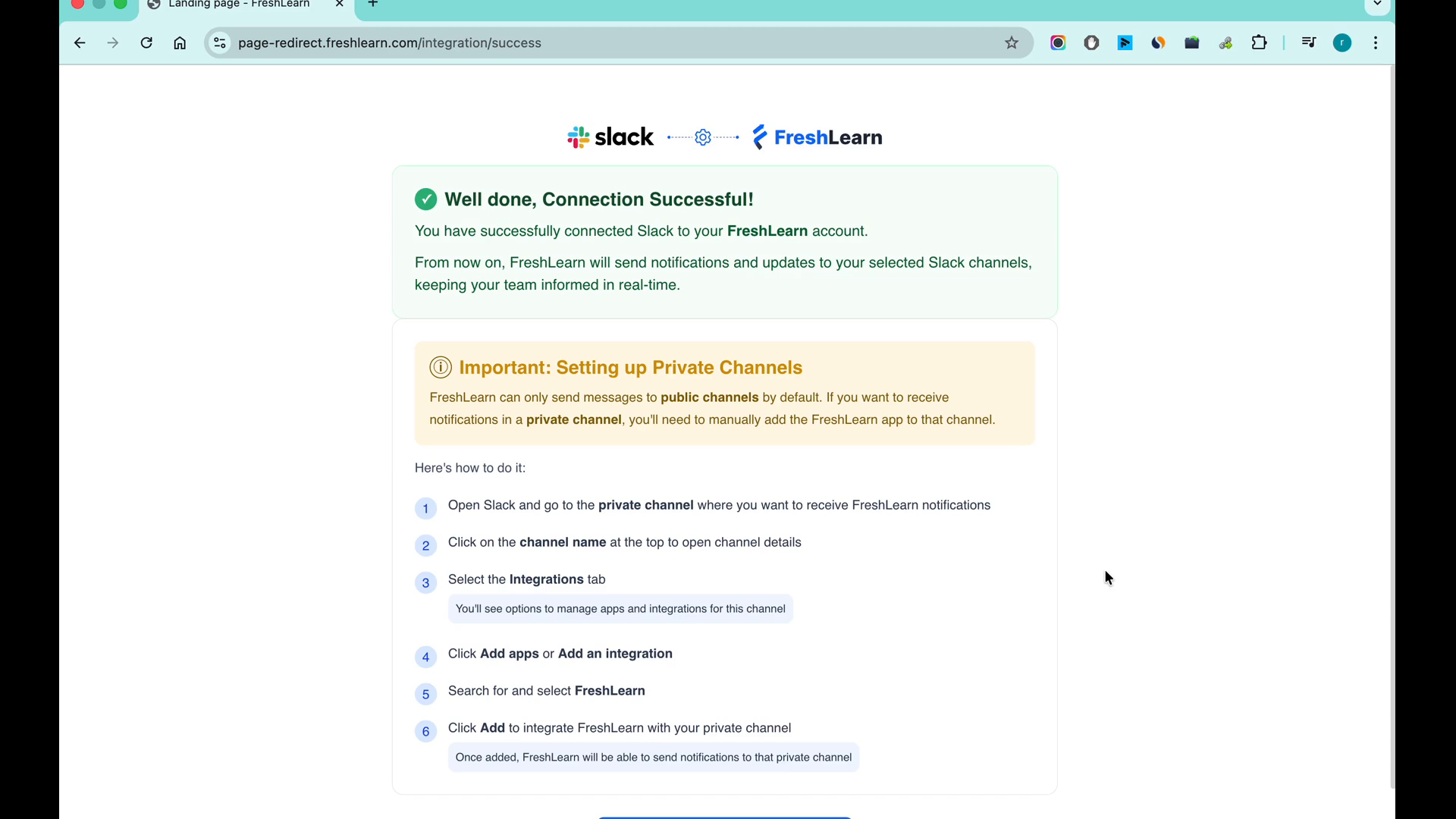
6. Click the Go to FreshLearn Admin Account button.
a. Manually add the FreshLearn app to your desired private channel in Slack.
b. Once added, FreshLearn can send notifications to that private channel.
Note: (Optional) To receive notifications in a private Slack channel Refer to Slack’s documentation for instructions on adding apps to private channels.
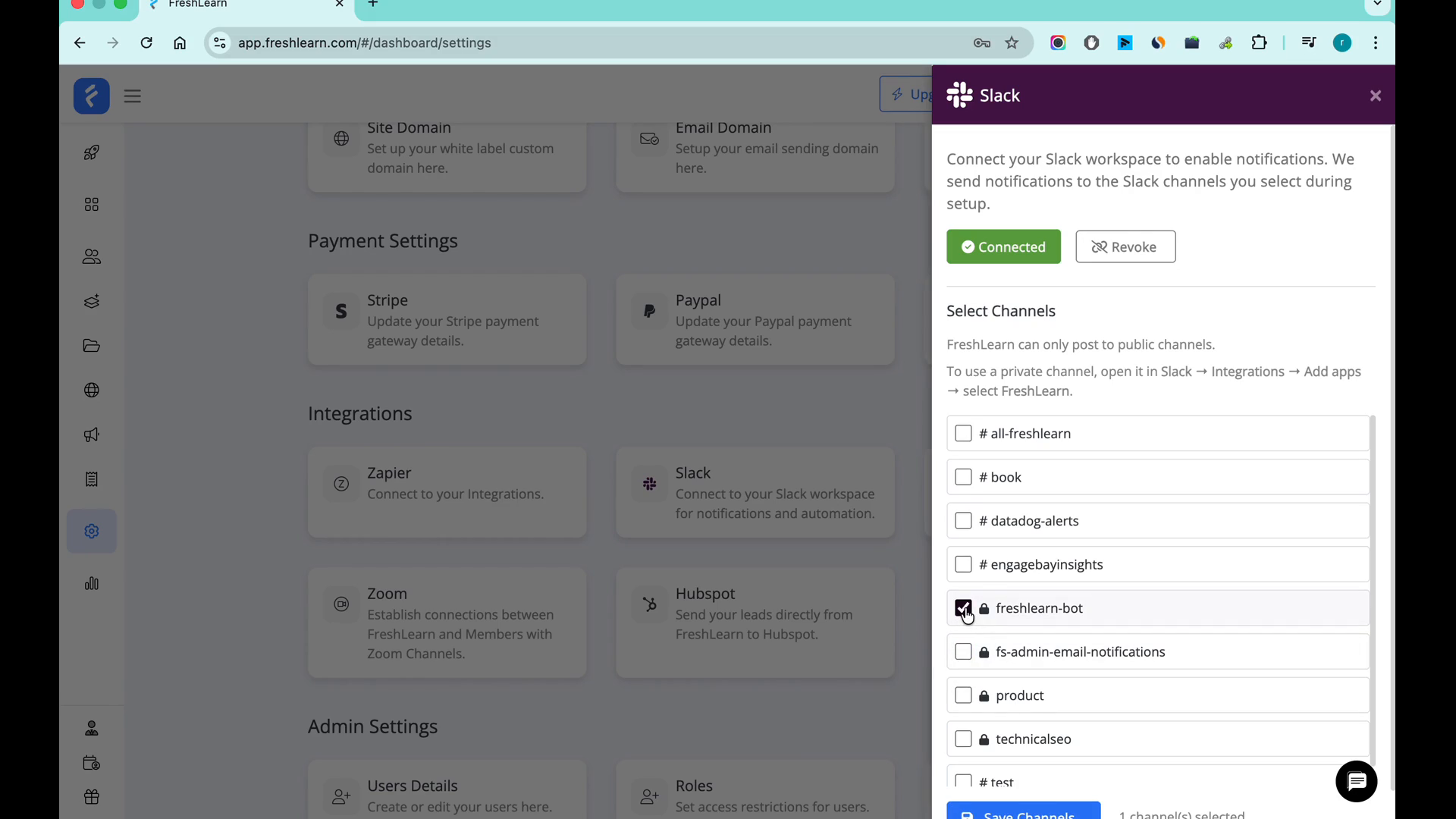
7. (Optional) To change the connected Slack channel:
a. Deselect the current channel.
b. Choose a new channel for updates and notifications.
c. Click Save to confirm your selection.
The new channel is now set to receive notifications.
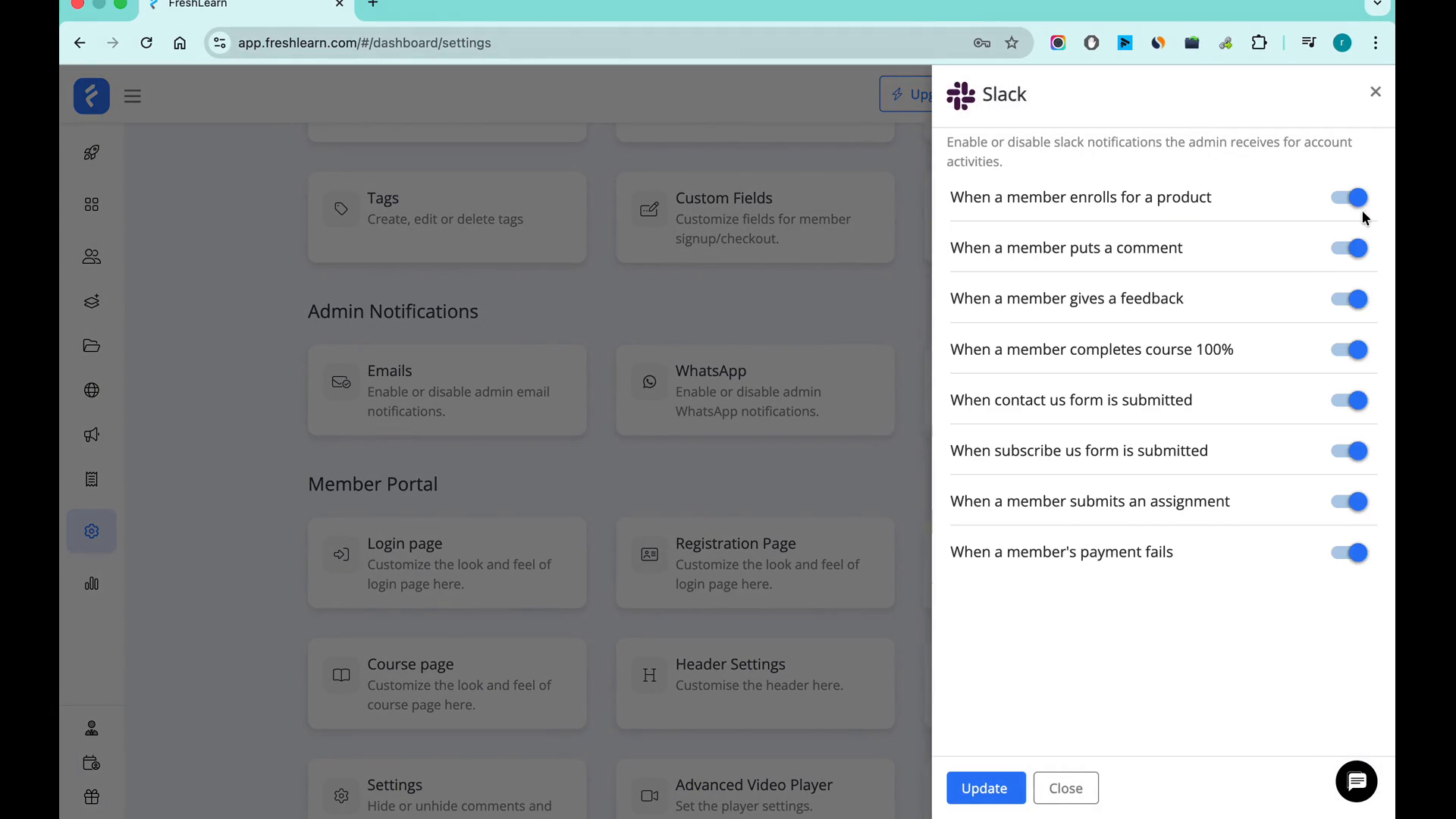
8. Go to Admin Notifications in FreshLearn.
The Admin Notifications settings page appears and choose which notifications you’d like to receive on Slack by toggling the desired options.
The selected notifications will be sent to your connected Slack channel.
Note: You can also turn off notifications you do not wish to receive.
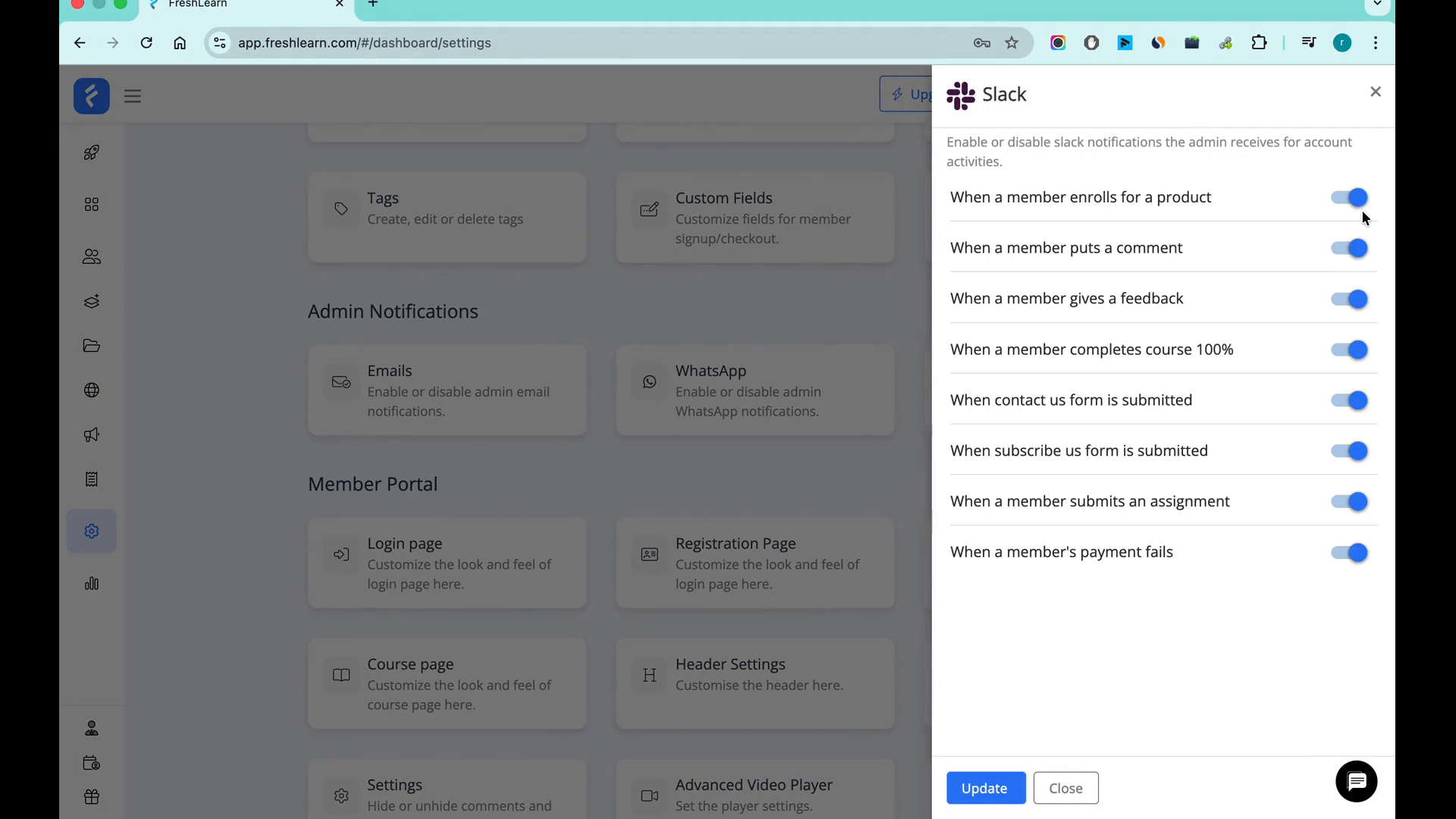
12. After making your selections, click Update to save your preferences.
Your Slack connection and notification preferences are now fully set up.
You have now successfully connected Slack with FreshLearn and configured your notification preferences. You can revisit these settings at any time to adjust your Slack integration or notification choices.
FreshLearn Slack App – Privacy & Data Use Policy
Last updated: December 2025
FreshLearn (“we”, “us”, or “our”) respects the privacy of Slack users and workspaces. This Privacy & Data Use Policy explains what information our Slack integration accesses, how that information is used, and how it is protected.
This policy applies specifically to the FreshLearn Slack app and the data accessed through Slack permissions (scopes) granted during installation.
Information We Collect via Slack
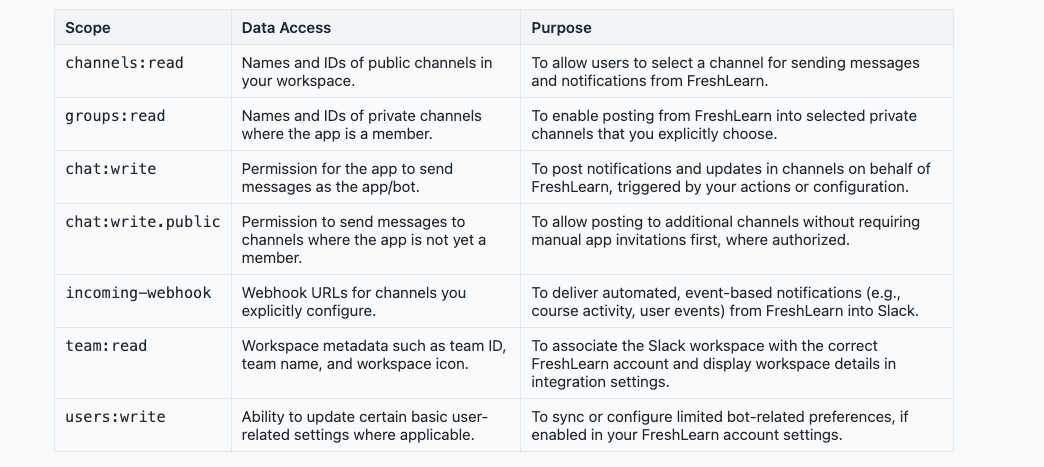
When you install and authorize the FreshLearn Slack app, Slack provides access to certain data according to the scopes you approve. Based on the scopes used by our app, we may access the following information:
What We Do Not Collect
Through the Slack integration, we do not:
- Read or store the full content of Slack messages or message history.
- Access or store direct messages (DMs) between users.
- Access files shared in Slack, unless explicitly provided to the app via user actions.
- Collect or store email addresses from Slack, unless you explicitly provide them to us by other means.
- Sell or rent any Slack workspace data to third parties.
How We Use the Data
We use the information obtained from Slack solely to provide and improve the integration, including:
- Sending notifications and updates from FreshLearn into selected Slack channels.
- Allowing you to configure which channels should receive specific notifications.
- Displaying the connected Slack workspace name and basic details inside FreshLearn.
- Managing the link between your FreshLearn account and your Slack workspace.
- Maintaining logs related to integration health, debugging, and security monitoring.
We do not use Slack data for targeted advertising, profiling, or resale to third parties.
Legal Basis (Where Applicable)
Where required by applicable law, we rely on your consent as the legal basis for processing data via the Slack integration, which you provide when you install and authorize the app in your workspace.
Data Storage & Security
We take the security of your data seriously and implement reasonable technical and organizational measures, including:
- Storing configuration and workspace metadata in secure, access-controlled systems.
- Using encryption in transit (HTTPS/TLS) and at rest where appropriate.
- Restricting data access to authorized FreshLearn personnel who need it to operate and support the integration.
- Monitoring systems for security and performance issues.
Data Retention
We retain only the minimum amount of Slack-related data necessary to operate the integration, such as workspace identifiers, selected channels, and configuration details.
When you uninstall the FreshLearn Slack app from your workspace, we will remove or anonymize the associated Slack integration data from our systems within a reasonable period, typically within 24 hours.
User Choices & Control
You are in control of the integration at all times. You can:
- Configure which channels receive notifications within FreshLearn.
- Revoke the integration at any time by uninstalling the app from your Slack workspace.
- Contact us to request deletion of remaining integration-related data.
Third-Party Sharing
We do not sell, rent, or trade data obtained via Slack with third parties. We may share limited data with trusted service providers who help us host and operate our systems (e.g., cloud infrastructure providers), strictly under data protection agreements and only for the purpose of delivering our services.
International Transfers
Depending on your location, your data may be processed on servers located in other countries. Where applicable, we take steps to ensure that such transfers comply with relevant data protection laws.
Your Rights
Subject to applicable law, you may have rights to access, correct, or delete personal data we hold about you, or to object to or restrict certain processing activities. To exercise these rights, please contact us using the details below.
Contact Information:
If you have any questions or requests related to this policy or the FreshLearn Slack integration, contact us at:
FreshLearn Support
Email: support@freshlearn.com
Changes to This Policy
We may update this Privacy & Data Use Policy from time to time to reflect changes in our practices, the Slack API, or applicable laws. When we do, we will update the “Last updated” date at the top of this page. In case of significant changes, we may provide additional notice within our product or via email.
© 2025 FreshLearn. All rights reserved.