The Ultimate Guide to Learning Management Systems (LMS) in Education

Last updated: September 22, 2026
Quick Answer
The best LMS for education depends on the type of institution: Canvas, D2L Brightspace, and Blackboard Learn suit universities and large districts that need deep assessment tools and SIS integration; Schoology and Google Classroom suit K–12 schools, with Schoology built around PowerSchool SIS and Google Classroom free for schools already on Google Workspace; Moodle suits technical teams that want open-source control; and FreshLearn suits continuing education, bootcamps, and micro-credential programs that need built-in payments. Canvas, Schoology, Blackboard Learn, and D2L Brightspace are sold on custom quotes, Moodle is free to self-host, Google Classroom's core Fundamentals edition is free for qualifying institutions, and FreshLearn publishes self-serve pricing with 0% transaction fees. The most reliable way to choose between them is a six-to-eight-week pilot with real courses, scored against roster accuracy, grade passback, and support response times.
Key Takeaways
- Blackboard's parent company, Anthology, emerged from Chapter 11 on February 27, 2026, as a debt-free company rebranded as Blackboard, after selling its SIS and student-success businesses; Blackboard Learn kept operating throughout the restructuring.
- Google Classroom is included free in Google Workspace for Education Fundamentals for qualifying institutions; the paid Education Standard edition starts around $3 per user per year, and Education Plus now runs about $6 per user per year on new purchases.
- Google ended its "one free staff license for every four student licenses" model between October 2025 and February 2026 and introduced a 50-license minimum on paid editions, so every active student and staff member now needs a paid license when a school buys Standard or Plus.
- Canvas, Schoology, Blackboard Learn, and D2L Brightspace do not publish list prices; all four are sold on custom quotes tied to enrollment, support tier, and implementation scope.
- Moodle's core software is free and open source, while MoodleCloud's hosted plans run from about $170 per year (Starter, 50 users) to about $2,140 per year (Standard, 750 users), with USD figures shifting slightly because MoodleCloud prices in Australian dollars.
- FreshLearn is built for continuing education and micro-credentials, not as a replacement for a university's core LMS; it has fewer enterprise SIS connectors than Canvas, Blackboard Learn, or D2L Brightspace.
- An LMS's total cost of ownership is usually driven more by SIS connectors, migration hours, training time, and premium support than by the license fee itself.
Learning Management Systems in education help you run courses, cohorts, and assessments in one place, but choosing one is rarely simple. I wrote this guide to help you move from vague feature lists to clear decisions: what to test, how to pilot, and how to measure outcomes.
You’ll find practical frameworks here: must-have technical checks, pedagogy fit, support and SLA questions, migration steps, training plans, and a comparison table you can copy.
By the end, you will know how to design a six- to eight-week pilot, score vendors with real data, and forecast ROI using a simple worksheet.
Keep this open as you evaluate tools, invite stakeholders to add notes, and use the RFP block to get apples-to-apples answers from every vendor.
TL;DR
- Choose an LMS by outcomes, not features. Define three outcomes, then test only what proves them in a short pilot.
- Validate four things early: SIS sync, grading at scale, assessment depth, and support responsiveness.
- Run a six- to eight-week pilot with real courses, real faculty, and a weekly scorecard.
- Budget for the whole journey: licenses, integrations, migration help, training time, and support.
- FreshLearn is worth a pilot for continuing education and micro-credentials where fast course-to-market, built-in commerce, and simple community tools matter.
- FreshLearn is also increasingly used outside of education: SaaS companies rely on it to create structured product training academies for customers — reducing support costs, accelerating feature adoption, and lowering churn without custom development.
- It's also worth evaluating for technical certification training programs that need assessment-gated progression, mandatory lab assignments, and pass-threshold controls — not just content delivery.
Why LMS Platforms Still Matter?
You need an LMS because teaching and governance do not live in spreadsheets. An LMS platform gives you one place to enroll students, run assessments, record grades, and meet compliance. It keeps rosters, content, and outcomes aligned, so instruction scales without chaos.
I lean on an LMS for three practical reasons: accountability, repeatability, and data. You can audit who learned what, copy winning course designs, and pull evidence for accreditation. When budgets tighten, that traceability is what keeps programs funded.
Current Market Signals
I track the LMS market through procurement docs, faculty feedback, and live demos. Here are the signals that matter right now, plus what you should verify in a pilot. Use these to shape your shortlist and RFP.
1) Consolidation and “platform sprawl fatigue.”
Institutions want fewer tools, one place for content, grading, and reporting. When budgets tighten, add-on fatigue grows, and leaders prefer a platform that covers the basics well.
2) AI is useful when it is guardrailed
Authoring assistants, rubric suggestions, and auto-generated quizzes help only if they respect your item banks and privacy. Faculty adoption improves when AI stays optional and explainable.
3) SIS, SSO, and data portability are make-or-break
Rosters drift, sections change, and grade passback must stay reliable. Leaders also expect a clean exit plan, not lock-in. The standard behind most SIS-to-LMS roster syncs is OneRoster, maintained by the standards body 1EdTech. Version 1.2 is current, and 1EdTech's OneRoster Planning and Procurement Guide includes ready-made RFP language asking vendors to confirm certified 1.2 support, or to give a timeline for upgrading from 1.1.
4) Assessment depth over shiny features
Real courses need randomization, versioned banks, rubric analytics, and accommodations. Discussion grading, peer review, and plagiarism flows are frequent pain points.
5) Mobile, accessibility, and lightweight UX win adoption
Students submit their work on phones, and instructors grade it between meetings. If mobile or screen-reader flows are awkward, usage drops.
6) Community and engagement features are resurfacing
Programs want discussion that feels alive, not a dead forum. Simple communities, nudges, and certificates improve completion in continuing education.
7) Pricing scrutiny and TCO discipline
License numbers look similar across vendors. The gap appears when you add SIS connectors, SSO, migration hours, and training time.
8) Security, privacy, and data residency reviews
RFPs now demand clearer incident reporting, audit logs, and regional data options.
9) Micro-credentials and paid programs
Continuing education and certificates are growing. Programs need checkout, receipts, and learner communities alongside core LMS features.
10) Open standards still matter
You will keep inheriting content. SCORM and QTI imports, LTI 1.3, and plain-text exports reduce migration pain. SCORM is maintained by the U.S. Department of Defense's Advanced Distributed Learning (ADL) Initiative, while LTI and QTI come from 1EdTech. 1EdTech certifies vendor implementations and requires LTI 1.3 tools to recertify annually, so ask any vendor for a current certification rather than accepting "LTI compatible" on trust.
11) Vendor stability is now a procurement question
The past year has shown that LMS vendors can change ownership or restructure mid-contract. Blackboard's parent company went through Chapter 11 and emerged under a new name in February 2026, and consolidation across edtech is continuing. None of that has disrupted day-to-day service, but it's a reasonable thing to ask about before signing a multi-year agreement.
The right signals: What to check in a demo
How to Choose an LMS: Actionable Evaluation Framework
You do not need 200 features. You need a clear path to proof. Below, I have given you the framework I use with teams to move from shortlist to a confident decision in weeks.
Step 1: Must-have technical checklist
What to verify first:
- SIS sync: Nightly and on-demand, field mapping for sections, roles, and accommodations.
- API surface: Users, courses, enrollments, grades, items; auth method, rate limits.
- Scale and performance: Concurrent users, page loads under 2 seconds at peak, export jobs under 15 minutes.
- Data portability: Complete export of courses, users, submissions, and grades in open formats.
You can copy and use this sample test matrix:
Step 2: Pedagogy checklist
What instructors will actually use:
- Assessment types: Quizzes, assignments, discussions, peer review, plagiarism workflow.
- Question banks: randomization, versioning, outcomes tagging, bulk import.
- Rubrics: Criteria, levels, quick-mark comments, analytics by criterion.
- Accommodations: Extended time, multiple attempts, alternative submissions, and due date overrides.
- Item analysis: Difficulty and discrimination, rubric distribution, outcomes report.
Step 3: Support and SLA checklist
What keeps you safe during crunch time:
- P1 response: Under 30 minutes, 24×7 coverage, clear escalation path.
- SLA evidence: Last 12 months of incident reports and uptime by month.
- Named CSM: Cadence, migration office hours, quarterly roadmap reviews.
- Docs that teach: Instructor-ready guides and short videos, not only admin manuals.
Step 4: Pilot plan template
Run a real course, score weekly, and make decisions based on the data. Feel free to copy and use the following pilot scorecard:
Step 5: Procurement and TCO worksheet
Line items to price:
- Licenses: per user or per MAU.
- Integrations: SIS connector, SSO, video, and proctoring.
- Migration: Course rebuild hours × hourly rate.
- Training: Teacher hours × pay rate, substitute coverage.
- Support: Premium SLA uplift, after-hours coverage.
- Contingency: 10% for unknowns.
Formulas to copy
- Migration cost = Courses to rebuild × Hours per course × Rate.
- Training cost = Teachers × Hours × Pay rate.
- Annual TCO = License + Integrations + Migration + Training + Support + Contingency.
- ROI (year 1, simple) = (Time saved × Hourly value × Affected staff) − Annual TCO.
Side-by-side comparison
Below is the one-page grid you can scan with your team. I kept it honest, practical, and sourced. Use it to shortlist 2–3 platforms, then run your 6-week pilot.
Top 7 Learning Management Systems in Education
If you are shortlisting LMS platforms, think “proof over promises.” In this section, I’ll walk you through seven options with details you can test in a pilot. I keep each profile focused on how it works, what the features mean for day-to-day teaching, and what to expect in annual pricing.
I will start with FreshLearn because it’s the newest in this list and impressed me the most with its affordability and ease of use.
1. FreshLearn
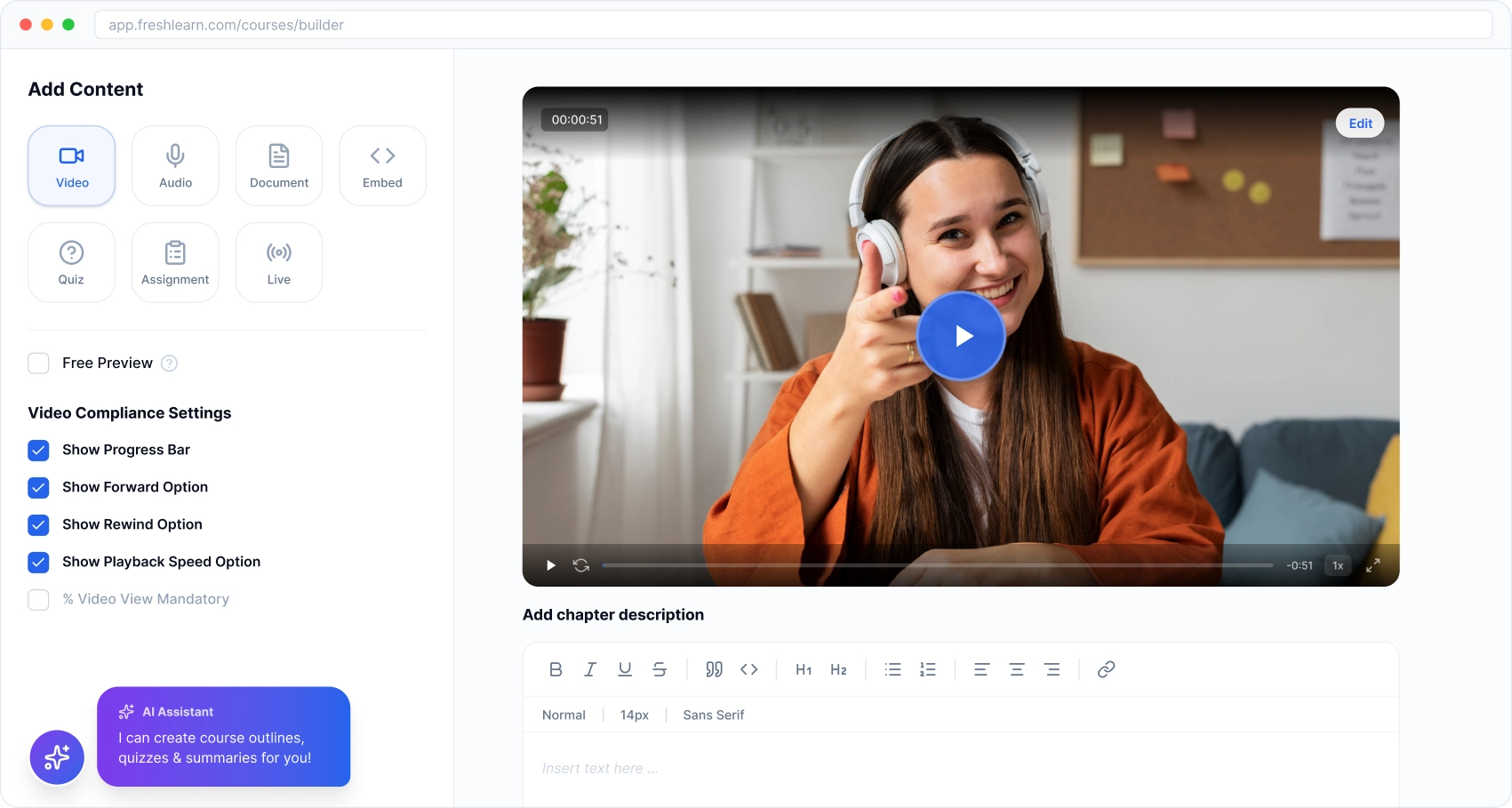
FreshLearn is an all-in-one LMS for continuing education, bootcamps, and micro-credentials where speed to market, built-in commerce, and community matter.
You create courses or live cohorts, sell with native checkout, and keep learners engaged through memberships, emails, and certificates without stitching multiple tools. Highlights include SCORM support, 0% transaction fees, unlimited enrollments, and a modern feature set designed for small institutions and creator-led programs.
FreshLearn fits best when you want a single admin to handle course build, payments, and engagement. You can connect Stripe, PayPal, or Razorpay in a few clicks, issue certificates on completion, run email campaigns, and even white-label mobile apps if you need branded experiences. The payoff is simpler operations, clearer TCO, and faster cohort launches.
Where it doesn't fit: FreshLearn is not built to be a university's system-of-record LMS. If you need nightly SIS roster sync across thousands of sections, deep LTI 1.3 grade return, or institution-wide outcomes reporting for accreditation, Canvas, D2L Brightspace, or Blackboard Learn are the more appropriate core platforms, with FreshLearn working alongside them for continuing-education and certificate programs.
How it works (step by step)
- Create your product: From the dashboard, choose On-demand Course or Live Cohort, then use the builder to add lessons, live sessions, quizzes, and feedback forms. Cohorts support schedules, gamification, and certificates to maintain high engagement.
- Set pricing and checkout: Attach a pricing plan, coupons, or bundles, and connect a gateway. FreshLearn supports Stripe, PayPal, and Razorpay so you can start collecting payments quickly, with 0% platform commission on your sales.
- Launch memberships and community: Group courses and perks into memberships and run an in-platform community. Use posts, moderation, and light gamification to drive participation, then tie access to plans.
- Automate engagement: Design email campaigns from inside FreshLearn to welcome, nurture, and re-engage learners. Trigger messages by actions, and review performance to refine subject lines and timing.
- Award certificates and track completion: Configure certificate templates, auto-issue on completion, and let learners download proof of achievement. This is especially useful for professional programs and CE credits.
- Extend brand and access: Point a custom domain at your academy and, when needed, ship white-label mobile apps so learners study on the go under your brand.
Key features
- Cohort courses and on-demand learning: Publish live cohorts alongside traditional courses, add sessions, feedback, and certificates, and use gamification to maintain momentum.
- Memberships and community spaces: Bundle access as memberships and host a branded community with posts, moderation, and engagement tools, reducing tool sprawl.
- Email marketing and automations: Build lists, design emails, send or schedule campaigns, and measure results without leaving the platform.
- Certificates on completion: Design or upload certificate layouts and auto-award when learners finish requirements.
- Mobile and white-label options: Offer branded mobile apps for a continuous learning experience and stronger brand presence.
- Referrals and affiliates: Turn learners into affiliates, create links, track conversions, and manage payouts from your admin.
Pricing (Annually)
FreshLearn offers creator-friendly pricing with annual and biennial discounts. Highlights include 0% transaction fees, unlimited enrollments, SSL security, and 99.9% uptime.
If you find it a good fit, take a demo, and the team at FreshLearn might offer you a cool discount, including free migration.
2. Canvas (Instructure)
Canvas is a mature LMS that many universities and large districts use as a baseline. Instructors like SpeedGrader for fast rubric-based marking, admins lean on SIS pathways and a big LTI ecosystem, and students get consistent navigation that scales across courses.
If your goal is predictable delivery at scale, Canvas provides proven building blocks, including item banks, blueprints, and robust integrations, which you can standardize across departments.
Canvas shines when you need governance plus day-to-day speed. You set up templates once, align outcomes, and push updates where needed, while keeping grading efficient for busy faculty.
I focus my evaluation on how quickly a new instructor can publish, how reliably SIS handles adds and drops, and whether grading stays smooth during peak weeks. The official product page emphasizes scale, reliability, and a large partner network, which lines up with how most higher-ed teams actually use it.
How it works (step by step)
- Model your course with Modules: Create weekly or outcome-based modules, then add pages, discussions, assignments, and quizzes. Use prerequisites or dates to unlock content in a controlled sequence.
- Build assessments with New Quizzes: Create quizzes from item banks, randomize questions, and apply accommodations such as extended time or extra attempts.
- Grade fast with SpeedGrader: Open submissions in one pane, apply complex rubrics, leave inline comments, and move through the class efficiently.
- Standardize using Blueprint Courses: Maintain a master “blueprint” shell, lock required elements, and sync updates to associated sections to keep consistency without manual edits.
- Connect tools via LTI and integrate your SIS: Use LTI 1.3 for publishers, proctoring, or video tools. For SIS, Canvas supports OneRoster-style pathways, with documented flows for systems like Infinite Campus, including roster sync and grade passback.
Key features
- SpeedGrader for rubric-based grading: Grade individual or group work with rubrics and annotations in a single, focused workspace. This cuts context switching for instructors.
- New Quizzes with item banks: Build randomized assessments, share banks across courses, and reuse vetted items to preserve academic integrity at scale.
- Blueprint Courses: Push template content to many sections, lock key elements, and sync changes with a clear history. This keeps multi-section courses aligned.
- Wide partner and integration ecosystem: Canvas highlights 1,000+ partners, making it easier to plug in tools your faculty already know.
- Analytics and visibility: Built-in analytics help instructors and program leads monitor participation and grade trends so they can act before problems grow.
- SIS pathways with grade passback: Documented connections, including OneRoster flows for Infinite Campus, support roster sync and posting assignment grades back to the SIS.
Pricing (Annually)
Canvas sells on a quote basis through Instructure. Institutions request pricing that reflects enrollment, support tier, training, and implementation scope. Instructure provides discovery and trials via its official pages; public list prices are not posted.
For procurement accuracy, request a written quote directly from Instructure.
3. Moodle
Moodle is the open-source LMS that many institutions adopt when they need deep control, a vast plugin library, and the option to self-host or use MoodleCloud (SaaS). Instructors get powerful assessment tools and question banks; admins can tailor roles, workflows, and integrations; students benefit from a mature mobile app with offline access.
The trade-off is governance: you will plan hosting, upgrades, and UX theming more deliberately than with turnkey LMS options.
Moodle works best when your team wants flexibility over a long horizon. You can start on MoodleCloud for speed, then move to self-hosting (or a certified partner) as needs grow.
Standards support (LTI, OneRoster) and a healthy plugin ecosystem make it possible to connect SIS, proctoring, analytics, and content tools—not just at install time, but as your stack evolves.
How it works (step by step)
- Model courses with activities and sections: Create a course, add weekly/topic sections, and insert activities: Assignments, Quizzes, Forums, Lessons, Databases, and more. Each activity has granular settings for grading, availability, and completion tracking.
- Build assessments and banks: Author questions once in Question banks, organize them into categories, and reuse across courses. Randomize items, create multi-page quizzes, set time limits, and apply attempt rules—then analyze results to refine items.
- Grade with rubrics and advanced methods: Use rubrics and marking guides to standardize feedback. The Gradebook aggregates results across activities; you can weight categories, hide columns, and export grades for downstream systems.
- Sync rosters via SIS (OneRoster) and LTI tools: Adopt the certified OneRoster enrollment plugin to synchronize classes, users, and grades with common K–12/Higher-Ed SISs. Connect external tools via LTI 1.3 and configure grade return where supported.
- Enable mobile and offline access: Turn on the official Moodle App so learners can access content and submit work on mobile, even offline, then sync when connected. Institutions can also opt for a branded app experience.
- Harden security, privacy, and governance: Leverage Moodle’s security program, roles/permissions, auditability, and data-retention options. Establish an upgrade cadence (minor/major) and test plugins in staging before production.
Key features
- Question banks and item reuse: Create once, reuse everywhere. Organize by category, randomize draws, version over time, and run item analysis after attempts to improve exams at scale.
- Rich activity set for pedagogy: Assignments with file uploads/annotations, Quizzes, Workshops (peer review), Forums, SCORM/IMS content, and conditional release for mastery-based paths.
- Granular Gradebook and rubrics: Weight categories, drop lowest scores, apply rubrics/marking guides, and export to CSV for registrars or data teams.
- SIS roster sync with OneRoster: Use the Moodle OneRoster enrollment plugin (IMS-certified) to keep classes, users, and grades aligned with your SIS; reduce manual CSV merges.
- Mobile learning (online/offline): Official iOS/Android app supports offline content access, submissions, notifications, and grade views; optional branded app for institutions.
- Security and extensibility: Open-source core with active security program, plus thousands of plugins for analytics, proctoring, SSO, theming, and more, governed by your change-management process.
Pricing (Annually)
- Self-hosted Moodle LMS: Software is free (open source). Your annual cost is infrastructure, managed support (optional), and staff time for maintenance and upgrades. Use this path if you have internal DevOps and a clear plugin governance model.
- MoodleCloud (official SaaS hosting): Published annual plans with user caps and storage tiers. Current examples on the official pricing page list annual USD options such as Starter (50 users), Mini (100), Small (200), Medium (500), and Standard (750), priced from about $170 per year for Starter to about $2,140 per year for Standard, with add-ons like custom domains depending on plan. MoodleCloud sets its prices in Australian dollars, so the USD figures shift slightly with the exchange rate. Note that MoodleCloud no longer offers a permanent free plan; it provides a free trial only.
4. Google Classroom
Google Classroom is the “lowest-friction” LMS choice for schools already on Google Workspace. Teachers move fast because classes, assignments, grading, and Meet sit next to Docs, Drive, and Forms. Admin controls live in the Workspace admin, and now there is first-party SIS roster import and grade export via OneRoster, which reduces manual setup for terms and sections.
Classroom works best when you want quick adoption, simple grading flows, and tight collaboration. I see it used as a primary LMS in K–12, and as a companion layer in higher education for seminars, labs, and lightweight courses.
The trade-off is depth: you will not find as many native knobs for outcomes analytics or complex rubrics as in enterprise LMSs, so plan your pilot to verify the exact assessment features you need.
How it works (step by step)
- Create your class and roster students: In Classroom, create a class, then roster by sharing a class code or by importing from your SIS with Google’s OneRoster pathway. SIS import can keep rosters aligned and support grade export back to the SIS.
- Post materials and assignments in Classwork: Organize topics, attach Docs, Slides, or links, and set due dates. For auto-graded quizzes, attach a Google Form configured as a quiz so students see results right away if you allow it.
- Run academic-integrity checks with originality reports: When you create an assignment, you can enable originality reports. Teachers can scan submissions against the web and institution repositories; students can also run limited checks if you allow it.
- Grade and return work from one pane: Use the Classroom grading tool to view submissions, annotate, score, and return. You can grade from Student Work, the grading tool, or the Grades page, then post grades to the SIS if configured.
- Keep guardians in the loop: Turn on guardian email summaries so parents receive periodic updates on missing work and upcoming assignments. This improves transparency without giving guardians full class access.
Key features
- Tight Google integration: Classroom is the hub for Docs, Drive, Sheets, Slides, and Meet, so teachers can assemble materials and assessments with tools everyone already uses. This reduces the learning curve for new staff.
- Quizzes with Google Forms: Create Forms-based quizzes that auto-grade, release scores immediately, and export item-level data to Sheets for quick analysis. Great for bell-ringers, exit tickets, and low-stakes checks.
- Originality reports: Enable plagiarism checks on assignments to compare student work against web sources and your school repository. Students can run self-checks if you allow it, which turns the tool into a teaching moment.
- SIS roster import and grade export (OneRoster): Reduce manual enrollment changes by connecting Classroom to supported OneRoster SIS partners. Import rosters, then push grades back, which keeps gradebooks aligned across systems.
- Streamlined grading workflow: Grade from the Classroom grading tool, leave comments, and return work in bulk. Teachers can keep momentum without switching tabs or tools.
- Guardian summaries: Send weekly or daily email summaries to guardians with missing and upcoming work, keeping adults informed without separate portals.
Pricing (Annual)
Google Classroom is part of Google Workspace for Education.
- Fundamentals: Available at no cost for qualifying institutions.
- Paid editions: Education Standard, Teaching and Learning Upgrade, and Education Plus add security analytics, advanced Meet features, and expanded teaching tools (such as institution-wide originality reports). Google publishes suggested retail pricing for these rather than quoting case by case: Education Standard starts at around $3 per user per year, and Education Plus runs about $6 per user per year on new purchases, up from $5. Paid editions are bought through authorized Google for Education partners, so the final figure on your partner's quote can vary by region and volume; institutions typically commit for a full year or multiple years.
- Licensing change to budget for: between October 2025 and February 2026, Google ended its model of one free staff license for every four paid student licenses, and introduced a 50-license minimum on paid editions. Under Google's current licensing rules, every active user, student or staff, now needs a paid license when a school buys Education Standard or Education Plus, which means older pricing estimates will understate current costs.
5. Schoology (PowerSchool)
.png)
Schoology is a K-12-focused LMS that fits districts standardizing on PowerSchool or teams that want tight SIS alignment. Teachers organize classwork, grade in a platform, and keep parents in the loop; admins rely on roster automation and grade passback; students get a familiar course hub.
I see Schoology used when a district wants one workflow from SIS to gradebook without misrepresenting any add-ons.
What makes Schoology attractive is its SIS posture and standards support. Districts can roster from their SIS using OneRoster, sync sections on a schedule, and push grades back, while still layering in LTI tools for content and assessments.
If your goal is a dependable K–12 pipeline from classroom to official grades, Schoology is built for that scenario, with product docs that spell out partner pathways and configuration steps.
How it works (step by step)
- Create courses and structure materials: You create a course, then organize weekly folders with pages, assignments, discussions, quizzes, and external links. Teachers share resources across courses and reuse items each term, which keeps setup time low at scale.
- Set up SIS Connect with OneRoster: System Admins configure SIS Connect to pull schools, terms, users, courses, and enrollments from a OneRoster-compatible SIS. You can schedule daily syncs and also trigger manual updates after add-drop windows.
- Map grade passback: After rostering, teachers align Schoology assignments to SIS categories and push scores back. PowerSchool publishes a grade passback checklist to help avoid mapping errors and verify alignment before midterms.
- Connect external tools with LTI 1.3: For publishers, assessment suites, and enrichment apps, use LTI 1.3. Schoology is certified LTI 1.3 Advantage Complete, which means you can launch tools and return grades through a standards-based path.
- Enable parent visibility: Schools can let guardians view student activity and due dates, reducing email churn and improving transparency during busy grading periods.
- Manage change and updates: PowerSchool posts monthly release notes. District admins review features, test in a staging environment, then communicate changes to teachers in cadence with the academic calendar.
Key features
- OneRoster-based SIS sync: Schoology’s SIS Connect uses OneRoster 1.1 to roster data from third-party SISs and supports grade return. If your SIS is certified or working toward certification, you can keep rosters and grades consistent without double entry.
- Infinite Campus app pathway: There is a documented integration path for Infinite Campus to provision schools, terms, users, courses, and enrollments, plus a course-level teacher app for grade passback. This is helpful for districts already standardized on Infinite Campus.
- LTI 1.3 Advantage: Schoology supports LTI 1.3 and encourages new apps to use it. That gives you secure launches, name and role provisioning services, deep linking, and assignment and grade services, which reduce bespoke integrations.
- Standards alignment and mastery passback: With Standards Grade Passback, districts can provision learning objectives and scales from PowerSchool SIS into Schoology, then pass standards-aligned scores back to SIS. This supports mastery reporting without manual re-entry.
- K-12-ready classroom workflows: The core covers assignments, discussions, quizzes, and course materials with a layout that teachers can learn quickly. Districts can template courses and share resources, which shortens the ramp for new staff.
- Parent engagement: Built-in guardian access helps adults track missing and upcoming work, which reduces support tickets and keeps communication focused on learning, not logistics.
Pricing (Annually)
Schoology Learning is sold on a quote basis through PowerSchool. Official pages direct districts to “contact sales” for pricing that reflects enrollment, implementation scope, and support tier.
PowerSchool does not post public list pricing. When you prepare a purchase order, cite the vendor quote as the source of truth for the annual cost.
6. Blackboard Learn (Anthology)
Blackboard Learn is a long-standing LMS used by large universities and systems that value compliance, deep assessment tooling, and enterprise integrations. Instructors get mature grading and rubric workflows; admins rely on SIS pathways and governance; students see a consistent Ultra interface across devices.
When scale, auditability, and standards matter, Blackboard provides a predictable backbone that schools can standardize on.
I treat Blackboard as the “enterprise continuity” choice. It preserves historical content, supports accessibility and competency-based programs, and ships frequent SaaS updates that improve tests, gradebook, and integrations.
A significant ownership change worth knowing about: Blackboard's former parent company, Anthology, filed for Chapter 11 in September 2025. It sold its SIS business to Ellucian and its student-success business to Encoura, then emerged on February 27, 2026, as a debt-free company rebranded as Blackboard, with roughly $1.6 billion in funded debt eliminated. Blackboard Learn kept running throughout, and the restructured company is now focused solely on teaching and learning products. If you're evaluating a renewal or a new multi-year contract, it's reasonable to ask about the product roadmap and to confirm your data-export terms.
How it works (step by step)
- Model your course in Ultra: Create content as Documents, Assignments, Tests, and Discussions inside weekly or topic blocks. Use release conditions, due dates, and accommodations, so learners see the right materials at the right time.
- Build assessments with banks and item analysis: Author questions into pools, randomize, and align to goals. After delivery, run Item Analysis to flag weak distractors and improve future exams, especially in high-enrollment courses.
- Grade with rubrics and consistent feedback: Attach analytic rubrics, grade in a single pane, and return annotated work. Rubrics create shared expectations for students, and they speed multi-section grading for instructors.
- Connect SIS via the SIS Integration Framework: Use Blackboard’s SIS Framework to synchronize terms, users, courses, enrollments, and to support grade return with systems such as Ellucian or PeopleSoft. Schedule nightly jobs and trigger on demand during add-drop.
- Extend with LTI and manage releases: Launch third-party tools over LTI 1.3 and track changes with Learn SaaS release notes. New capabilities roll out monthly, with admin actions called out so upgrades do not surprise faculty.
Key features
- Ultra Course View with accessible design: Blackboard emphasizes an inclusive, mobile-friendly UI and integrated accessibility tools so students can access content across devices without friction.
- Rubrics and structured grading: Instructors attach rubrics to assignments and tests, apply levels quickly, and deliver consistent, transparent feedback that aligns with program outcomes.
- Test quality with Item Analysis: Post-assessment analytics highlight question difficulty and discrimination to improve exam reliability across large cohorts.
- Enterprise SIS Framework: Blackboard documents an SIS Integration Framework to move course, user, and enrollment data in and out of Learn and to align gradebooks with official records.
- Frequent SaaS updates: Monthly Learn SaaS releases add improvements across instructional design, tests, gradebook, and integrations, with notes that specify any admin action required.
- Ecosystem and governance: Because many institutions have multi-year Blackboard footprints, you inherit proven workflows, audit logs, and a path to preserve legacy content while modernizing delivery in Ultra.
Pricing (Annual)
Blackboard Learn is sold on a quote basis through Blackboard (formerly Anthology). Official pages direct institutions to contact sales; public list pricing is not posted.
Annual cost typically reflects enrollment, hosting, support tier, training, and implementation scope. Use the vendor’s written proposal as the source of truth for your purchase order and budget.
7. D2L Brightspace
D2L Brightspace is the LMS I reach for when accessibility, modern UX, and assessment depth are non-negotiable. Instructors get clean course design, robust rubrics, and outcome alignment; admins rely on standards-based SIS options and steady SaaS releases; students benefit from a responsive interface and the Brightspace Pulse app for on-the-go learning.
What sets Brightspace apart is its combination of accessible UI and mature evaluation workflows. Competency and outcome mapping flow through assignments, quizzes, and discussions, with Mastery View to visualize progress. Intelligent Agents automate reminders based on behavior, which helps at-risk students without creating extra work for faculty.
In large classes, Quick Eval centralizes grading across tools, so instructors keep momentum during peak weeks.
How it works (step by step)
- Set up the course shell and structure content: Create a course offering, then organize modules and topics in the Content area. Add Pages, Assignments, Quizzes, and Discussions. Use release conditions to reveal items by date, score, or activity, so students see the right tasks at the right time.
- Align activities to outcomes and rubrics: Define program outcomes or competencies, attach analytic rubrics, and link them to activities. When instructors grade, Brightspace records achievement at the criterion level, which feeds Mastery View for a quick read on who needs help.
- Build assessments with banks and proctoring options: Create Question Libraries, randomize sections, and set accommodations like extra time or multiple attempts. Add integrity controls such as shuffling, question pools, and time windows. For written work, use inline annotations and audio feedback to speed responses.
- Automate follow-ups with Intelligent Agents: Configure rules that watch for behaviors: missed deadlines, low quiz scores, or long gaps in activity. The system sends targeted messages or nudges, reducing manual check-ins and helping instructors scale care.
- Integrate SIS and external tools: Use documented pathways like IPSIS or Ellucian ILP, or a OneRoster CSV flow, to sync terms, users, courses, enrollments, and grades. Launch external apps with LTI 1.3 and return scores to the Grade Book through the Assignment and Grade Services model.
- Monitor progress and act from Quick Eval and Mastery View: Quick Eval centralizes ungraded work across courses, while Mastery View rolls up outcomes achievement. Instructors can filter, message students, and adjust activities without hunting through multiple pages.
Key features
- Accessibility and modern UI: Brightspace emphasizes inclusive design, keyboard navigation, and screen reader support. The interface is consistent across devices, and the Pulse mobile app helps students track deadlines, view content, and receive notifications without friction.
- Outcomes, competencies, and Mastery View: Map outcomes to activities, grade with analytic rubrics, and see mastery by criterion. Program leads can verify alignment during accreditation reviews, while instructors spot learning gaps early.
- Question Library and advanced quiz engine: Create pools, randomize draws, set per-question time limits, and apply accommodations. Item-level statistics help refine weak distractors and improve reliability in high-enrollment courses.
- Quick Eval for grading at scale: Aggregate ungraded submissions from Assignments, Quizzes, and Discussions in one place. Instructors triage by activity or student, leave inline and audio feedback, and keep grading time predictable during crunch weeks.
- Intelligent Agents for behavior-based outreach: Trigger messages when students miss work, score below thresholds, or stop participating. Agents personalize at scale, which is especially useful in gateway courses and first-year seminars.
- Standards-based integrations: SIS options include IPSIS and ILP pathways, plus OneRoster CSV. External tools launch over LTI 1.3 with secure deep linking and grade return, so your app ecosystem stays manageable without custom plumbing.
Pricing (Annually)
D2L Brightspace is sold on a quote basis directly from D2L. Official materials point institutions to contact sales for an annual proposal keyed to factors like enrollment, support tier, implementation scope, training, and chosen integrations.
Because public list prices are not posted, treat the vendor’s written quote as the budgeting source of truth.
Choose for Outcomes, Not Hype
You are buying outcomes. Pick the LMS that meets your SIS, scale, and support needs, then prove it in a 6-week pilot.
Say yes only if roster accuracy and grade passback hit 100 percent, mobile success reaches 90 percent, and feedback time drops by 15 percent. Lock training, SLA, and data-export terms in the contract so success is repeatable.
Evaluate the top two vendors with the pilot scorecard, require documented SLAs and export samples, and choose the platform that meets your thresholds.
If faster course-to-market with built-in commerce, memberships, community, and certificates matters to you, include FreshLearn in that pilot and compare results side by side.
FAQs
1. What is the difference between an LMS and an SIS?
An LMS runs teaching: courses, content, submissions, quizzes, grading, and feedback. An SIS is the system of record: terms, courses, sections, enrollments, attendance, and transcripts. The two must sync.
Rule of thumb: LMS is the classroom, SIS is the registrar. Your pilot should verify roster sync and grade passback in both directions.
2. How do K–12 requirements differ from higher education when choosing an LMS?
K–12 prioritizes parent visibility, standards alignment, behavior tools, and simple workflows that teachers learn quickly. Higher education emphasizes outcomes, rubrics, item analysis, accessibility, LTI depth, and research flexibility.
For K–12, test guardian summaries and OneRoster. For higher ed, test outcome mapping, large-course grading speed, and LTI 1.3 grade return.
3. What will an LMS really cost, beyond the license?
Budget for more than licenses, connectors, migration, training, premium support, and contingency. Use a simple worksheet.
TCO Year1 = License + SIS connectors + Migration + Training + Premium SLA + 10% contingency.
Add hidden time: course rebuild hours, analytics setup, and change management. Ask vendors for line items, not blended “implementation” buckets.
4. How long does migration usually take?
Most schools succeed in 6–10 weeks:
- Week 0: sandbox, SSO, roles.
- Weeks 1–2: import two real courses, fix links, run first passback.
- Weeks 3–5: pilot 3–5 courses, track KPIs weekly.
- Weeks 6–10: staged roll-out in waves, legacy LMS set to read-only.
Pause any wave if roster accuracy or passback falls below targets.
5. When should I choose FreshLearn over a traditional LMS?
Pick FreshLearn when your priority is speed to market and built-in monetization. It combines course delivery with native payments, memberships, community, and certificates, so one admin can build, sell, and engage without stitching tools.
It's a strong fit for continuing education, micro-credentials, bootcamps, and small colleges running short programs. It isn't built to replace a university's core LMS; if you need institution-wide SIS roster sync and LTI grade return at scale, pair it with Canvas, D2L Brightspace, or Blackboard Learn rather than substituting for them.
6. Is Blackboard still a stable choice after Anthology's bankruptcy?
Blackboard Learn kept operating throughout the restructuring. Anthology, Blackboard's former parent company, filed for Chapter 11 on September 30, 2025, sold its SIS business to Ellucian and its student-success business to Encoura, and emerged on February 27, 2026 as a debt-free company rebranded as Blackboard, with roughly $1.6 billion in funded debt eliminated. The restructured company now focuses only on teaching and learning products. For a renewal or new contract, ask about the product roadmap and confirm you can run a full data export on your own.
7. Is Google Classroom free?
Yes, for qualifying institutions. Google Classroom is included in Google Workspace for Education Fundamentals at no cost. Paid editions add security, analytics, and advanced teaching tools: Education Standard starts at around $3 per user per year, and Education Plus runs about $6 per user per year on new purchases. Since the 2025 to 2026 licensing change, a school buying a paid edition must license every active student and staff member, with a 50-license minimum, and the old model of one free staff license per four student licenses no longer applies.
You might also like
Hosted by