
Thinkific vs Kartra 2026: Which One Actually Delivers Value?

When I started comparing Thinkific vs. Kartra, I soon realized it’s less apples-to-apples and more like classroom vs. command center.
Thinkific helps you make a great course. Kartra helps you sell it.
Simple enough, until you see that they push you to run your business in two very different ways.
Thinkific keeps the spotlight on your lessons and students. Kartra tries to be your all-in-one command centre; funnels, emails, checkouts, memberships, the works.
So how do you figure out which approach fits your needs? To help you decide that, this guide explains what it’s really like to work with each one, the trade-offs they don’t talk about, and a third option if you want the best parts of both.
The one question you must answer: Course-first or marketing-first?
Before you compare features line-by-line, decide which philosophy fits your business: do you need a course-first platform that prioritizes teaching and learner experience, or a marketing-first platform that unifies funnels, email, pages, and support, with courses as one component? Everything else flows from this choice.
Let’s see what these concepts actually mean.
What is a “course-first” platform?
A course-first platform puts teaching at the center of everything. It gives you tools to design, deliver, and manage learning experiences before anything else, and then wraps the marketing and sales features around that core.
Think smooth course creation, customizable lesson structures, video hosting that actually works for educators, and student engagement tools like quizzes, communities, and progress tracking.
In short, these platforms treat your course as the main event, not a side hustle. Every feature exists to help learners succeed and to help you teach without dealing with clunky workarounds.
What is a 'marketing-first' platform?
A marketing-first platform employs a 'sell first, teach second' approach. The focus is on funnels, email campaigns, landing pages, and automation, with course delivery included as just one piece of the puzzle.
You can host courses inside it, but the learning tools are simpler, with fewer options for structuring content or engaging students compared to a dedicated teaching platform. The core purpose here is business growth, with education as an add-on.
Thinkific vs Kartra: Quick comparison table
Before we get into the nitty-gritty details, here’s a side-by-side comparison of how Thinkific and Kartra stack up. This quick table will help you spot the biggest differences at a glance, so you know where to look closer as we unpack each feature in the next sections.
Feature breakdown: Where do they excel and where do they fail?
It’s easy to get lost staring at feature lists. So let’s skip that and look at what actually matters: how these platforms perform in the areas that impact your work the most.
Course creation and student experience (The litmus test)
When you shed away all the marketing talk, a platform’s real test is simple: can you easily build a course your students will love to take?
Thinkific: Purpose-built for learning
Thinkific isn’t just “course-capable,” it’s learning-first. The platform gives creators complete control over how they design, deliver, and optimize their courses for a smooth student experience.
Thinkific's course builder is designed with educators in mind, offering:
- Drag-and-drop interface: Easily organize your content into modules and lessons without any technical expertise.
- Bulk uploading: Quickly import videos, PDFs, and audio files using the Content Uploader, streamlining the course creation process.
- AI-powered tools: Utilize the AI Course Outline Generator to structure your course.
- Video library: Customize each video with settings like preview, title, thumbnail, captions, playback controls, and privacy. Additionally, you can track engagement through analytics, download, archive, or delete videos as needed.
- Drip scheduling: Release course content based on student enrollment date, course start date, or a specific calendar date, ensuring a paced learning experience.
- Content locking: Control access to lessons, enforcing prerequisites and timed unlocks to guide student progression.
Apart from an intuitive course builder, Thinkific provides several tools and features for a better student experience. Let’s look at them in detail:
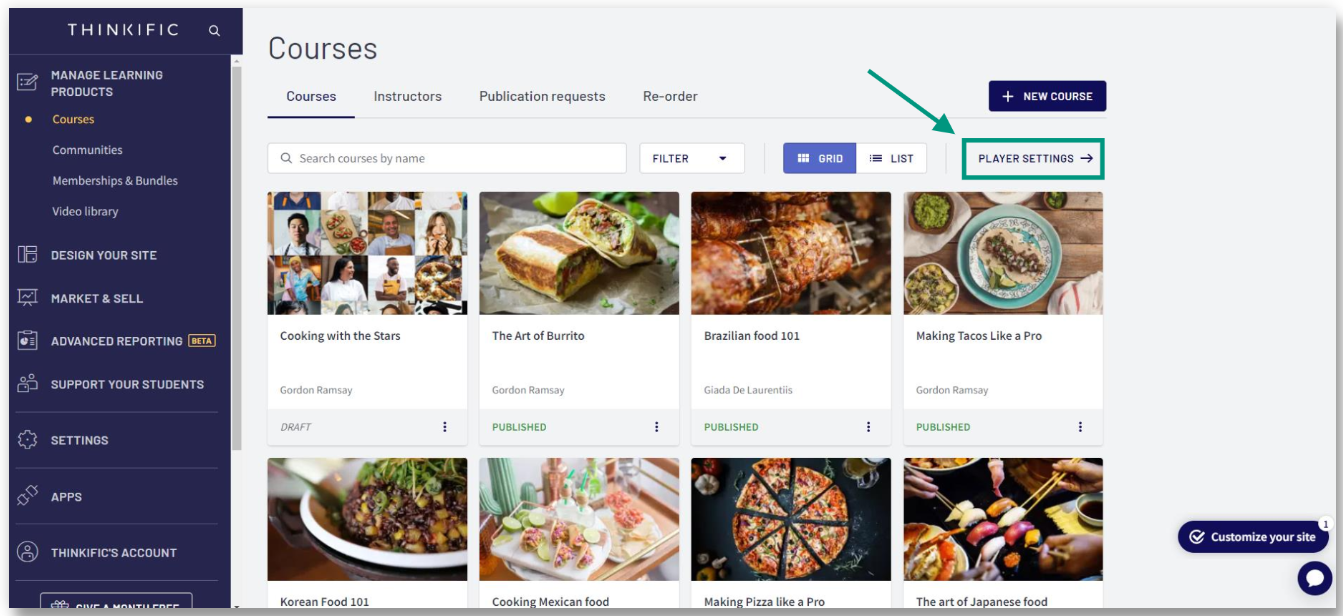
Intuitive course player: The Thinkific Course Player is the central hub where students access and engage with course content. It supports various content types, including videos, quizzes, and assignments.
The course player supports several features, including:
- Completion messages
- On-lesson discussions
- Free preview
- Course review
- Individual course player appearance customizations
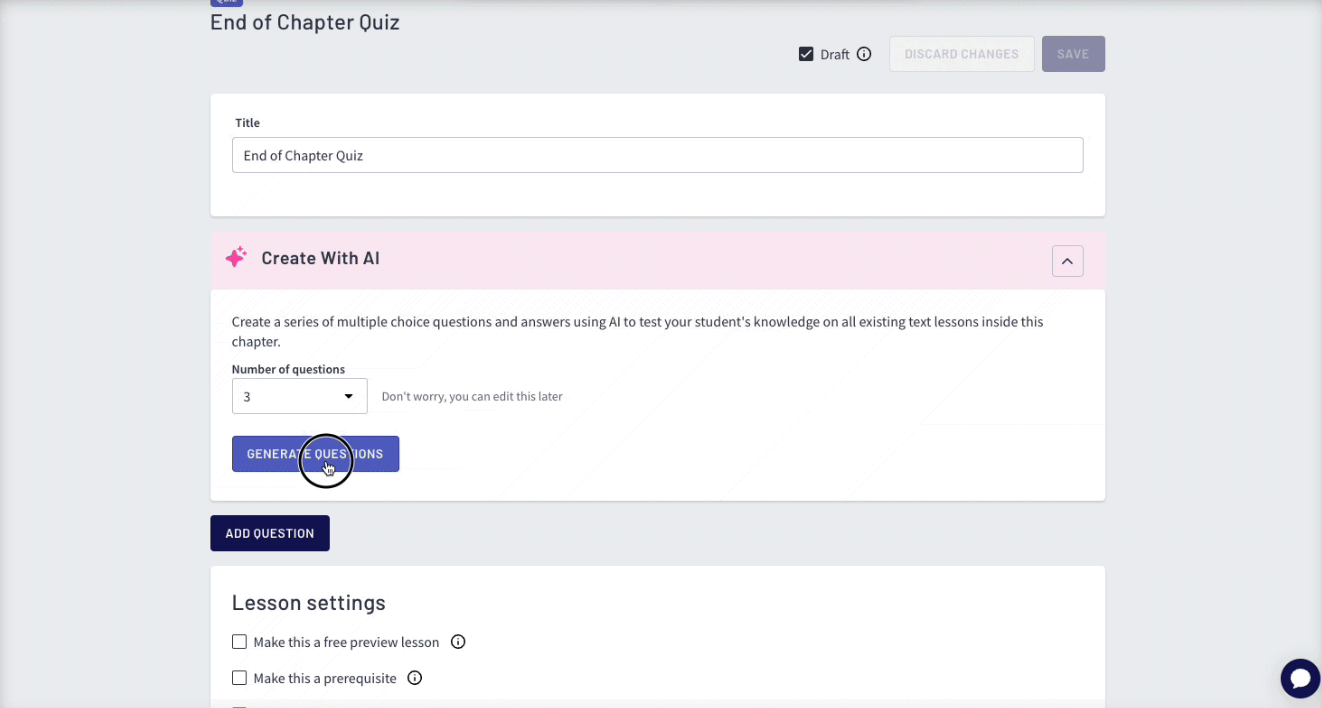
Quizzes and assessments: The platform supports various assessment types, including quizzes and surveys. Thinkific’s quiz builder lets you create multiple-choice questions with single or multiple correct answers, giving students instant feedback and reinforcing key concepts.
If you already have a question bank, you can import it directly to quickly build quizzes, then set Thinkific to randomize questions from your bank for each student. Thinkific also has an AI quiz generator, which generates questions based on your course’s text, video, or PDF lessons.
Thinkific mobile app: The platform offers a white-labeled mobile app, which is fully responsive, allowing students to access courses on tablets and smartphones. Thinkific also allows certain mobile-only features, including:
- Drip lesson release notifications: When you unlock a new lesson through a drip schedule, Thinkific sends a push notification to students via the mobile app.
- Push notifications for community activity: Thinkific sends push notifications to students’ mobile devices when there is new activity in communities they have joined.
Your students will receive notifications when they are added to a community, when an admin posts, when someone mentions them, comments on their post, or replies to their comment or a thread they are following.
Community: Thinkific’s community feature creates spaces, giving students a dedicated place to interact with instructors and peers, whether alongside a course or as a standalone product.
Each community appears as a dedicated page on your Thinkific site where members can post updates, share ideas, and comment on discussions.
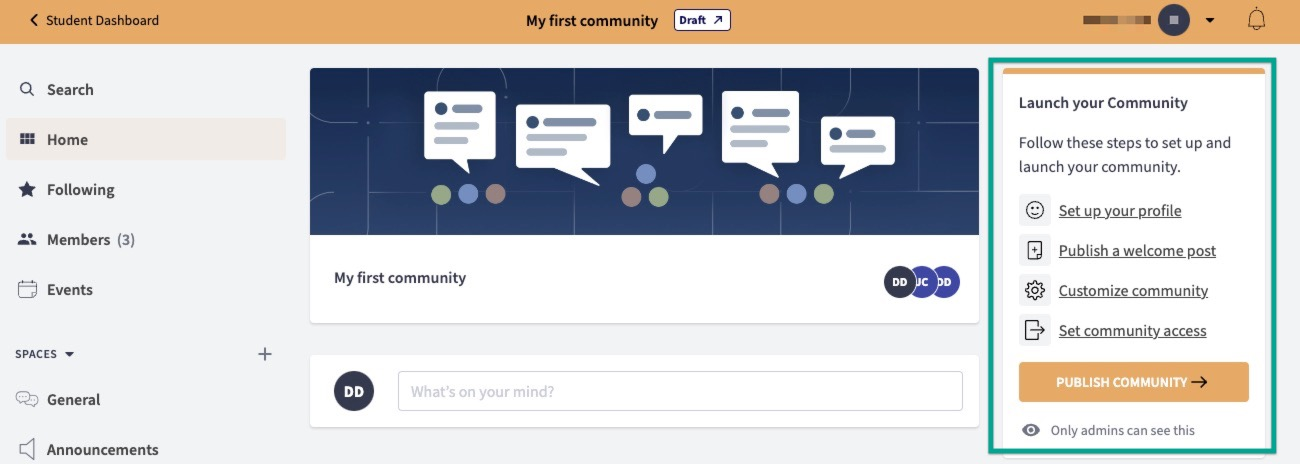
You can connect a community to a specific course or bundle so that only enrolled students can join. Pricing options include free access with a set expiry date, one-time payments with defined enrollment duration, or monthly payment plans with adjustable access periods.
While communities cannot be permanently deleted or archived, you can set them to private or switch them to draft mode so only site admins can view them. Also, using Thinkific’s spaces feature, link a community directly to a course and display a community card inside the course Player.
Course templates: For course templates, Thinkific offers 6 options to choose from:
- Blank course
- Pre-sell course
- Mini course
- Flagship course
- Webinar replay and
- Membership resource library.
Kartra: marketing-first, learning-secondary
Kartra focuses on sales, funnels, and automation, with course creation as one of its many add-on features. It offers solid business tools, but its approach to learning experiences differs from what dedicated course platforms typically provide.
Let’s break it down.
Kartra treats courses more like a membership site, where modules and lessons are available as flexible, page-based content. It's good at marketing automation and selling, but lacks native LMS features such as structured student progression, built-in quizzes with pass/fail logic, or built-in certificates.
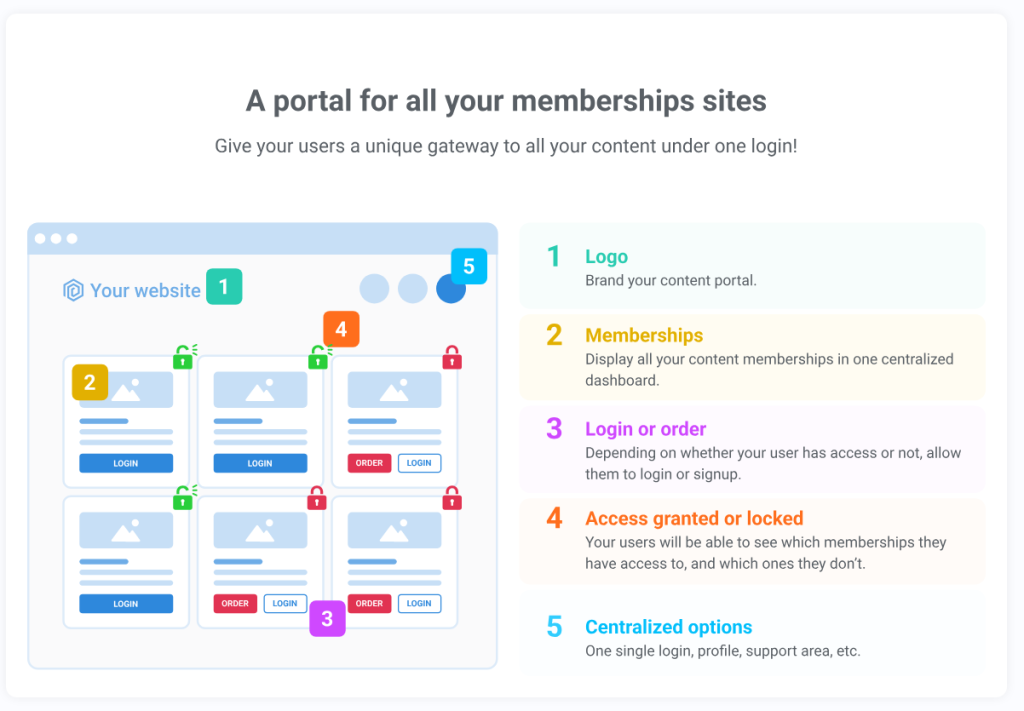
Kartra offers the following features:
- Drip scheduling: Kartra’s membership/courses feature allows you to set drip scheduling, releasing content to students over time instead of all at once. You can specify release intervals (e.g., after X days from signup) or specific calendar dates.
- Upsells and cross-sells: Kartra’s course builder includes options to upsell and cross-sell directly within lessons. You can place checkout elements inside course pages, letting learners purchase additional products or upgrades without leaving the content.
- Integrated helpdesk: Kartra integrates a helpdesk into the course experience. This tool offers live chat, a wiki-style knowledge base with articles and guides, and account management features. However, this functionality is available only in the growth and professional plans, starting at $229 per month.
- Paywall for specific modules: The platform also lets you lock specific modules behind a paywall. For example, you can make the first lesson free and add a checkout element for unlocking the remaining course.
- Manage membership access levels: Configure membership tiers for different content sets, drip lessons on a set schedule, and display user progress with visual progress bars.
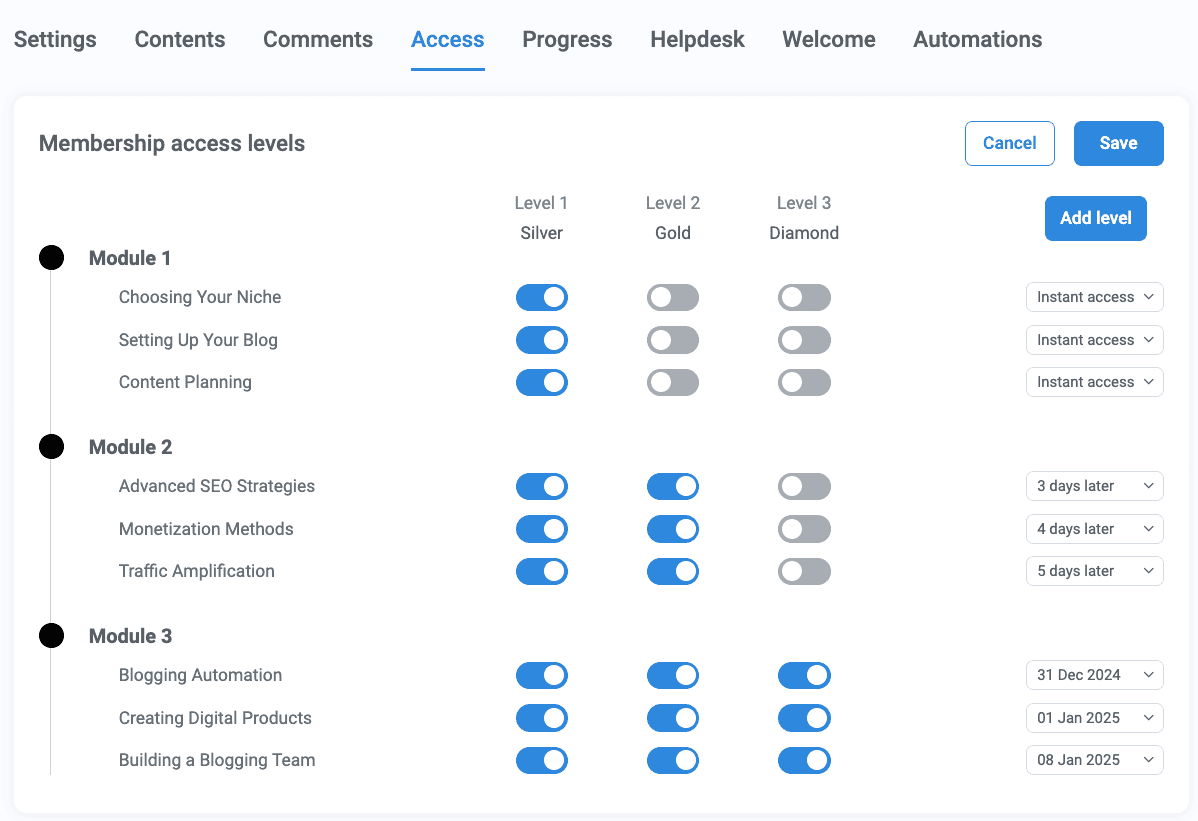
Kartra presents courses through a membership-style portal: lessons appear in a left-side menu while content displays on the right. It also supports mobile-responsive layouts for viewing on various screen sizes.
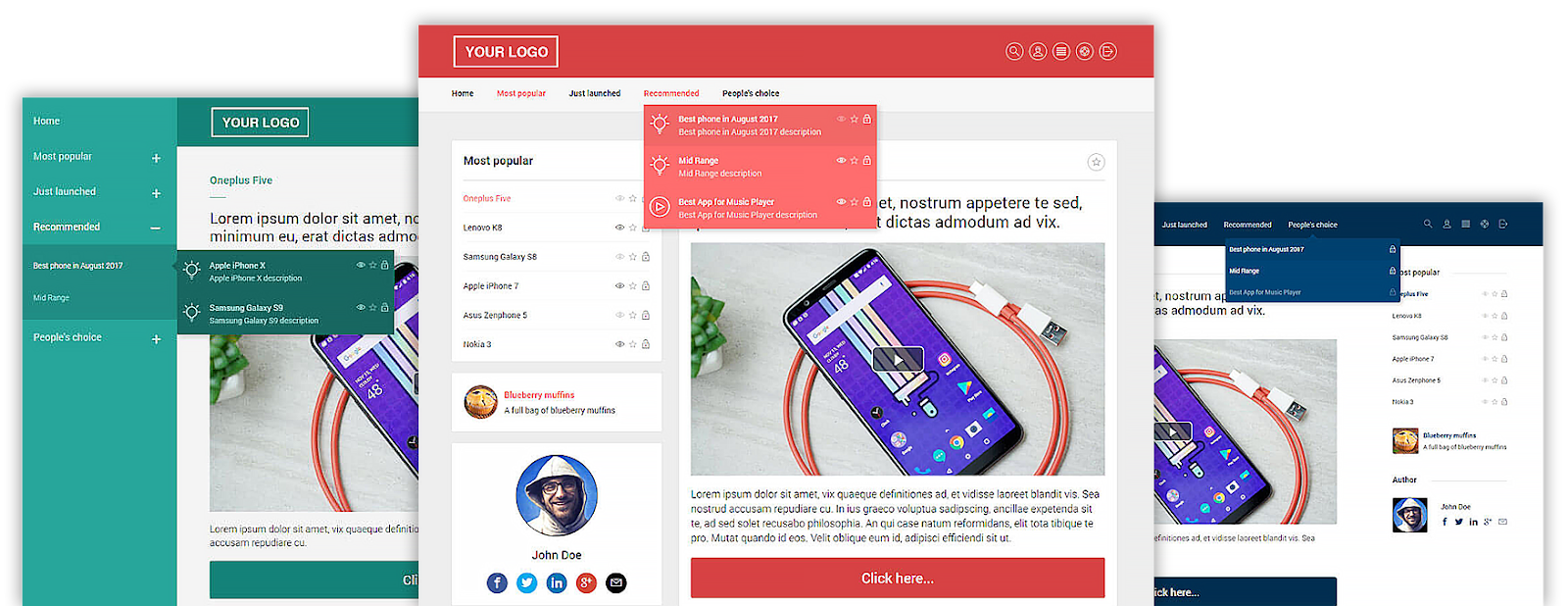
Kartra only has 3 basic course templates, which are hard to change while developing the course, and are available only when you save your lesson page.
Kartra doesn’t offer a branded mobile app or built-in community features. So while it covers course delivery, you’ll need separate tools if you want students to connect or learning on the go.
Winner: Thinkific, no contest.
When you line them up feature for feature, Thinkific clearly delivers more for course creators and students alike. Here’s the side-by-side breakdown.
If you’re looking for more course-building options beyond Thinkific, check out our detailed guide on its top alternatives.
Sales funnels and marketing automation
Both Thinkific and Kartra provide tools for setting up landing pages, email sequences, and course-related upsells. But the way each platform handles funnel logic, automation, and lead management makes all the difference for tracking potential students, segmenting audiences, and triggering targeted follow-ups throughout the sales journey.
Kartra: Funnels and automations, all-in-one
Kartra offers a comprehensive suite of tools for building and automating sales funnels from opt-in to follow-up sequences. Here's an overview of its key features:
* Funnel mapper: Kartra’s funnel mapper enables you to visually plan and organize your marketing strategy. You can drag and drop all pages and assets onto an open canvas, connecting them freely to structure your conversion flows.
Each asset in your funnel, like a landing page or opt-in form, can point to an existing page, act as a placeholder for one you’ll build later, or even link out to an external URL.
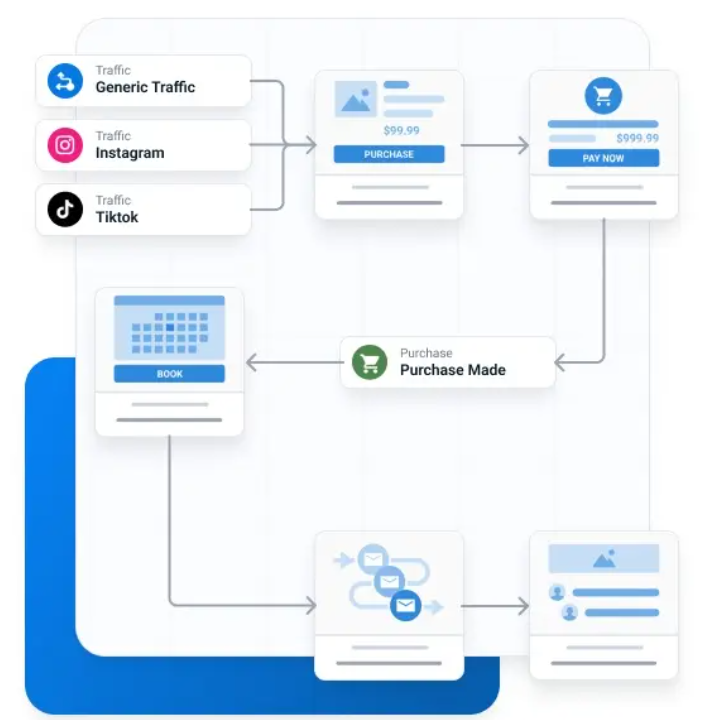
As you map the funnel, you can decide the exact actions users need to take to move to the next step, while adding tags, subscribing leads to lists, or sending personalized emails to improve conversions.
Funnel stimulator: Test your entire funnel before going live. Kartra shows potential sales, costs, and ROI, helping you analyze revenue per visitor, revenue per lead, cost per visitor, cost per lead, and overall ROI.
Once your funnel is ready, Kartra makes sharing and monetizing it simple. You can send a dedicated funnel map page to clients or team members, export it as a PDF, or even sell your funnel directly through Kartra’s marketplace, with payment and delivery handled automatically.
Plug-and-play campaigns: These are fully structured marketing campaigns created by Kartra, including everything you need for lead generation, sales, and follow-ups.
Each campaign comes with:
- Pre-designed pages (landing pages, sales pages, checkout pages, thank-you pages)
- Automated email sequences for nurturing leads and promoting products
- Pre-configured automation rules and triggers
- Optional video and copy assets you can customize.
The idea is that you can take a campaign, customize it slightly to fit your product or offer, and launch it without having to build everything from scratch. You can also test the campaign before going live to check for broken links, incorrect email content, or missing images.
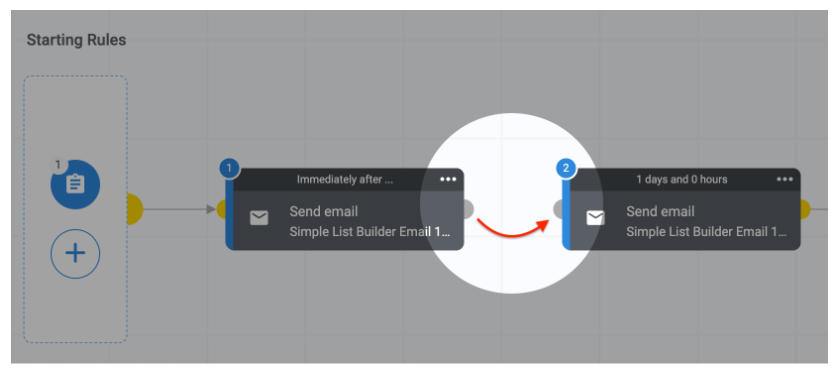
Sequence builder: Design your email sequences using a visual canvas. Simply drag steps like emails, delays, and actions onto the canvas and connect them in the order you like. Kartra lets you organize complex workflows by creating sub-sequences within your main sequence. This helps in managing long or intricate email campaigns more efficiently.
Form builder: Kartra comes with a dedicated form builder that works as the access point for your sales funnels. With it, you can create opt-in forms, embedded forms, or even Peek-a-boo forms without needing an external tool.
The drag-and-drop editor allows you to add fields (such as name, email, phone, and custom responses), adjust styling, and embed forms anywhere on your Kartra pages.
Kartra also has the following marketing automation features to make your sales more conversion-focused:
- Behavior-based automation: Create personalized email and SMS sequences triggered by user actions such as clicks, purchases, or form submissions.
- Unlimited trigger rules: Set up multiple triggers to make sure your audience receives the right message at the right time.
- Automated tags, lists, and sequences: Automatically tag leads, add them to lists, and enroll them in sequences based on their interactions.
- A/B testing: Experiment with different email content, subject lines, or page variations to see which converts better, feeding back into your automated campaigns.
- Lead scoring: Assign points to leads based on actions like email opens, clicks, and purchases. Prioritize high-intent prospects and automatically disqualify disengaged leads.
Kartra also provides advanced segmentation, countdown timers, and event-based automations to make your sales funnels and marketing efforts more targeted and effective.
Thinkific does not offer most of what Kartra provides and has basic sales funnel features.
Thinkific provides 3 in-built funnel templates to support your sales processes. These templates guide potential customers through a structured journey, from awareness to purchase completion.
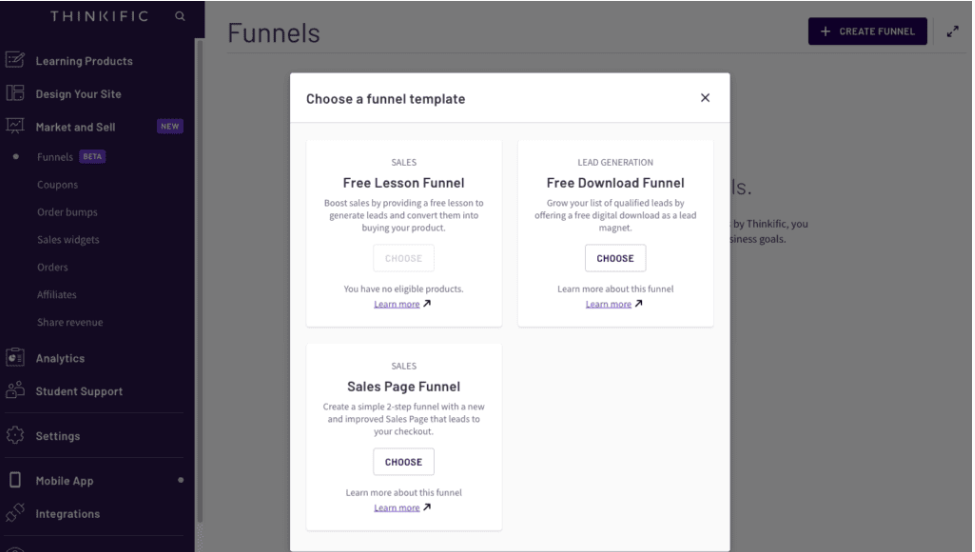
Free lesson funnel: The Free Lesson Funnel allows you to offer a free piece of your existing learning content to generate new leads and nurture them toward making their first product purchase. Using the free lesson funnel, you can leverage basic functionalities, including:
- Creating a landing page
- Providing the main offer at a discounted price after the user consumes the free offering.
- Optimize your funnel SEO.
- Cross-sell checkout and
- Create a thank you page.
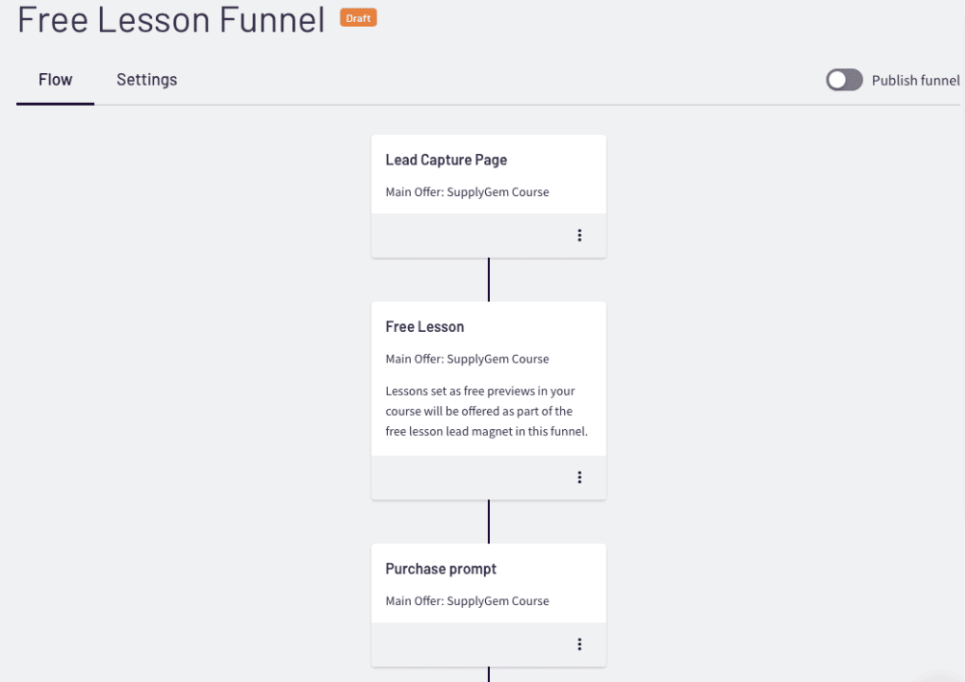
Free download funnel: When I looked into this feature, it felt more like a fancy rebrand of a digital download, and Thinkific apparently agreed. As of August 26, 2025, it will be retired and folded into their standard digital download offering.
Using the free download funnel, you basically provide a free digital download for your potential customers. You can also preview the funnel before publishing.
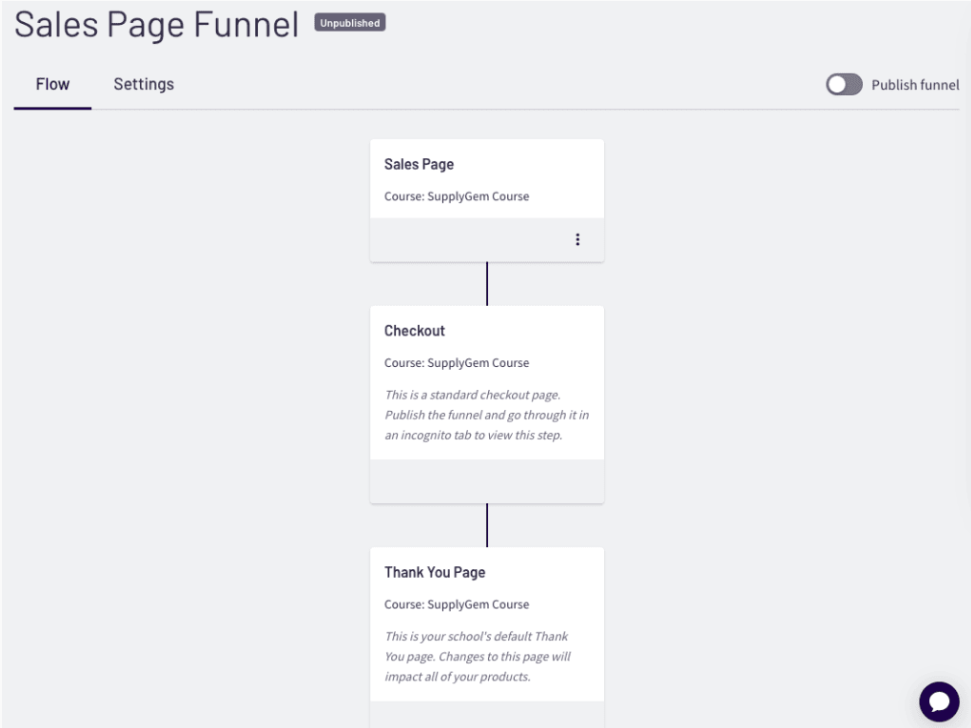
Sales page funnel: This template enhances your product page with AI-assisted marketing copy and additional content sections, improving SEO and highlighting course benefits. You get options to change your sales page’s colors, font, button, and a few more. Similar to other funnel templates, you can preview your sales page before publishing.
As part of marketing automation, Thinkific lets you do:
Email automation with sequences: Thinkific lets you set up automated email sequences using its built-in Email Automation tools. Choose a sales flow tied to a product, and an email trigger based on criteria like whether a lead has subscribed but not purchased. You can then design sequences with AI-assisted templates. This also includes abandoned cart reminders to recover incomplete purchases.
Automated email notifications: Configure auto-email alerts for various site activities, such as student sign-ups, orders, community posts, discussions, and new reviews. Both admins and students can receive tailored notifications, and many of these messages are customizable.
These functionalities show that Thinkific offers some built-in automation tools to support course sales, including sales flow templates and email triggers for events such as sign-ups or non-purchases.
However, its automation is fairly lightweight and remains tightly focused on course-related workflows rather than broader marketing funnels.
Winner: Kartra, obviously.
Here’s a feature-by-feature comparison of what both platform offers:
Website and page building
Both Thinkific and Kartra let you create professional-looking websites and pages without touching code. Thinkific, being the ‘course-first’ and Kartra the ‘marketing-first’ platforms, differ in their approach and the end result. Let’s see the features in detail.
Thinkific = course-centric site and page building
Page builder
Let me get this straight. Thinkific does not have a dedicated ‘page builder’ feature. Instead, you can use the ‘website builder’ as your page editor to create your course’s home page, product pages, community landing page, sales pages, bundle landing page, and more. You build your pages by dragging and dropping sections, choosing themes, and customizing styles.
Thinkific gives you two ways to build course pages:
AI-generated landing pages: You can quickly launch landing pages using Thinkific’s AI tool. Just follow the prompts, and the system will generate a ready-to-publish page for your course. From there, you can customize colors, text, and images through the new web page editor.
Course product pages: Using the site builder and site themes, you can design course pages with more control. The classic editor and default templates are suitable options if you rely on third-party apps or want to fine-tune the layout and design.
Website builder
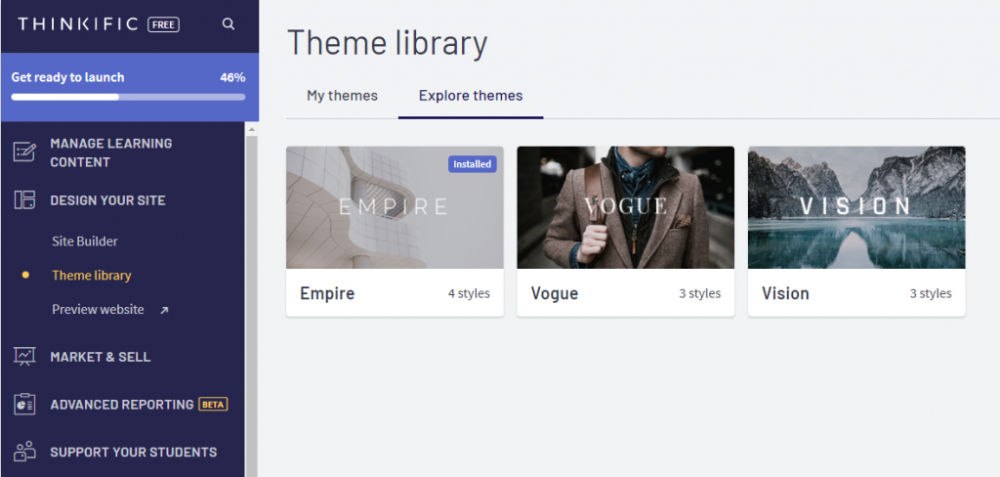
Thinkific’s site builder has three themes: Empire, Vogue, and Vision. The option you select appears on your home page, community, or any custom pages you create.
On top of those, Thinkific gives you default pages to your site — system-generated essentials like:
- Student dashboard
- All product listings provide a customizable site header.
- Sign in
- Sign up (for users who do not have an account)
- Checkout & thank you
- Student certificate
- Coming soon page
These default pages come preloaded with key features, but let you customize them by adding branding touches, upsell sections, or any extra information you want to include via the site builder.
Thinkific supports custom pages, such as About, Contact, FAQ, or any special landing pages you need. You can build them from scratch using the same drag-and-drop tools and modular sections as your course pages. Plus, you can control access so that only logged-in users or enrolled students can view certain custom pages.
Kartra = marketing-centric site and page building
Page builder
Unlike Thinkific, Kartra does have a dedicated page builder, one of its strong features. You can create websites, sales funnels, landing pages, membership portals, and checkout flows using its drag-and-drop editor.
You access the page builder through the "Pages" section (sometimes “My Pages”) in the dashboard. From there, you can create new pages, pick templates, and organize them into site folders for easy navigation and management.
Some of Katra’s key page-building features are:
Visual page builder & templates: A drag-and-drop page builder that simplifies creating landing pages, sales pages, membership pages, and more; no coding required. It offers over 500 professionally designed, responsive templates to choose from.
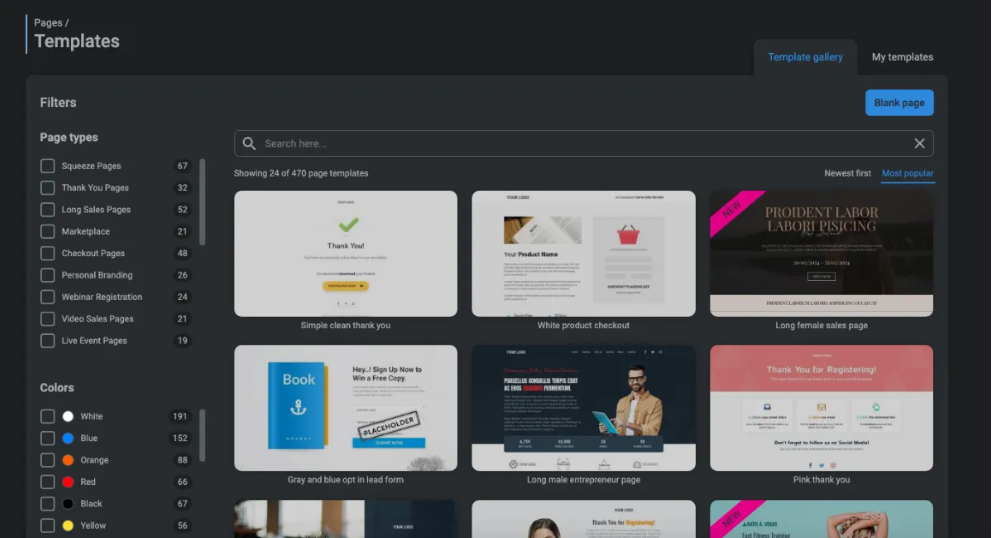
Customization features: You can drag and drop components, including images, videos, buttons, forms, opt-in forms, pop-ups, testimonials, and more. The editor supports responsive design, allowing adjustments for mobile, tablet, and desktop views.
Website builder
Kartra doesn’t have “themes” like Thinkific. Instead, it offers full website creation via pages and templates:
- You can stack multiple pages (home, about, contact, blog, pricing, etc.) and connect them using menus and navigation bars.
- Pre-designed website templates allow you to launch an entire multi-page website quickly.
- Kartra hosts everything for you (WordPress or external hosting is optional).
- Built-in SEO settings let you add meta descriptions and tracking codes.
- Because it’s part of the Kartra ecosystem, every page can integrate it with email campaigns, membership sites, and product checkouts.
Winner: Kartra
Until this point, it’s fair to say both Thinkific and Kartra provide strong, no-code solutions for building websites and pages. Thinkific shines for course-centric pages, while Kartra offers more flexibility with its template library and visual page builder.
But what puts Kartra firmly ahead in page and site building?
Behavior-Adaptive Marketing (BAM™): Kartra utilizes this powerful technology to dynamically adjust page content based on visitor behavior, creating a truly personalized experience that responds in real-time.
Trigger-based pop-ups and dynamic on-page conversions: With Kartra, pop-ups aren't generic overlays; they can trigger based on scroll behavior, exit intent, or time, improving conversions directly in the funnel.
Deep email and funnel integration: Every page built in Kartra links with campaigns, automations, emails, membership access, and product checkouts. All connected under one roof; no tool-chaining needed.
Analytics and reporting
You can’t improve what you don’t measure, right? Both Thinkific and Kartra give you ways to see how your courses, pages, and campaigns are performing. But they do it in slightly different ways, and the kind of insights you get can make a big difference in how you grow your business.
Let’s see what each platform offers.
Thinkific: Data-driven insights for creators
Thinkific gives you course-centric reporting, designed mainly for tracking student progress and learning outcomes. Let’s explore the different types of reporting and analytics that the platform provides:
- Marketing dashboard: Track how your marketing performs and optimize efforts with better insights. See which channels drive the most traffic and conversions, and monitor visitor trends on your website and landing pages. This dashboard also helps evaluate upsells such as coupons and order bumps.
- Custom reports: Create custom reports and dashboards to focus on the metrics that matter most. Filter and segment data, share tailored reports with partners via email, and get information about your learners through advanced survey and engagement data.
- Course enrollment dashboard: Helps you track enrollment trends to understand student growth. Monitor changes over time, evaluate your membership health, and identify which courses attract the most learners.
- Revenue dashboard: Monitor earnings over time, track which products bring in the most income, and analyze key financial metrics.
- Order dashboard: Track your orders and spot sales trends to understand when your products sell best. Monitor peak selling periods and revenue patterns to inform more informed marketing decisions.
- Engagement dashboard: Using this, you can see how your students engage with your courses and community. Track content interaction, quiz performance, and overall learner progress to understand what’s working and what needs improvement.
Apart from this, Thinkific also offers basic analytics, including progress reports, group reports, and user reports, and provides integration with Google Analytics.
Looks like it leaves nothing out? Hold up. Although you can use the basic analytics in all pricing plans, the catch is that advanced analytics are only available in Thinkific’s Grow and Thinkific Plus plans, which start at $199/month.
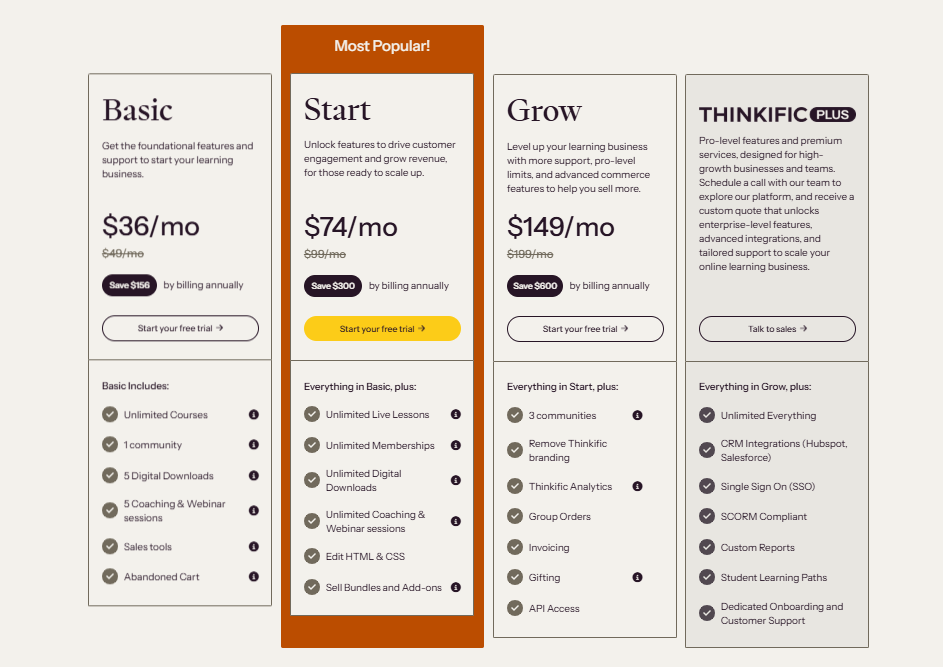
Want a full view of Thinkific’s plans and features? Take a look at our detailed article breaking down Thinkific pricing.
Kartra: Real-time performance insights
Kartra provides business-focused reporting, designed to track sales, marketing performance, and customer behavior. Let’s see the various analytics and reporting tools the platform gives:
- Real-time funnel analytics: Helps you monitor the performance of your sales funnels in real-time. Track visitor behavior, conversion rates, and identify bottlenecks to optimize your marketing strategies and improve overall performance.
- Email & SMS analytics: Evaluate the performance of your email and SMS campaigns. Track open rates, click-through rates, and other key metrics to refine your communication strategies.
- Affiliate analytics: Track clicks, leads, and sales generated by each affiliate in real-time, see which promotions are converting best, and provide commissions accordingly.
- Sales analytics: Gain insights into your sales performance. Monitor revenue, average order value, and other key financial metrics to assess the health of your business. It also lets you see:
- Sales+rebills
- Refunds+cancellation
- Average retention
- Active subscriptions and more.
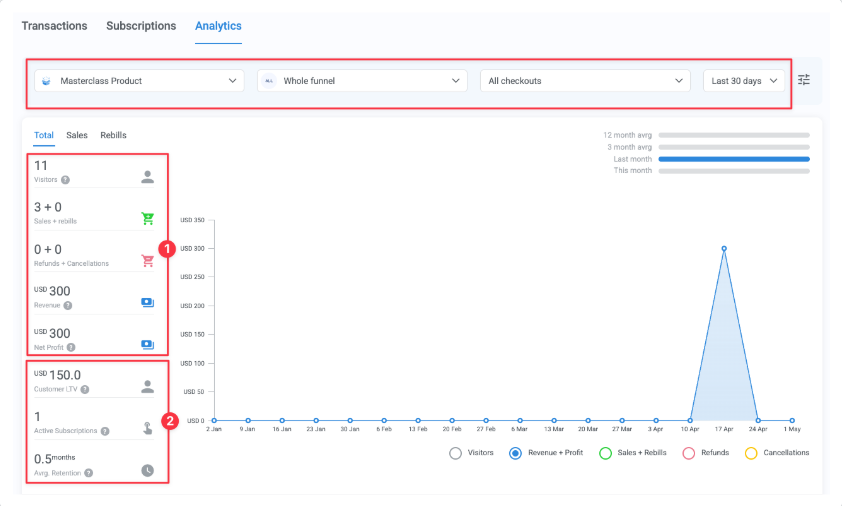
- External page tracking: Track visits on external pages by embedding Kartra's tracking code. This feature is essential for monitoring traffic from external sources and understanding user behavior across different platforms.
- Agency dashboard: For agencies managing multiple client accounts, Kartra provides a centralized dashboard to monitor key metrics across all accounts. This feature includes real-time analytics and the ability to generate client-specific reports.
- Helpdesk analytics: Track how efficiently your support team is handling customer queries. You can monitor key metrics, including ticket volume, response times, and resolution times.
- Membership analytics: See how users engage with your membership site to make sure your platform delivers the experience they expect and keeps them coming back.
In addition to these, Kartra also provides engagement analysis, visitor analytics, and marketing analytics, giving you a comprehensive view of how users interact with your content, funnels, and campaigns.
Winner: Kartra
The reason is that Thinkific’s analytics are focused on course performance and student engagement, providing instructors with detailed insights into how learners progress.
Kartra, on the other hand, tracks everything from sales funnels and marketing campaigns to membership activity and affiliate performance, offering a complete view of your business.
For creators who want both course insights and full business intelligence, Kartra clearly takes the lead.
Here is the reporting and analytics feature comparison of both platforms:
Pricing: The true value for a course creator
When it comes to pricing, it’s not just about the sticker on the plan; it’s about the value you get for your money. Course creators often ask: “Do I really need Kartra’s $59/month marketing suite if I have only one course and just need a decent course player?” That’s the question that separates marketing power from course-first thinking.
Thinkific keeps it simple and affordable. Even at its basic level, it gives you a solid course creation environment without forcing you to pay extra for tools you might not need. You can create, host, and sell your courses with all the core features intact — no funnel complexity required unless you want it.
Kartra, on the other hand, works if you have multiple products, sales funnels, email campaigns, and marketing automation to manage. Its price starts higher ($59/month for Essentials), reflecting the all-in-one business platform, not just a course player.
But remember, for a single course creator focused on learning delivery, much of that marketing strength may go unused, making it a bigger upfront investment.
Here’s a side-by-side comparison of starting prices and value for the creator:
Additional details:
Thinkific
- Thinkific does not include a transaction fee in all its pricing plans.
- It provides priority email and phone support only in its Grow plan (Thinkific Plus gets a dedicated team).
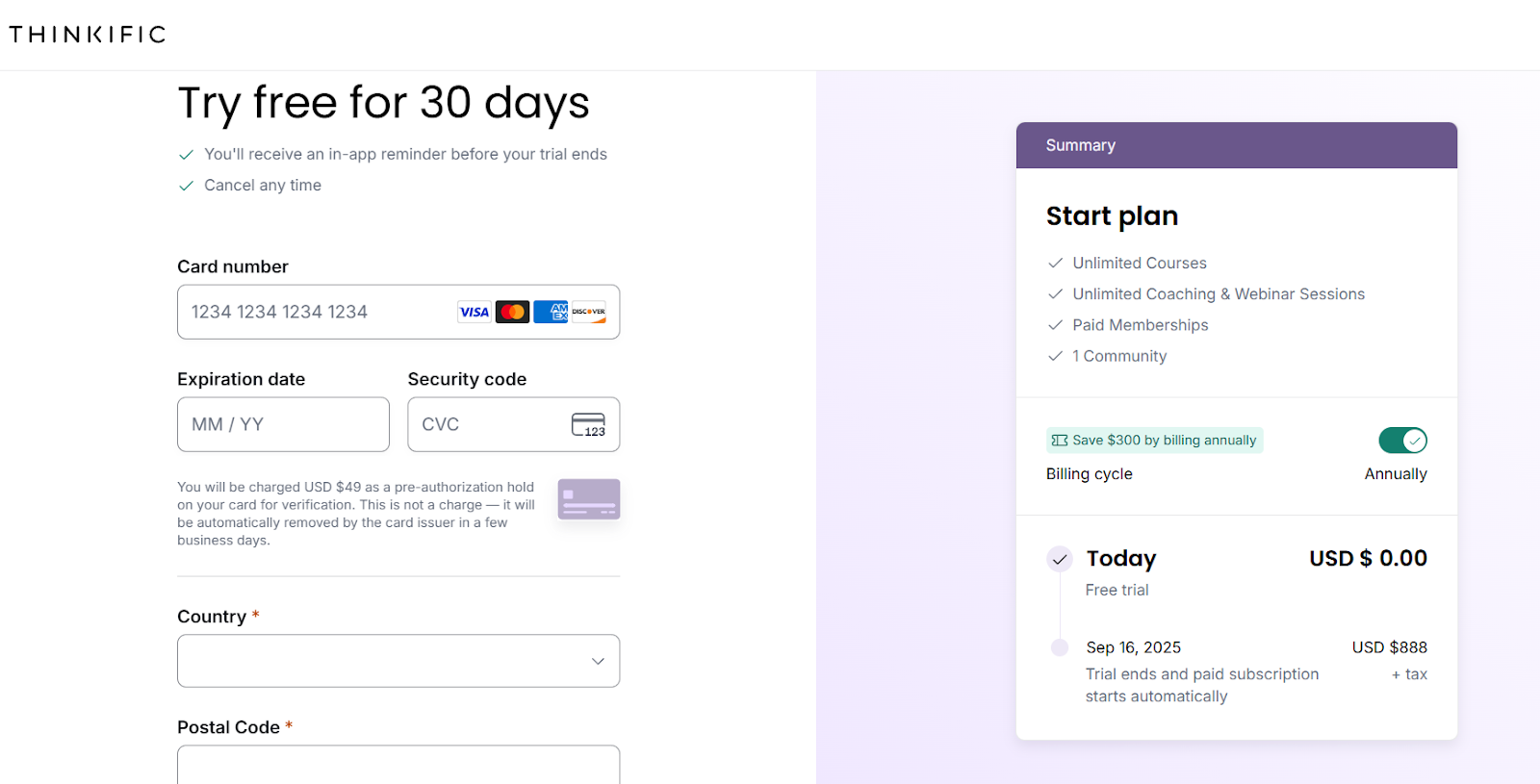
- Thinkific does not offer a free plan, but it does provide a 30-day free trial. But it asks for credit card details upfront, which is a let down as missing to cancel it will cost you $888+tax
Kartra
- Kartra includes a 5% transaction fee in its starting plan (Essentials).
- No phone or email support. Kartra handles customer queries only through tickets.
- Kartra does not offer a free plan or trial.
The smarter alternative: A true all-in-one course platform
You’ve seen how Thinkific nails course delivery and how Kartra thrives at marketing scale. But what if you want the best of both worlds — without the complexity or sticker shock? Check FreshLearn, the thoughtful compromise between “course-first” clarity and essential marketing add-ons.
Why FreshLearn is the perfect balance?
Here’s what makes FreshLearn the sweet spot for creators.
Course creation meets built-in growth tools.
FreshLearn gives you the full course creation toolkit, including drip scheduling, quizzes, assignments, gamification, mobile apps, AI-powered course outlines, and assessments.
But what sets it apart is that it doesn’t stop there. It also includes bundled marketing essentials, such as email campaigns with a drag-and-drop builder, automation workflows, lead magnets, a sales page builder, blogging, checkout, memberships, coupons, referrals, and assignment automation — all in one dashboard.
FreshLearn also offers AI Agents to auto-generate course outlines, quizzes — you name it, with just a prompt.
That means you can build, market, and sell from one roof, without being widely overwhelmed or paying for complexity.
Value that doesn’t feel like an overspend
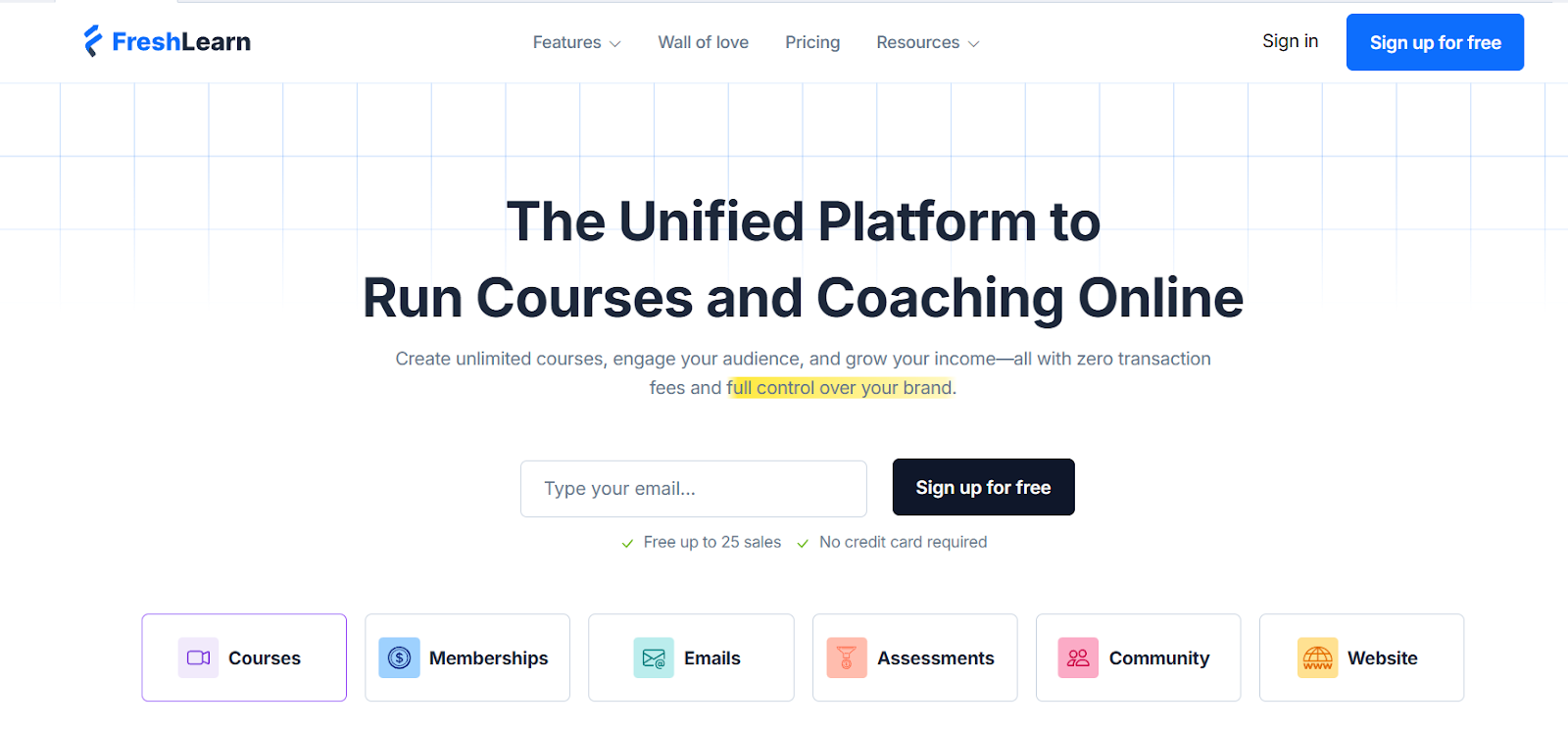
FreshLearn is for creators who want marketing strength, but not inflated fees. With zero commission, a freemium tier (up to 25 enrollments), and plans starting far lower than Thinkific and Kartra (just $29/month if paid for 2 years), we deliver a serious return without any price tag surprise.
Credibility that speaks loudest
All these features are great on paper, but FreshLearn becomes unbeatable when real users rave about it. Users' score hovers at 4.7/5, with reviewers consistently praising its ease of use, speed of site creation, and human-first support.
Here’s what real creators have to say about building on FreshLearn:
Final Verdict: Who should use Thinkific, Kartra, or FreshLearn?
Choose Thinkific if…
Your number one priority is giving students the best learning experience. Thinkific works well when you want structured course design, smooth delivery, and tracking learner progress.
You’ll need to bring in other marketing tools as you grow, but if teaching and student outcomes are the main purposes of your business, Thinkific is a strong choice.
Choose Kartra if…
You’re a marketing power-user who runs multiple products, services, or funnels, and courses are just one part of your business. Kartra gives you the full marketing toolkit: advanced funnels, automation, and analytics that go way beyond course delivery. If scaling and optimizing every part of your sales flow excites you, Kartra is for you.
Choose FreshLearn if...
You want everything in one place without burning time or budget on complexity. FreshLearn makes course creation simple while giving you the essential marketing tools to grow your business. It’s affordable, easy to use, and built for creators who want to focus on teaching, not tech.
At the end of the day, the right platform depends on your primary goal. If it’s teaching, Thinkific is your friend. If it’s marketing dominance, Kartra takes the crown. And if you are an LMS where teaching meets growth without the overwhelm, FreshLearn is the platform to bet on.
Ready to see how FreshLearn can support your journey? Start with our free version today.
FAQ
1. Can Kartra replace my email marketing service?
Yes, Kartra can replace your standalone email marketing tool. It includes funnel building, automation, segmentation, and even SMS campaigns. If your business is funnel-heavy and you want everything tied together under one roof, Kartra handles it well.
2. Does Thinkific have sales funnels?
Yes, Thinkific includes built-in funnel tools. You can create different types of guided journeys right inside the platform, like Free Lesson Funnels and Sales Page Funnels. These allow you to offer a preview lesson or a professionally styled sales page, complete with AI-assisted marketing copy to draw in and convert your audience.
3. Is Kartra a good LMS?
Kartra doesn’t function as a full-fledged LMS. It allows you to host videos, create memberships, and gate content, but its course player and learning features are relatively basic. If you’re running multiple products and see courses as just one part of your business, Kartra works. But if you want comprehensive LMS features along with the right marketing tools, FreshLearn is the right choice.
4. What's better than Thinkific?
If you want something more affordable and easier to use than Thinkific, FreshLearn is a strong choice. It focuses on course creation while also giving you built-in marketing tools, landing pages, and automation. You get everything in one place without juggling extra integrations or paying high fees.
5. What are the cons of Thinkific?
Thinkific comes with a few downsides: it no longer offers a free plan, its starter plans provide limited customer support, and you’ll need third-party tools for advanced features like email automation or affiliate management. This can make scaling more complex and expensive over time.
You might also like
Hosted by
