
LearnUpon vs Docebo: Which LMS Delivers Better Value in 2026?

LearnUpon and Docebo: two of the biggest names in enterprise learning. Both are strong contenders, trusted by large organizations, and both promise scalability and automation at every level.
However, once you start comparing them closely, the differences become apparent in how intuitive they are, how flexible the setup feels, and how much support you actually receive after rollout.
Let’s see all those differences in detail, and also see how FreshLearn offers a simpler, more transparent alternative to both.
At a glance: Docebo vs LearnUpon vs FreshLearn
Before we get into the granular details, here’s a quick table comparing Docebo, LearnUpon, and FreshLearn.
While this article mainly compares Docebo and LearnUpon, it’s worth noting how FreshLearn differs in approach, especially for businesses that don’t need heavy enterprise complexity.
Understanding the core differences: Who are they for?
Let’s start by looking at the types of teams each one actually serves.
Who is Docebo for? The AI-Powered enterprise hub
Consider a global company with thousands of employees, resellers in multiple regions, and a partner network that needs certification. They’re managing training for internal teams, external partners, and customers all under one roof.
The business also requires high scalability, advanced automation, and a platform that functions like a learning ecosystem, not just a training portal. Docebo is applicable for this kind of “big picture” scenario.
What it’s built for
Docebo presents itself as “AI-first,” targeting large enterprises with complex learning needs, including employees, customers, and partners.
It supports extensive automation, integrations with major systems, and enterprise-level features (such as multi-portal capability, global compliance, and multilingual content) that large organizations require.
Many competitor analyses say that it is ideal for organizations where training isn’t just a task for one department, but a strategic function that spans multiple audiences.
Key strengths
AI-powered tools for content creation, personalization, and automation give Docebo a strong appeal for enterprises looking to manage learning at scale.
Docebo offers strong integrations and flexibility, as it easily integrates with HR systems, CRM, and eCommerce platforms, helping to tie learning into broader business workflows.
The platform supports multiple content formats (SCORM, xAPI, video, audio) and offers built-in authoring tools, which help enterprises optimize content development.
Key Weaknesses/Considerations
Docebo follows a custom pricing model, which makes budgeting less transparent for teams that prefer clear, upfront estimates. Additionally, the platform’s users note that although Docebo offers a strong feature set, several advanced tools, such as automation workflows and AI-powered content creation, are available only through add-ons. (Source: G2)
The user interface could be smoother in certain areas. Features like the certification templates and overall navigation can sometimes feel clunky, which affects usability for administrators managing large or complex setups. (Source: G2)
The initial setup of Docebo can be challenging, often requiring external assistance to get everything running smoothly. This highlights the need for a more user-friendly implementation process and stronger onboarding support for new customers. (Source: G2)
Who is LearnUpon for? The streamlined corporate and partner training
Consider a mid-to-large company that handles training for employees, external clients or customers, and channel partners. They need an LMS that’s strong enough to deliver structured programs while also being straightforward to manage across teams without incurring constant heavy administrative overhead. LearnUpon fits that profile.
What it’s built for
LearnUpon is purpose-built for organizations needing structured training across multiple audiences in one place: employees, customers, and partners.
It emphasizes usability and fast deployment with an interface that is intuitive for both administrators and learners.
Reviewers consistently recognize its support and service, particularly in enterprises where training needs to run without any hiccups.
Key strengths
LearnUpon’s interface makes it easy to find information, schedule classes, and manage access for specific audiences. The platform also allows course reviews, helping admins better understand and improve the learner experience.
LearnUpon integrates easily with everyday business tools, simplifying administrative work. The updated UI contributes to a consistent and intuitive experience for learners, administrators, and customers alike.
It offers multi-tenant and multi-audience capability, which helps in handling multiple portals or segments for different learner groups.
Key weaknesses/Considerations
While LearnUpon has improved its reporting suite (e.g., migrating to the new “Progress Report” format), many users still experience constraints in data depth, customization, and large-scale filtering.
Some users note that LearnUpon’s integration options are restrictive beyond SSO, which can create additional administrative work. It is especially applicable when syncing data with HR or other internal systems. (Source: Capterra)
Feature breakdown: A head-to-head comparison
Let’s now compare Docebo and LearnUpon in terms of feature offerings:
Course creation and content management
When it comes to enterprise learning, the real test is more than delivering courses; it’s about how easily teams can create, manage, and update them. That’s where LearnUpon and Docebo take two very different paths.
Docebo: Designed for scale and smart automation
Docebo takes a complex yet strong approach.
Docebo Shape
An AI-powered content creation tool that helps teams instantly transform existing resources, such as documents, links, or scripts, into engaging, multilingual microlearning content. It allows admins to create and share training materials across the organization in minutes, without requiring a lengthy onboarding process.
Docebo Creator
An integrated authoring tool that simplifies the process of building and managing interactive lessons directly within the Docebo platform. It provides course creators with a clean, drag-and-drop interface to design structured learning experiences, complete with multimedia, quizzes, and learner activities, without requiring separate software or technical expertise.
These features help teams produce large volumes of personalized content quickly, particularly for multilingual or global rollouts.
Beyond this, Docebo also offers a content library with audio lessons, courses, and professional certifications. It has features to add custom metadata fields, text, dropdowns, dates, and even iframe links to courses, learning plans, or sessions.
Docebo allows you to manage the course layout and content through widgets (e.g., description widgets, file repository widgets, forums), enabling you to configure the course page with learner interactivity and relevant context.
LearnUpon: Built for speed and structure
LearnUpon takes a more streamlined and practical approach to course creation and management, focusing on usability and structured delivery. Its course creation features include:
Built-in authoring and course management
LearnUpon allows course creators to upload and organize learning materials directly within the platform, whether SCORM, xAPI, video, or document-based content. Combine multiple modules into structured learning paths, schedule sessions, and restrict access to specific learner groups. The drag-and-drop builder and reusable templates make it simple to set up courses without technical complexity.
AI-assisted course & quiz creation
LearnUpon offers AI-powered tools to accelerate content creation. Its AI-Supported Assessments automatically generate exam questions from existing materials, helping teams save time while maintaining relevance. Admins can also utilize AI assistance for summarization, translation, and generating visual assets to improve learning materials, although these features complement, rather than replace, manual course authoring.
Beyond this, LearnUpon also offers:
- Centralized content library to store and reuse training assets across departments or audiences.
- Automated workflows for enrollments and certifications.
- Built-in feedback and course rating features that help teams track learner satisfaction and engagement.
Overall, I found that LearnUpon’s course creation tools emphasize simplicity, structure, and ease of deployment for corporate and partner training programs. However, compared to Docebo, it offers fewer advanced AI capabilities, as Docebo’s Shape and Creator provide more depth in automated content generation and interactive design.
Reporting and analytics
Here’s how reporting and analytics differ between Docebo and LearnUpon.
Docebo: Reporting and analytics
What you get
Docebo gives a strong set of reporting and analytics tools designed to help enterprises understand learning impact at multiple levels.
For teams with more complex data needs, Docebo’s Learn Data enables you to integrate all learning data into your own data space, providing deeper analysis and insights.
With Learn Data, you can also explore relationships between metrics like:
- Course completion rates and employee turnover
- Training and sales performance or cycle length
- Training and customer NPS
- Time spent training on new features and adoption rates
Tailor dashboards and visualizations to your needs using multiple chart types, including bar charts, line charts, heatmaps, scatter plots, funnel charts, radar charts, word clouds, pivot tables, and more.
While Docebo’s native analytics focus on LMS data, Learn Data allows you to bring learning data together with other business data in your BI tools. This supports organizations to reveal actionable insights across multiple datasets and measure the real impact of training programs.
User feedback and limitations
- Although Docebo offers “custom dashboards” through its Advanced Insights module, the underlying datasets and fields are fixed and cannot be freely modified.
- Some of the strongest reporting and visualization features are only available on premium plans, which adds cost and complexity for teams that require deeper insights.
- Users report that while standard reports are straightforward, advanced or multi-dimensional analytics can feel unintuitive, making it harder to extract actionable insights without additional training or external tools.
LearnUpon: Reporting and analytics
What you get
LearnUpon provides a reporting and analytics suite designed to give training teams clarity on usage, progress, and outcomes across learner audiences.
- Reports tracking user progression, exam results, certifications/credits, survey responses, and training histories.
- Filtering, export, and scheduling functionality with which you can apply date ranges, group filters, and custom user data filters, then export results (CSV) or schedule delivery through email.
- Dashboard overview widgets display metrics such as enrollments, logins, and progress status, providing administrators with a quick picture without requiring full reports.
- Advanced reports (Progress Report, Learning Path report, Live Learning report) allow you to pick courses, portals, and layout columns (drag and drop) in the report builder.
User feedback and limitations
- Basic reports support up to 10,000 rows of data; larger datasets require filtering or must move into advanced reports.
- Custom reporting depth is considered restrictive, with a user noting that the system lacks flexibility for complex or multidimensional analytics. For example: “Reporting/BI was limited and cumbersome.” (Source: Software Advice)
- Users requiring complex BI workflows or large-scale analytics still rely on external tools or integrations to extend their reporting capabilities. (e.g., an additional platform recommended for deeper data analysis).
When comparing both platforms, the final say is that while LearnUpon delivers strong reporting and analytics for most standard training workflows. It is especially useful when you need reliable progress tracking, scheduling, and exports.
However, it still shows limitations when the job is to connect training results to broader business metrics, run large-scale datasets, or customize dashboards in-depth.
Compared to Docebo’s more extensive analytics tools (with its advanced visualization and BI options), LearnUpon may require fewer resources and be easier to deploy. Still, if your needs are highly complex, you may find yourself reaching for external tools.
User experience and ease of use
On the usability front, LearnUpon consistently leads Docebo. According to G2 ratings, LearnUpon scores 9.2 and 9.3 for ease of use and ease of setup, while Docebo scores 8.4 and 7.6, respectively.
This score shows that LearnUpon’s interface is intuitive and easy to use. Admins, instructors, and learners can easily navigate the platform, set up courses quickly, and manage learning paths without getting stuck in complicated menus or workflows.
For organizations looking for a solution that “just works” without extensive onboarding or dedicated setup resources, LearnUpon clearly delivers a smoother experience.
Integrations and eCommerce
Here’s how LearnUpon and Docebo compare in integrations and eCommerce capabilities; two important areas for training teams looking to manage learning, sell content, and link everything into their broader business systems.
Docebo: Enterprise connectivity meets eCommerce flexibility
Docebo offers integration capabilities through its “Docebo Connect” module, supporting over 400 third-party systems that enable workflow automation, data exchange, and syncing with external systems.
On the e-commerce front, Docebo offers an E‑Commerce App (“E‑Commerce” module) where you can build a marketplace, sell courses/subscriptions, integrate with payment gateways (PayPal, Authorize.net, Cybersource, Stripe), and link to platforms like Shopify or WordPress.
Why does it matter?
Suppose your job is “build a global training marketplace, sell to external customers/partners, integrate learning with eCommerce and business systems at scale”. In that case, Docebo offers the breadth and flexibility needed, especially for enterprise setups.
LearnUpon: Easy integrations and ready‑to‑sell courses
LearnUpon supports multiple integrations with CRM, HRIS, webinar tools, automation platforms, and e-commerce platforms. You’ll find categories such as “eCommerce”, “Sales & Partner Enablement”, “Webinar”, and more in their integrations catalogue.
On the eCommerce side, you can enable course bundles, set up payment gateways (Stripe, PayPal), brand your storefront, and sell courses directly from your portal. For example, LearnUpon supports Shopify stores, allowing learners to purchase courses and automatically enroll through webhook triggers.
The width of integrations means training data and learner journeys can connect to business processes (onboarding, sales enablement, partner training) without building everything from scratch.
Why does it matter?
Suppose your job is “deliver learning to customers or partners, monetize training content, and tie it into our sales/CRM systems”. In that case, LearnUpon handles the entire end-to-end process, from course creation to checkout, enrollment, and tracking.
Looking at both platforms closely, I found that LearnUpon and Docebo each offer strong integrations and e‑commerce capabilities.
- LearnUpon wins for its easy, all‑in‑one approach: enabling you to both integrate broadly and start selling with minimal friction.
- Docebo wins for scale and flexibility, as its enterprise integrations and eCommerce marketplace capabilities are stronger, especially for complex or multi-audience deployments.
The elephant in the room: Pricing and hidden costs
At the end of the day, one of the biggest deciding factors for any team is pricing and how predictable (or unpredictable) it can be. Let’s see how Docebo and LearnUpon compare on the pricing.
Docebo pricing
We all know Docebo does not have public pricing. Instead, it operates on a quote‑based model tailored for enterprise-scale implementations. This means your final cost depends on the number of yearly active users, the product tier, and the specific modules you actually need.
Its pricing tiers are:
- Elevate: Key features in this pricing plan include workflow automation, AI content creation tools, and multilingual training.
- Enterprise: Key features in this plan include Integration with up to 6 tools, a branded mobile app, and a dedicated database.
According to the competitor analysis, the starting price is $25,000/year for a core LMS setup with no free trial. (Source) Also, as it’s quote-based, add-ons like AI content tools, advanced analytics, or additional integrations can quickly increase the final bill.
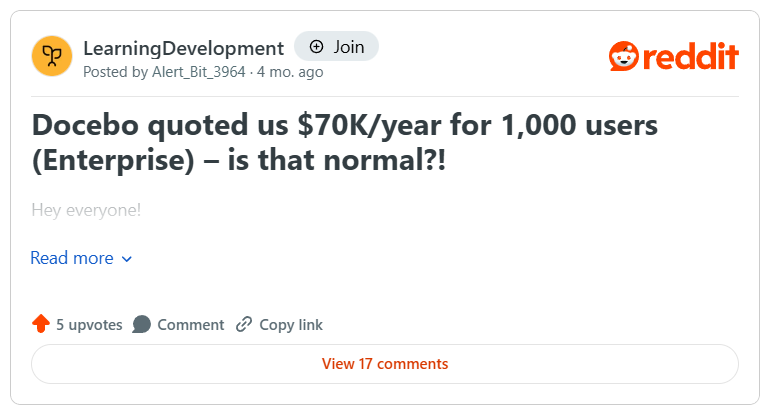
I even came across a Reddit thread where a user shared that Docebo quoted $70,000/year for 1,000 users under the Enterprise package, which clearly shows how costs scale for larger deployments.
My take on Docebo’s pricing is that this model works well for large organizations or those delivering training to multiple audiences, such as partners or customers, because it provides a tailored solution that meets their specific needs.
But if your team is smaller or simply prefers predictability, the lack of upfront transparency can be frustrating. Expect some negotiation and plan for add-on costs beyond the base LMS license, for integrations and analytics.
LearnUpon pricing
LearnUpon also does not publish its pricing, but public resources suggest a starting price of around $15,000/year (source), which usually covers a core LMS setup with essential functionality. It also offers a free trial. Also, depending on the size of the deployment, annual costs for many organizations range from $20,000 to over $50,000. (Source)
Key features that influence which tier you need:
- Essential: Supports teams with up to 150 users and includes SCORM, xAPI, eCommerce, webinars, and basic LMS functionality.
- Premium: Suits mid-sized teams with 150-500 users and includes additional languages, Zapier integration, and two-way API access.
- Enterprise: Designed for large deployments with 500+ users, includes white‑labeling, Salesforce integration, and enterprise SLA.
My take on LearnUpon’s pricing is that it’s well-suited for mid-market to large teams that want clarity and predictability. The tiered structure clearly shows which features you get at each level, and costs scale transparently with the number of active users.
However, you should still account for internal admin time, onboarding efforts, and any optional integrations or third-party content when planning your budget.
When you compare Docebo and LearnUpon’s pricing, a few things are common:
- Both platforms provide custom quotes rather than fixed public pricing, meaning you need to talk to sales to get your exact cost.
- Pricing for both scales mainly depends on the number of active users, so larger teams naturally pay more.
- Although both offer different levels of functionality, certain advanced features will ultimately determine the final price.
The hidden costs to consider
When evaluating an LMS, be it Docebo or LearnUpon, the sticker price isn’t the whole story. Beyond the license fee, enterprises often face several additional costs that can significantly affect their budget:
Implementation and onboarding specialists
Both LearnUpon and Docebo offer implementation support; however, teams still incur hidden costs. Even when the platform provides an implementation consultant or a “no-cost setup,” your team must still invest internal hours to configure workflows, migrate content, set up integrations, and train administrators.
Dedicated support plans
While you get basic support, enterprise organizations often purchase premium support or SLAs to guarantee response times and personalized assistance, which may incur additional costs.
Third-party course content
You rarely get off-the-shelf content (e.g., compliance modules, professional certifications) in the base license. Purchasing these resources from external providers adds to the total LMS spend.
Internal staff time
Managing an LMS is not “set it and forget it.” Admins spend time on user management, course creation, reporting, and troubleshooting. Complex platforms with advanced features (like Docebo’s AI tools or multi-domain Extended Enterprise setups) can require more internal hours, which translates to hidden costs in labor.
Custom integrations and advanced features
Some organizations require custom integrations with HRIS, CRM, or other internal systems. While LearnUpon tends to bundle common integrations into its plan, Docebo often treats more advanced or multiple integrations as optional add-ons.
Similarly, advanced analytics, AI content creation, or multi-language capabilities may be included only in higher tiers, which means scaling up can be more expensive than initially anticipated.
A smarter alternative: FreshLearn
If you’ve made it this far, comparing Docebo vs LearnUpon, one thing is obvious: these systems are strong, but ultimately serve enterprise-level teams with large budgets, technical admin support, and multi-layered training needs.
That’s good if you’re running a complex learning operation, but it leaves a big gap for everyone else who simply wants to launch, manage, and sell learning products without spending five figures a year.
This is where FreshLearn gives you the power without the enterprise price tag.
If a $15,000+ annual starting point, layered feature bundles, or a lengthy onboarding cycle feels excessive for your business, you’re definitely not the only one. Many creators, coaches, small teams, and mid-market businesses need something capable but not complicated.
FreshLearn supports those teams help bring down that cost by 75%. It gives you the core functionality you genuinely need to launch and grow your learning business, without the enterprise overhead that slows you down (or drains your budget).
How FreshLearn solves the core problems
FreshLearn approaches the LMS experience differently, focusing on three things enterprise platforms often complicate: cost, usability, and scope.
1. Affordability without the negotiation
Instead of having $ 15,000/year commitments and lengthy pricing conversations, FreshLearn keeps things straightforward. You get clear, predictable pricing with no surprise add-ons required just to utilize essential functionality.
What other platforms charge extra for advanced course creation, custom integrations, and digital product support, FreshLearn includes by default. To know more about our offerings, check out our pricing page.
2. A platform you can actually run yourself
FreshLearn is intentionally designed for non-technical users, meaning you don’t need a learning operations specialist just to build pages, upload lessons, create funnels, or manage users.
Creators repeatedly mention how quickly they were able to get started, a common comment that you can see across FreshLearn’s user reviews.
3. An all-in-one solution
Instead of stitching together four or five tools to build and sell learning products, FreshLearn brings your entire workflow into a single platform:
- Course builder (with SCORM support)
- Website and landing page builder
- Digital product creation
- Email marketing
- Community spaces
- Analytics
- Payments
No extra contracts, no third-party tools, and no complex integration setup.
Final verdict: How to choose in 3 steps
Here’s a simple three-step way to make the right choice.
1. Choose Docebo if…
- You’re a large enterprise with the budget and structure to support an advanced LMS.
- You need AI-driven personalization and multilingual content automation
- You will deliver training across multiple audiences (internal teams, partners, customers)
- You have a dedicated L&D or IT team to manage setup, data workflows, and ongoing administration
- You are comfortable with a quote-based, enterprise-scale pricing model
It’s the right fit when flexibility, automation, and deep analytics matter more than simplicity or cost.
2. Choose LearnUpon if…
- You’re a mid-to-large company that values structure, ease, and support without needing heavy AI capabilities.
- When you prioritize ease of use for admins and learners.
- You need consistent and reliable support, along with clean workflows, for corporate training.
- You want predictable, tier-based enterprise pricing starting around $15k+ per year.
- You will manage structured programs like employee onboarding, compliance, and partner training.
It’s ideal when you want a powerful LMS that stays straightforward and doesn’t require extensive customization.
3. Choose FreshLearn if…
- You’re a small-to-medium-sized company with 50-150 users for your LMS, and you want a simple, easy-to-use LMS for your customers, partners, or employees for knowledge sharing.
- Want an affordable, transparent pricing model without five-figure commitments.
- You prefer an intuitive, all-in-one platform (courses, website, community, email, funnels, digital products)
- You don’t want to manage integrations, add-ons, or technical complexity
- You will need to build, launch, and sell learning products quickly.
It’s designed for teams who want LMS capability, creator tools, marketing workflows, and simplicity, without the hefty price tags.
Wrapping up
Choosing the right LMS is more than finding the ‘most powerful’ platform. In fact, everything comes down to picking the one that fits your team size, training goals, and budget reality.
- If you’re running a large, complex enterprise ecosystem, Docebo offers the depth and AI-driven sophistication to match that scale.
- If your priority is streamlined corporate training with excellent usability and support, LearnUpon can be an ideal solution.
- And if you're looking for a strong, affordable, all-in-one system that simplifies the complexity of enterprise tools, FreshLearn is precisely what you need.
The next step is simple: choose the platform that aligns with your growth stage and requirements.
Ready to see how an all-in-one platform can simplify your life and grow your business? Sign up for free with FreshLearn today.
FAQs
1. Is LearnUpon an LMS?
Yes. LearnUpon is a cloud-based Learning Management System (LMS). It helps you create, deliver, track, and manage online courses, assessments, certifications, and more.
2. What is the main difference between Docebo and LearnUpon?
The biggest difference is in how each platform serves and how complex your training needs are.
- Docebo works well for large enterprises that need advanced automation, AI-driven personalization, and dozens of integrations.
- LearnUpon is also enterprise-ready, but it is much simpler to use, easier to administer, and ideal for teams that want multi-portal management without the heavy dependency on AI-supported features.
3. Is Docebo a good LMS?
Yes. Docebo is considered a strong LMS, especially for enterprises that need advanced automation and scalable training. It offers AI-powered workflows, flexible content support, built-in e-commerce options, and reporting and analytics. However, it can be expensive at scale; some users find the onboarding and admin interface complex, and certain features are available only on higher-tier modules.
4. How much does LearnUpon cost per user?
LearnUpon doesn’t publicly list a fixed per-user price; its pricing is quote-based and depends on factors such as the number of active users, feature set, and the number of portals. However, some sources suggest plans start at US$15,000/year for a base tier.
5. Are there better alternatives to Docebo and LearnUpon?
Yes. One strong alternative is FreshLearn. Here’s why it’s worth considering:
- FreshLearn is very accessible. We offer a Free plan, and our enterprise pricing starts at $249/month.
- FreshLearn is simple to set up and use, making it ideal for small to medium businesses, creators, or training companies.
- Despite being lightweight, we offer assessments, gamification, API access, and custom domains.
You might also like
Hosted by
